
Το επόμενο πρωί, αφού άνοιξες το Microsoft Secure Score
Στο Μέρος 1 ανοίξαμε ένα recommendation του Microsoft Secure Score και εξηγήσαμε κάθε πεδίο της οθόνης. Στο Μέρος 2 είδαμε από πού έρχεται η βαθμολογία, ποια προϊόντα της Microsoft την τροφοδοτούν και πώς δένουν όλα μέσα στο οικοσύστημα του Microsoft Defender.
Πλέον ξέρεις τι είναι το Microsoft Secure Score και από πού παίρνει τα δεδομένα του. Η επόμενη ερώτηση που κάνουν οι περισσότεροι είναι: τι κάνω τώρα με όλο αυτό;
Ανοίγεις τη λίστα Recommended actions και βλέπεις πάνω από 250 recommendations. Κάποια είναι Completed. Τα περισσότερα είναι To address. Λίγα είναι Planned ή Risk accepted. Κάποια ανεβάζουν τη βαθμολογία κατά +0.35%, άλλα κατά +0.69%. Σε κάποια το User impact λέει ότι δεν θα το καταλάβει κανείς, σε άλλα ότι θα αλλάξει η καθημερινότητα όλων.
Και η πρώτη σκέψη που σου περνά από το μυαλό είναι: από πού να ξεκινήσω;
Αυτό το άρθρο αφορά το επιχειρησιακό κομμάτι: πώς χρησιμοποιείς το Microsoft Secure Score στην καθημερινή δουλειά ενός CISO, ενός security engineer ή μιας ομάδας συμμόρφωσης. Πώς ιεραρχείς. Πώς δοκιμάζεις αλλαγές χωρίς να σπάσεις την παραγωγή. Πώς αντιστοιχίζεις τα recommendations στα πλαίσια που ελέγχουν οι ελεγκτές σου. Πώς στήνεις μια διαδικασία που κλιμακώνεται.
Το πρόβλημα της ιεράρχησης: 250+ recommendations και μία ομάδα
Η μεγαλύτερη επιχειρησιακή πρόκληση με το Microsoft Secure Score είναι η ιεράρχηση. Έχεις περιορισμένο χρόνο, περιορισμένους ανθρώπους και μια λίστα που μοιάζει ατελείωτη. Κάθε recommendation δηλώνει σημαντικό. Η Microsoft σου δίνει το Score impact και το Rank, αλλά αυτά από μόνα τους δεν σου λένε με ποιο να ασχοληθείς σήμερα στο δικό σου περιβάλλον.
Αυτό είναι το πλαίσιο που χρησιμοποιούμε. Δεν είναι περίπλοκο, αλλά δουλεύει.
Ο πίνακας ιεράρχησης τριών αξόνων
Αξιολογούμε κάθε recommendation του Microsoft Secure Score σε τρεις άξονες:
- Μείωση κινδύνου (ποια απειλή αντιμετωπίζει;)
- Κόστος εφαρμογής (πόσο δύσκολη είναι η ρύθμιση;)
- Κανονιστική αντιστοίχιση (προαιρετικός, αλλά χρήσιμος: καλύπτει απαίτηση της ΚΥΑ 1689/2025, του ISO 27001 ή άλλου πλαισίου στο οποίο ελεγχόμαστε;)
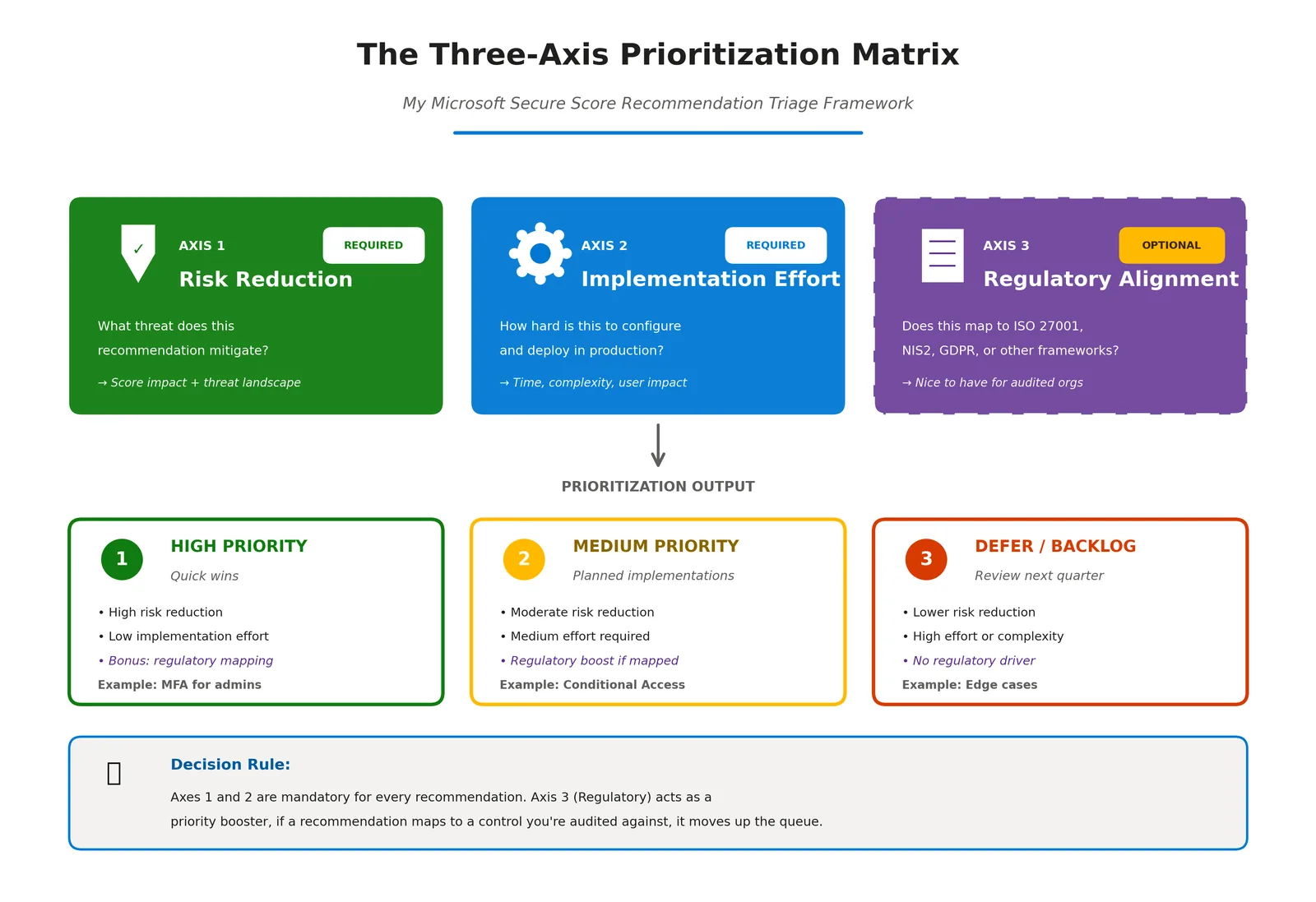
📷 Εικόνα 1: Ο πίνακας ιεράρχησης τριών αξόνων.
Άξονας 1: Μείωση κινδύνου
Είναι η αξία για την ασφάλεια. Ποιο διάνυσμα επίθεσης κλείνει αυτό το recommendation; Πόσο πιθανή είναι αυτή η επίθεση στο δικό μας περιβάλλον; Ποιο θα ήταν το αποτέλεσμα αν πετύχαινε;
Παραδείγματα:
- «Ensure ‘Phishing-resistant MFA strength’ is required for Administrators»: Υψηλή μείωση κινδύνου. Οι παραβιασμένοι λογαριασμοί διαχειριστών είναι από τις σοβαρότερες απειλές, και αυτό το control μπλοκάρει άμεσα το credential phishing, έναν από τους συχνότερους τρόπους αρχικής πρόσβασης.
- «Enable self-service password reset»: Χαμηλή μείωση κινδύνου. Είναι κυρίως βελτίωση λειτουργικότητας. Μειώνει τον φόρτο του helpdesk, αλλά δεν σταματά μια ενεργή απειλή.
Χρησιμοποιούμε απλή κλίμακα: Υψηλή, Μέτρια, Χαμηλή. Δεν χρειαζόμαστε περισσότερη λεπτομέρεια. Ο στόχος είναι να ξεχωρίσουμε όσα μειώνουν ουσιαστικά την έκθεσή μας από όσα όχι.
Άξονας 2: Κόστος εφαρμογής
Πόση δουλειά είναι, στ’ αλήθεια; Μπορεί να το ρυθμίσει ένας άνθρωπος σε 30 λεπτά, ή θέλει συντονισμό τριών ομάδων, εμπλοκή προμηθευτή και σταδιακή εφαρμογή;
Παραδείγματα:
- Ενεργοποίηση της καταγραφής ελέγχου (audit log) στο Microsoft Purview: Χαμηλό κόστος. Μία ρύθμιση, μία φορά.
- «Ensure all users can complete multifactor authentication»: Υψηλό κόστος. Θέλει εγγραφή όλων των χρηστών σε MFA, ενημέρωση, εκπαίδευση του helpdesk και διαχείριση εξαιρέσεων για όσους δεν έχουν smartphone.
Κλίμακα: Υψηλό, Μέτριο, Χαμηλό. Να είσαι ειλικρινής με το κόστος. Αν το υποτιμήσεις, το recommendation θα μείνει έξι μήνες στο Planned.
Άξονας 3: Κανονιστική αντιστοίχιση (προαιρετικός, αλλά τον προτείνω ανεπιφύλακτα σε οργανισμούς που ελέγχονται)
Αντιστοιχεί αυτό το recommendation σε απαίτηση της ΚΥΑ 1689/2025, σε control του ISO/IEC 27001:2022 Annex A, στο άρθρο 21 της Οδηγίας NIS2, στο άρθρο 32 του ΓΚΠΔ ή σε άλλο πλαίσιο στο οποίο ελεγχόμαστε;
Παραδείγματα:
- «Ensure ‘Phishing-resistant MFA strength’ is required for Administrators»: αντιστοιχεί στην απαίτηση 13.ζ της ΚΥΑ 1689/2025 (πολυπαραγοντική αυθεντικοποίηση), στο A.8.5 του ISO 27001 (Secure authentication) και στο άρθρο 21(2)(ι) της Οδηγίας NIS2.
- Ενεργοποίηση του Microsoft Defender for Cloud Apps: δεν αντιστοιχεί άμεσα σε συγκεκριμένη απαίτηση, αν και υποστηρίζει έμμεσα αρκετές.
Αν ένα recommendation καλύπτει απαίτηση για την οποία θα ελεγχθείς, παίρνει προτεραιότητα. Αν όχι, εξακολουθεί να έχει αξία, αλλά μπορεί να περιμένει.
Όλα μαζί: οι κατηγορίες προτεραιότητας
Χωρίζουμε τα recommendations σε τέσσερις κατηγορίες:
Προτεραιότητα 1: Υψηλός κίνδυνος, χαμηλό κόστος, με κανονιστική αντιστοίχιση Τα γρήγορα κέρδη. Μεγάλη αξία για την ασφάλεια, εύκολη εφαρμογή, και καλύπτουν απαιτήσεις ελέγχου. Ξεκίνα από αυτά.
Παράδειγμα: η καταγραφή ελέγχου στο Microsoft Purview (απαίτηση 24.δ της ΚΥΑ, A.8.15 του ISO 27001, χαμηλό κόστος, άμεση αξία για τη διερεύνηση περιστατικών).
Προτεραιότητα 2: Υψηλός κίνδυνος, υψηλό κόστος, με κανονιστική αντιστοίχιση Τα μεγάλα έργα. Θέλουν χρόνο, αλλά είναι αδιαπραγμάτευτα και για την ασφάλεια και για τη συμμόρφωση.
Παράδειγμα: «Ensure ‘Phishing-resistant MFA strength’ is required for Administrators» (13.ζ, A.8.5, υψηλό κόστος, κρίσιμη μείωση κινδύνου).
Προτεραιότητα 3: Μέτριος ή χαμηλός κίνδυνος, χαμηλό κόστος, με κανονιστική αντιστοίχιση Θέματα «υγιεινής» της συμμόρφωσης. Δεν είναι επείγοντα από την πλευρά των απειλών, αλλά κλείνουν ευρήματα ελέγχου με μικρό κόστος.
Παράδειγμα: «Ensure password protection is enabled for on-prem Active Directory» (A.5.17 του ISO 27001, χαμηλό κόστος, μέτρια μείωση κινδύνου).
Προτεραιότητα 4: Όλα τα υπόλοιπα Μέτριος ή χαμηλός κίνδυνος, χωρίς αντιστοίχιση στο τρέχον πεδίο ελέγχου. Μπαίνουν στο backlog. Είτε θα τα φτάσεις κάποια στιγμή, είτε θα τεκμηριώσεις αποδοχή κινδύνου.
Παράδειγμα: το Cloud Discovery του Microsoft Defender for Cloud Apps (χρήσιμο για το Shadow IT, αλλά όχι απαίτηση από μόνο του).
Η Εικόνα 1 δείχνει τη συνοπτική εκδοχή με τρία αποτελέσματα. Οι τέσσερις κατηγορίες είναι η αναλυτική εκδοχή που χρησιμοποιούμε στο Excel.
Πώς το εφαρμόζεις στην πράξη
Κάθε τρίμηνο εξάγουμε όλη τη λίστα των recommendations με το κουμπί Export της καρτέλας Recommended actions σε ένα αρχείο Excel. Προσθέτουμε τρεις στήλες: Μείωση κινδύνου, Κόστος εφαρμογής, Κανονιστική αντιστοίχιση. Τις συμπληρώνουμε, ταξινομούμε ανά κατηγορία προτεραιότητας, και αυτό γίνεται το πλάνο των επόμενων 90 ημερών.
Δεν προσπαθούμε να κάνουμε τα πάντα. Στοχεύουμε 10 έως 15 recommendations ανά τρίμηνο από τις Προτεραιότητες 1 και 2. Αυτό είναι ρεαλιστικό. Με περισσότερα, είτε βιάζεσαι (και σπας πράγματα) είτε κλείνεις μόνο τα εύκολα (και ο πραγματικός κίνδυνος δεν αλλάζει).
Η διαδικασία αποκατάστασης: πώς αλλάζεις πράγματα χωρίς να τα σπάσεις
Όταν αποφασίσεις με ποιο recommendation θα ασχοληθείς, η επόμενη πρόκληση είναι η διαχείριση αλλαγών. Τα recommendations συχνά αγγίζουν πολιτικές ταυτοτήτων, κανόνες συμμόρφωσης συσκευών ή φιλτράρισμα email. Αν ρυθμιστούν λάθος, μπορεί να κλειδώσουν έξω τη διοίκηση, να μπλοκάρουν νόμιμα email ή να σπάσουν επιχειρησιακές εφαρμογές.
Το μάθαμε με τον δύσκολο τρόπο. Αυτή είναι η διαδικασία που ακολουθούμε τώρα. Είναι και η απάντηση στην απαίτηση 16.α της ΚΥΑ 1689/2025 για τη διαχείριση αλλαγών.
Βήμα 1: Εκτίμηση επιπτώσεων
Πριν αγγίξεις οποιαδήποτε ρύθμιση, διάβασε τις καρτέλες General και Implementation του recommendation. Η Microsoft συνήθως σου λέει τι θα δουν οι χρήστες (στο User impact) και τι πρέπει να προσέξεις. Στο παράδειγμα της Εικόνας 2, το WARNING σου λέει να έχουν εγγραφεί πρώτα οι διαχειριστές σε ισχυρή αυθεντικοποίηση, και τα βήματα ξεκινούν την πολιτική σε Report-only.
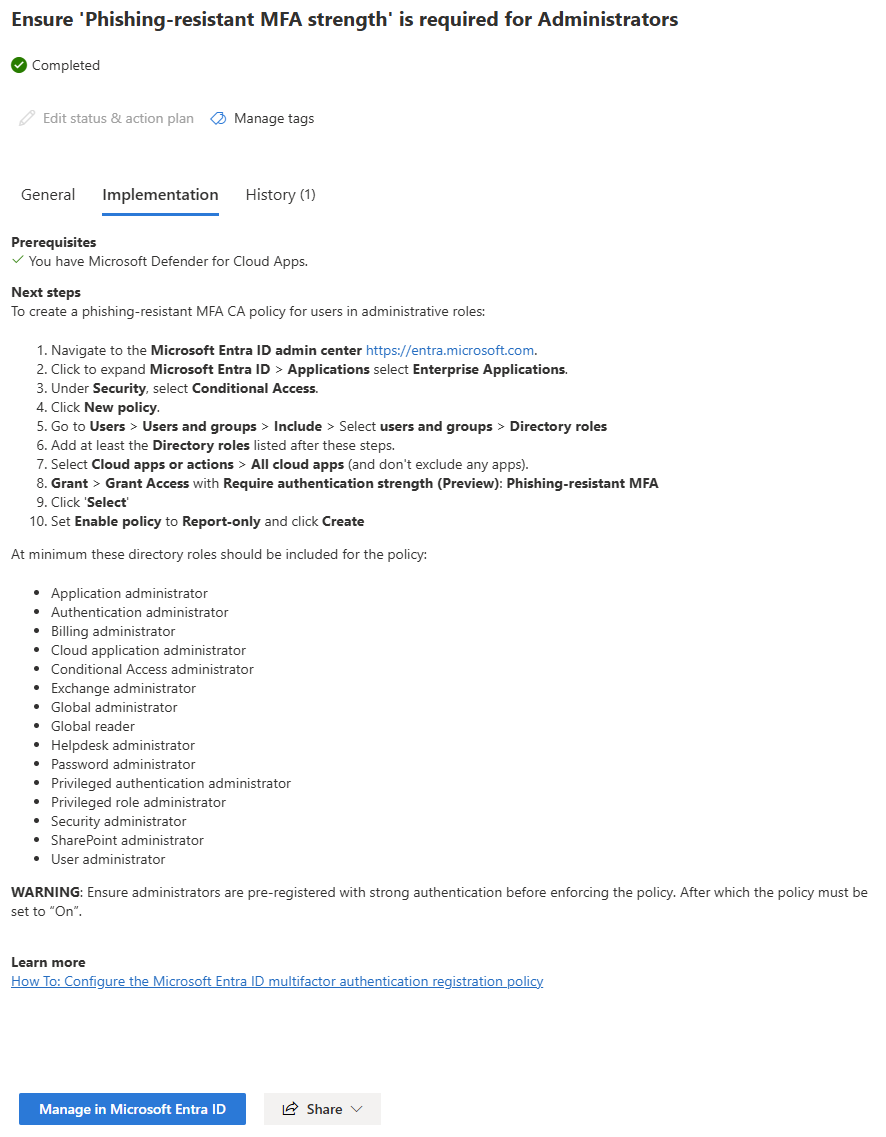
📷 Εικόνα 2: Η καρτέλα Implementation ενός recommendation του Microsoft Secure Score.
Μετά ρώτα:
- Θα μπλοκάρει κάποια υπάρχουσα συμπεριφορά των χρηστών;
- Χρειάζεται ενέργεια από τους χρήστες (π.χ. εγγραφή σε MFA);
- Θα σπάσει κάποιον service account ή κάποια αυτοματοποιημένη διαδικασία;
Αν η απάντηση σε κάποια από αυτές είναι ναι, χρειάζεσαι ενημέρωση και σταδιακή εφαρμογή.
Βήμα 2: Δοκιμή
Αν είσαι τυχερός και έχεις ξεχωριστό test tenant, κάνε πρώτα την αλλαγή εκεί. Επιβεβαίωσε ότι δουλεύει όπως λέει η Microsoft και ψάξε για παρενέργειες.
Αν δεν έχεις test tenant (οι περισσότεροι μεσαίοι οργανισμοί δεν έχουν), κάνε την αλλαγή στην παραγωγή, αλλά μόνο για μια πιλοτική ομάδα, συνήθως την ομάδα IT και μερικούς πρόθυμους power users. Για τις πολιτικές Conditional Access, ξεκίνα σε Report-only και δες στα sign-in logs ποιους θα επηρέαζε.
Παράδειγμα: για το phishing-resistant MFA στους διαχειριστές, φτιάξαμε μια πολιτική Conditional Access για μια ομάδα ασφαλείας με το όνομα CA-Pilot-Admins, βάλαμε μέσα τρεις λογαριασμούς διαχειριστών, και επιβεβαιώσαμε ότι η αυθεντικοποίηση με passkeys δούλευε πριν επεκτείνουμε την πολιτική σε όλους.
Βήμα 3: Τεκμηρίωση και έγκριση
Πριν από κάθε αλλαγή τεκμηριώνουμε τρία πράγματα:
- Τι αλλάζουμε (με link στο recommendation του Microsoft Secure Score, από το κουμπί Share)
- Γιατί το αλλάζουμε (μείωση κινδύνου και κανονιστική αντιστοίχιση)
- Σχέδιο επαναφοράς (πώς το αναιρούμε αν κάτι σπάσει)
Η τεκμηρίωση μπαίνει σε αίτημα αλλαγής στην πλατφόρμα του ISMS μας (χρησιμοποιούμε το Cynomi, αλλά μια λίστα στο SharePoint αρκεί). Για αλλαγές με μεγάλες επιπτώσεις, δηλαδή ό,τι αγγίζει τη διοίκηση ή κρίσιμες επιχειρησιακές διαδικασίες, ζητάμε έγκριση από τον IT Manager και τον υπεύθυνο της επιχειρησιακής μονάδας.
Στο Microsoft Secure Score αλλάζουμε την κατάσταση σε Planned από το Edit status & action plan, και στο πεδίο Action plan γράφουμε τον αριθμό του αιτήματος αλλαγής. Έτσι όποιος ανοίξει το recommendation ξέρει ότι κάποιος το δουλεύει.
Βήμα 4: Σταδιακή εφαρμογή
Εφαρμόζουμε τις αλλαγές σε φάσεις:
- Φάση 1: Πιλοτική ομάδα (ομάδα IT, 5 έως 10 χρήστες, μία εβδομάδα παρακολούθηση)
- Φάση 2: Early adopters (power users, 10% έως 20% του οργανισμού, δύο εβδομάδες παρακολούθηση)
- Φάση 3: Όλοι (όλοι οι υπόλοιποι, με παρακολούθηση 30 ημερών)
Ανάμεσα στις φάσεις ελέγχουμε τα Sign-in logs του Microsoft Entra ID για μπλοκαρισμένες συνδέσεις, τα αιτήματα στο helpdesk και ό,τι ασυνήθιστο. Αν δούμε πρόβλημα, σταματάμε και το διορθώνουμε πριν από την επόμενη φάση.
Βήμα 5: Το recommendation γίνεται Completed μόνο του
Εδώ είναι ένα σημείο που μπερδεύει πολλούς: την κατάσταση Completed δεν τη βάζεις εσύ. Τη βάζει η Microsoft, όταν ο αυτόματος έλεγχος βρει τη ρύθμιση στο tenant σου. Στην Εικόνα 3 φαίνεται ότι το Completed είναι γκρι και δεν επιλέγεται, και η Microsoft το γράφει ρητά: «System-generated statuses can’t be updated».
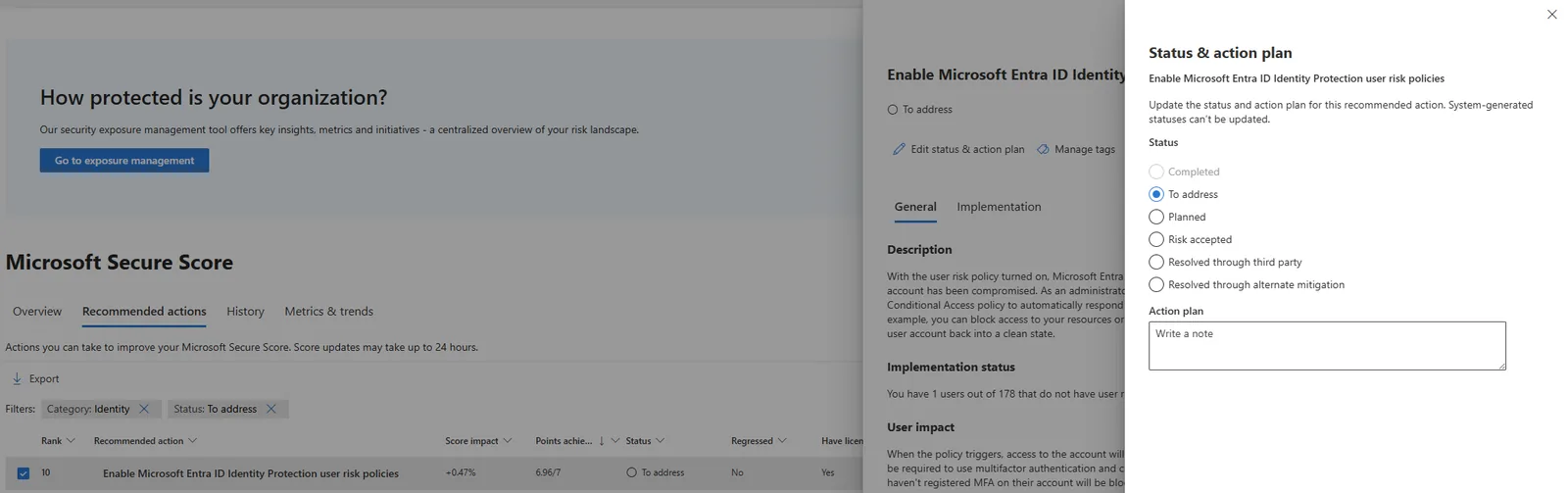
📷 Εικόνα 3: Οι καταστάσεις ενός recommendation στο Status & action plan.
Μετά τη Φάση 3, λοιπόν, δεν πατάς κάτι. Περιμένεις τον επόμενο συγχρονισμό (έως 24 ώρες στα περισσότερα recommendations, μία εβδομάδα σε αυτά του Microsoft Entra ID) και ελέγχεις ότι η κατάσταση άλλαξε σε Completed. Η καρτέλα History του recommendation κρατά την ημερομηνία, και αυτή είναι η χρονοσφραγίδα που θα δείξεις στον ελεγκτή. Αν δεν γίνει Completed, η ρύθμισή σου δεν καλύπτει αυτό που ελέγχει η Microsoft, π.χ. η πολιτική δεν έχει όλους τους ρόλους διαχειριστών.
Και αν δεν μπορείς να εφαρμόσεις ένα recommendation;
Μερικές φορές ένα recommendation δεν γίνεται. Ίσως σπάει μια παλιά εφαρμογή. Ίσως συγκρούεται με μια επιχειρησιακή ανάγκη. Ίσως το κόστος δεν δικαιολογεί τη μείωση κινδύνου.
Τότε το Microsoft Secure Score σου δίνει τρεις επιλογές:
- Risk accepted: αναγνωρίζεις το κενό, τεκμηριώνεις τον επιχειρησιακό λόγο και αποδέχεσαι τον υπολειπόμενο κίνδυνο. Το recommendation μένει ορατό, ώστε ο ελεγκτής να βλέπει ότι πάρθηκε συνειδητή απόφαση. Δεν παίρνεις όμως πόντους, οπότε μένει ως απόσταση από τη μέγιστη βαθμολογία.
- Resolved through third party: το control το καλύπτει προϊόν άλλου κατασκευαστή. Παράδειγμα: δεν χρησιμοποιείς το Microsoft Defender for Cloud Apps, αλλά έχεις CASB άλλου κατασκευαστή που κάνει την ίδια δουλειά. Παίρνεις τους πόντους, αλλά η Microsoft δεν μπορεί να το επαληθεύσει.
- Resolved through alternate mitigation: το καλύπτεις με εσωτερικό εργαλείο ή με άλλη ρύθμιση (compensating control). Παίρνεις κι εδώ τους πόντους, με την ίδια επιφύλαξη.
Κρίσιμο σημείο: κάθε τέτοια απόφαση πρέπει να τεκμηριώνεται. Ειδικά για τις δύο επιλογές «Resolved», που δίνουν πόντους χωρίς επαλήθευση, ο ελεγκτής θα ζητήσει απόδειξη ότι το εργαλείο ή η ρύθμιση υπάρχει πράγματι. Κρατάμε Μητρώο Αποδοχής Κινδύνου, που το περιγράφω παρακάτω. Αυτό ζητούν οι ελεγκτές, και αυτό είναι το πλάνο αντιμετώπισης κινδύνων της απαίτησης 5.1.γ της ΚΥΑ 1689/2025.
Αντιστοίχιση του Microsoft Secure Score σε ISO 27001 και NIS2
Ιεράρχησες. Εφάρμοσες. Τώρα πρέπει να το αποδείξεις σε έναν ελεγκτή.
Εδώ μπαίνει το Microsoft Purview Compliance Manager. Έχει πάνω από 360 έτοιμα πρότυπα αξιολόγησης (regulatory templates), ανάμεσά τους για το ISO/IEC 27001:2022, την Οδηγία NIS2 (ΕΕ) 2022/2555 και τον ΓΚΠΔ. Κάθε αξιολόγηση έχει improvement actions, δηλαδή συγκεκριμένες ρυθμίσεις ή ενέργειες που καλύπτουν ένα control.
Το σημαντικό είναι ότι το Compliance Manager κάνει αυτόματο έλεγχο (automated testing) σε όσα improvement actions μπορεί, και μία από τις πηγές του είναι το ίδιο το Microsoft Secure Score. Όταν ένα recommendation γίνει Completed, τα αντίστοιχα improvement actions μπορούν να ενημερωθούν μόνα τους. Ο αυτόματος έλεγχος είναι ενεργός εξ ορισμού, και η ρύθμιση βρίσκεται στο Compliance Manager settings → Testing source. Πρόσεξε όμως ότι αν προσθέσεις δικά σου τεκμήρια ή δικό σου αποτέλεσμα σε ένα action, ο αυτόματος έλεγχος απενεργοποιείται για αυτό το action, για να μη γραφτεί από πάνω η δική σου εγγραφή.
Πώς φτάνεις στο Compliance Manager
- Άνοιξε το
https://purview.microsoft.com(το Microsoft Purview portal) - Πάτα Solutions και μετά Compliance Manager
- Πάτα Assessments
- Διάλεξε την αξιολόγηση ISO/IEC 27001:2022 ή NIS2 Directive (EU) 2022/2555, ή φτιάξε νέα από το αντίστοιχο πρότυπο αν δεν υπάρχει
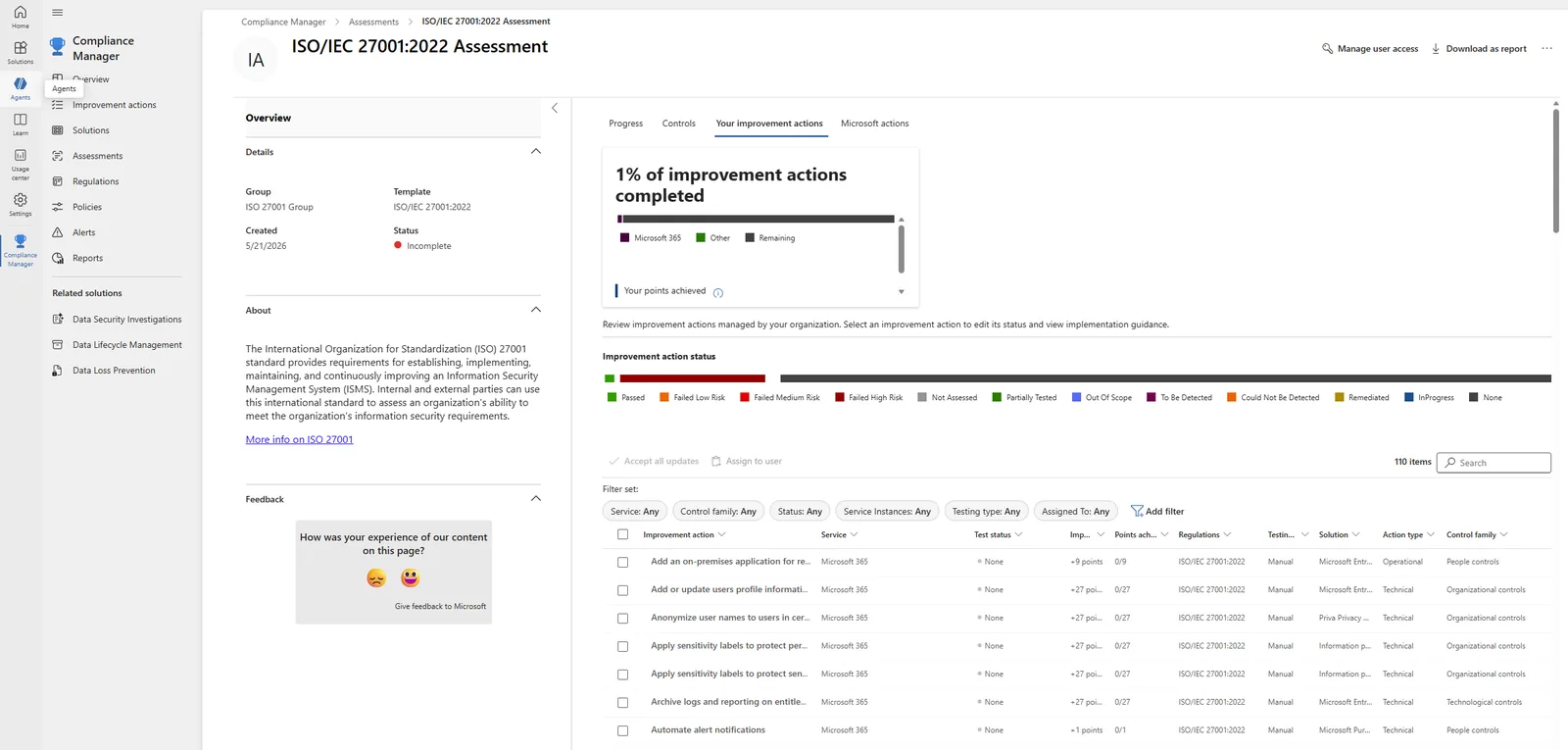
📷 Εικόνα 4: Η αξιολόγηση ISO/IEC 27001:2022 στο Microsoft Purview Compliance Manager.
Κάθε αξιολόγηση έχει τέσσερις καρτέλες: Progress, Controls, Your improvement actions (όσα κάνει ο οργανισμός σου) και Microsoft actions (όσα έχει ήδη κάνει η Microsoft ως πάροχος του cloud).
Παράδειγμα αντιστοίχισης: phishing-resistant MFA για τους διαχειριστές
Ας δούμε ένα συγκεκριμένο παράδειγμα. Το recommendation «Ensure ‘Phishing-resistant MFA strength’ is required for Administrators» αντιστοιχεί σε:
ΚΥΑ 1689/2025
- 13.ζ: πολυπαραγοντική αυθεντικοποίηση όπου απαιτείται με βάση την κρισιμότητα.
ISO/IEC 27001:2022
- A.8.5 Secure authentication: ασφαλείς μηχανισμοί αυθεντικοποίησης, ανάλογα με τους κανόνες πρόσβασης.
- A.5.17 Authentication information: διαχείριση των στοιχείων αυθεντικοποίησης.
Οδηγία NIS2
- Άρθρο 21(2)(ι): «χρήση λύσεων πολυπαραγοντικής επαλήθευσης ταυτότητας ή συνεχούς επαλήθευσης ταυτότητας, ασφαλών φωνητικών επικοινωνιών, επικοινωνιών βίντεο και κειμένου και ασφαλών συστημάτων επικοινωνιών έκτακτης ανάγκης εντός της οντότητας, κατά περίπτωση».
- Άρθρο 21(2)(θ): «ασφάλεια ανθρώπινων πόρων, πολιτικές ελέγχου πρόσβασης και διαχείριση πάγιων στοιχείων».
Οι τίτλοι των controls του ISO είναι οι επίσημοι. Οι περιγραφές είναι δικές μου, γιατί το κείμενο του προτύπου δεν αναπαράγεται.
Στο Compliance Manager, τα σχετικά improvement actions έχουν άλλους τίτλους από τα recommendations. Ένα παράδειγμα από την αξιολόγηση ISO 27001 είναι το «Configure and manage multi-factor authentication (MFA) fraud alerts». Όταν το ανοίξεις, βλέπεις:
- Details: τις οδηγίες εφαρμογής της Microsoft, με το ακριβές σημείο στο Microsoft Entra admin center και ένα link Launch Now
- Evidence: εδώ ανεβάζεις αρχεία ή links ως απόδειξη, με στοιχεία (όνομα, τύπο, ποιος το ανέβασε, ημερομηνία) για το audit trail
- Related controls: τα controls και τις ρήτρες του ISO 27001 που καλύπτει το action
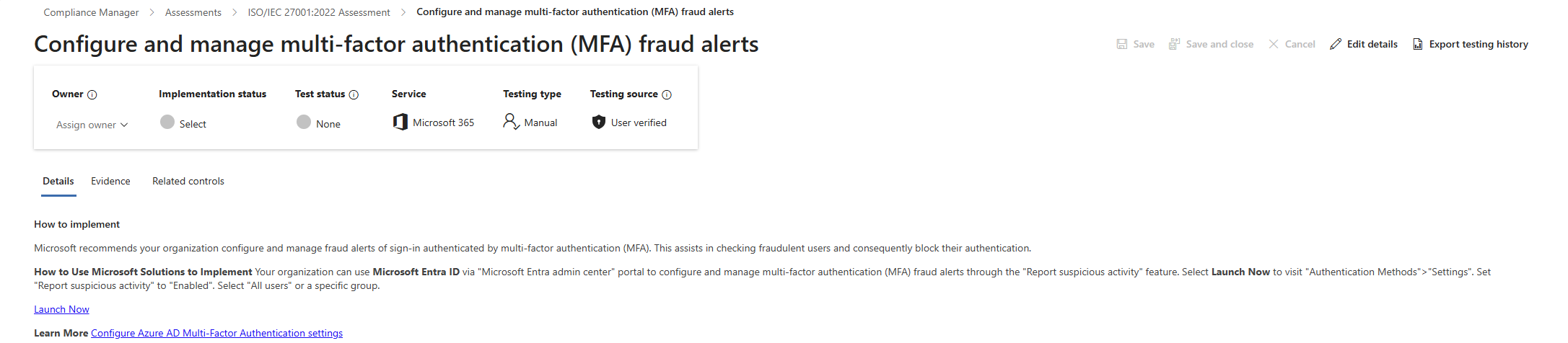
📷 Εικόνα 5: Ένα improvement action στο Compliance Manager.
Στο πάνω μέρος βλέπεις και τα Testing type και Testing source. Στην Εικόνα 5 είναι Manual και User verified, δηλαδή αυτό το action δεν ελέγχεται αυτόματα και την κατάσταση τη δηλώνεις εσύ, με τα τεκμήριά σου.
Κάλυψη: πόσο από το ISO 27001 και την Οδηγία NIS2 τεκμηριώνει το Microsoft Secure Score;
Με βάση τη δική μας υλοποίηση, η κάλυψη είναι περίπου:
Αξιολόγηση ISO/IEC 27001:2022 (123 actions της Microsoft)
- 60% έως 65% τεκμηριώνεται άμεσα από το Microsoft Secure Score και τα improvement actions του Compliance Manager
- 20% έως 25% από άλλα εργαλεία του Microsoft Purview (Data Loss Prevention, Information Protection, Insider Risk Management, Communication Compliance)
- 10% έως 15% είναι οργανωτικά controls (πολιτικές, εκπαίδευση, διαδικασίες περιστατικών) που θέλουν χειροκίνητη τεκμηρίωση
Αξιολόγηση Οδηγίας NIS2 (ΕΕ) 2022/2555 (142 actions της Microsoft)
- 70% έως 75% τεκμηριώνεται από το Microsoft Secure Score και το Microsoft Purview (το μεγαλύτερο μέρος του άρθρου 21 είναι τεχνικά μέτρα, που το Microsoft 365 καλύπτει καλά)
- 25% έως 30% είναι οργανωτικά μέτρα (διακυβέρνηση, εφοδιαστική αλυσίδα, επιχειρησιακή συνέχεια) που θέλουν τεκμηριωμένες διαδικασίες
Το βασικό συμπέρασμα: το Microsoft 365 καλύπτει ήδη το μεγαλύτερο μέρος των τεχνικών controls του ISO 27001 και της Οδηγίας NIS2. Το κενό δεν είναι στην τεχνολογία. Είναι στην τεκμηρίωση και στη διαδικασία διακυβέρνησης. Για την αντιστοίχιση απαίτηση προς απαίτηση, δες τους τρεις οδηγούς: ΚΥΑ 1689/2025, Οδηγία NIS2 και ISO/IEC 27001, ο καθένας με checklist σε Excel.
Πώς μαζεύεις τεκμήρια από το Microsoft Secure Score
Οι ελεγκτές δεν σε πιστεύουν στον λόγο σου. Θέλουν επαληθεύσιμα τεκμήρια, με ημερομηνία, ότι ένα control είναι σωστά ρυθμισμένο σήμερα.
Αυτά τους δίνουμε:
Επιλογή 1: Εξαγωγή από το Compliance Manager Στο Compliance Manager → Assessments → [η αξιολόγησή σου], το μενού πάνω δεξιά (Εικόνες 7 και 8) έχει Download as report, Export actions και Download evidence. Σου δίνουν τη λίστα των improvement actions με την κατάστασή τους και τα τεκμήρια που έχεις ανεβάσει.
Επιλογή 2: Εξαγωγή από το Microsoft Secure Score Το Export της λίστας Recommended actions και το Export της καρτέλας History σου δίνουν την τρέχουσα κατάσταση και το ιστορικό των αλλαγών, με ημερομηνίες.
Επιλογή 3: Screenshot με ημερομηνία Για μεμονωμένα αιτήματα, τραβάμε screenshot του recommendation σε κατάσταση Completed, μαζί με την καρτέλα History που δείχνει πότε άλλαξε, και το βάζουμε στον φάκελο τεκμηρίων.
Δεν είναι κομψό, αλλά δουλεύει. Οι ελεγκτές το δέχονται.
Συνεχής παρακολούθηση: πώς μαθαίνεις ότι κάτι χάλασε
Ένα από τα μεγαλύτερα επιχειρησιακά πλεονεκτήματα του Microsoft Secure Score είναι ότι αξιολογείται συνεχώς. Η Microsoft ξαναελέγχει τη ρύθμιση του tenant σου σε κάθε συγχρονισμό: καθημερινά για τα περισσότερα recommendations, μία φορά την εβδομάδα για το Microsoft Entra ID, μία φορά τον μήνα για το Microsoft Teams. Αν ένα control που είχες εφαρμόσει χαλάσει (κάποιος απενεργοποίησε μια πολιτική Conditional Access, σβήστηκε ένας κανόνας συμμόρφωσης συσκευών), το Microsoft Secure Score το εντοπίζει.
Αν όμως κοιτάς το dashboard μία φορά τον μήνα, δεν θα μάθεις για τις υποχωρήσεις μέχρι τον επόμενο έλεγχο. Έτσι στήνουμε τη συνεχή παρακολούθηση.
Η βάση αναφοράς: τι είναι «κανονικό» για τον οργανισμό σου
Πρώτα όρισε μια βάση αναφοράς (baseline). Ποια είναι η «υγιής» βαθμολογία σου; Για εμάς είναι πάνω από 90%, όπως φαίνεται και στα screenshots αυτής της σειράς. Εκεί σταθεροποιηθήκαμε μετά τις Προτεραιότητες 1 και 2. Το υπόλοιπο, λιγότερο από 10%, είναι η Προτεραιότητα 3 (στο πλάνο του επόμενου έτους) και τεκμηριωμένα Risk accepted.
Η δική σου βάση μπορεί να είναι 70%. Μπορεί να είναι 90%. Ο αριθμός δεν έχει σημασία. Σημασία έχει να ξέρεις πώς μοιάζει το κανονικό, για να καταλάβεις πότε κάτι αλλάζει.
Εντοπισμός υποχώρησης: controls που «ξερυθμίζονται»
Μερικές φορές ένα control δεν σβήνεται, απλώς σταματά να δουλεύει. Παράδειγμα: έχεις ενεργοποιήσει Safe Links στο Microsoft Defender for Office 365, αλλά μια αλλαγή στην πολιτική εξαιρεί μια ομάδα mailboxes, και ξαφνικά 50 χρήστες δεν προστατεύονται.
Το Microsoft Secure Score θα το πιάσει. Ένα recommendation που ήταν Completed θα επιστρέψει σε To address, η στήλη Regressed θα γράψει «Yes», και η κάρτα Actions to review της σελίδας Overview θα το μετρήσει στα Regressed. Αλλά και πάλι, το βλέπεις μόνο αν κοιτάς τακτικά.
Το αντιμετωπίζουμε με μια εβδομαδιαία σύσκεψη για το Secure Score (15 λεπτά, κάθε Δευτέρα). Η ατζέντα:
- Πρόσθεσε η Microsoft νέα recommendations; (κάρτα Recently added)
- Υπάρχουν recommendations που υποχώρησαν; (κάρτα Regressed)
- Υπάρχουν Planned recommendations που πέρασαν την ημερομηνία-στόχο τους;
Αν η απάντηση σε κάποιο είναι ναι, κάνουμε triage και ορίζουμε υπεύθυνο.
Ανάλυση τάσης: τριμηνιαίες και ετήσιες αναφορές
Κάθε τρίμηνο βάζουμε τα στοιχεία του Microsoft Secure Score στην τριμηνιαία αναφορά ασφάλειας προς τη διοίκηση, μαζί με την πρόοδο των αξιολογήσεων του Compliance Manager. Η αναφορά έχει:
- Τρέχουσα βαθμολογία: πού είμαστε σήμερα
- Τάση: η πορεία της βαθμολογίας, από την καρτέλα History
- Τι ολοκληρώθηκε στο τρίμηνο: τι εφαρμόσαμε, και ποιες απαιτήσεις της ΚΥΑ 1689/2025 και ποια controls του ISO 27001 καλύπτει
- Ανοιχτά κενά: τι είναι ακόμα To address ή Risk accepted, και γιατί
Η διοίκηση δεν ενδιαφέρεται για τα μεμονωμένα recommendations. Ενδιαφέρεται για την τάση. Όσο η βαθμολογία είναι σταθερή ή ανεβαίνει, και όλα τα κενά υψηλού κινδύνου είτε έχουν κλείσει είτε έχουν γίνει αποδεκτά με τεκμηρίωση, είναι ικανοποιημένη. Η ενημέρωση του ανώτατου οργάνου είναι και απαίτηση της ΚΥΑ 1689/2025 (απαίτηση 4.β).
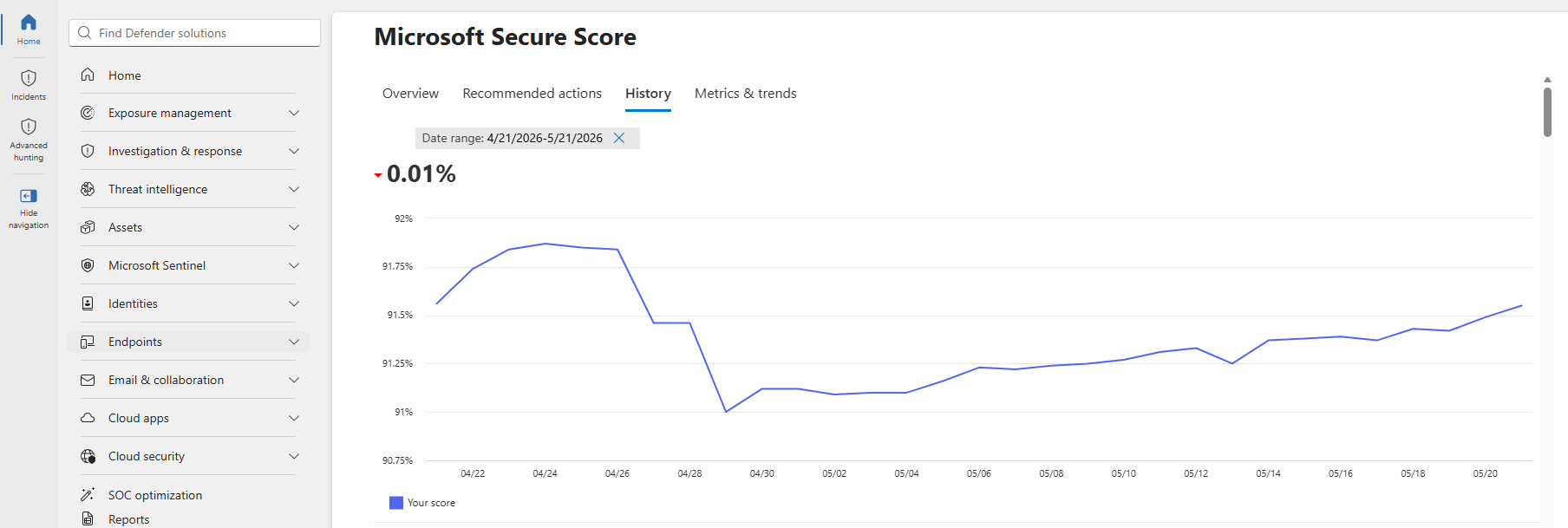
📷 Εικόνα 6: Η καρτέλα History του Microsoft Secure Score, από όπου παίρνουμε την τάση για την αναφορά.
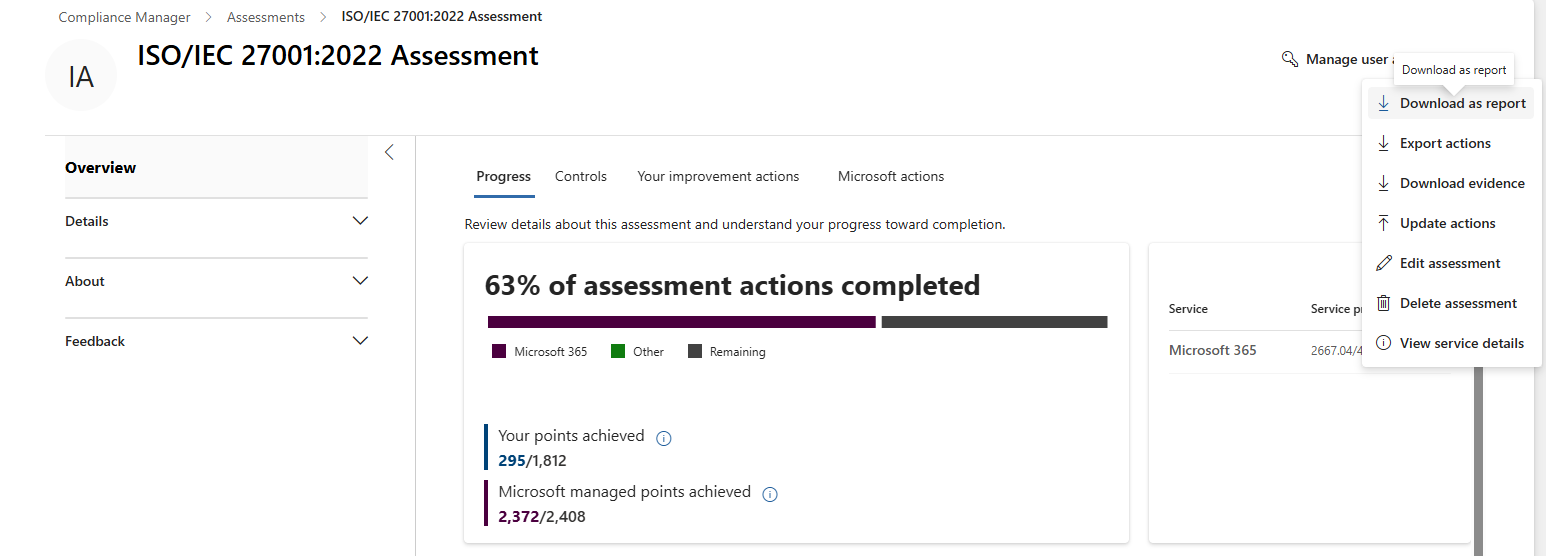
📷 Εικόνα 7: Η πρόοδος της αξιολόγησης ISO/IEC 27001:2022 στο Compliance Manager, με το μενού εξαγωγής.
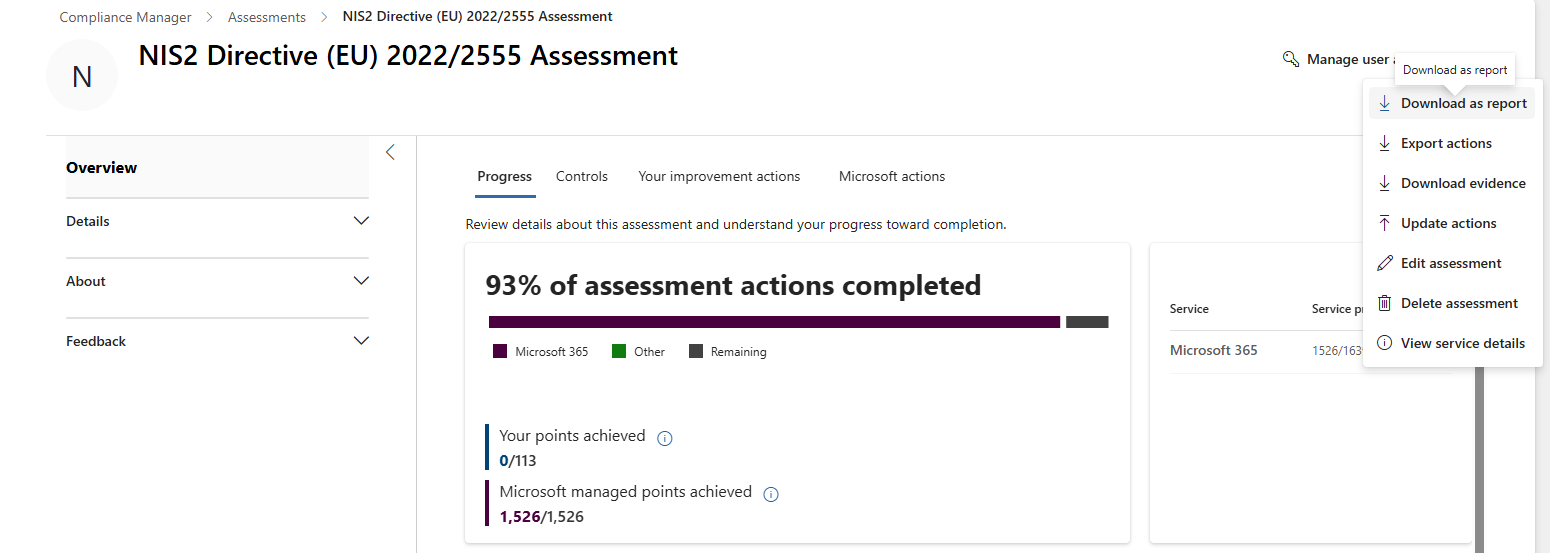
📷 Εικόνα 8: Η πρόοδος της αξιολόγησης NIS2 Directive (EU) 2022/2555 στο Compliance Manager.
Διακυβέρνηση και αποδοχή κινδύνου: πώς τεκμηριώνεις τα κενά που δεν κλείνουν
Δεν μπορεί να εφαρμοστεί κάθε recommendation του Microsoft Secure Score. Μερικές φορές ο επιχειρησιακός λόγος βαραίνει περισσότερο από το όφελος ασφάλειας. Μερικές φορές το κόστος είναι δυσανάλογο με τον κίνδυνο. Μερικές φορές ένα compensating control έξω από το Microsoft 365 καλύπτει την ίδια απαίτηση.
Όταν αποφασίζεις να μην εφαρμόσεις ένα recommendation, τεκμηρίωσέ το. Δεν είναι προαιρετικό. Αν αφήσεις ένα recommendation σε To address επ’ αόριστον, οι ελεγκτές θα το καταγράψουν ως κενό. Αν το βάλεις σε Risk accepted χωρίς τεκμηρίωση, θα το καταγράψουν ως μη διαχειριζόμενο κίνδυνο.
Έτσι το χειριζόμαστε.
Το Μητρώο Αποδοχής Κινδύνου
Κρατάμε Μητρώο Αποδοχής Κινδύνου (μια λίστα στο SharePoint αρκεί, εμείς χρησιμοποιούμε ξεχωριστή ενότητα στην πλατφόρμα του ISMS). Για κάθε recommendation σε Risk accepted (και σε Resolved through third party ή alternate mitigation) καταγράφουμε:
- Τίτλο του recommendation
- Category (Identity, Device, Apps, Data)
- Πόντους (πόσους πόντους αφήνουμε)
- Περιγραφή κινδύνου (ποια απειλή μένει ανοιχτή;)
- Επιχειρησιακή αιτιολόγηση (γιατί δεν μπορούμε να το εφαρμόσουμε)
- Compensating controls (τι άλλο έχουμε που μειώνει εν μέρει τον κίνδυνο;)
- Ημερομηνία και πρόσωπο έγκρισης (ποιος το ενέκρινε;)
- Ημερομηνία επανεξέτασης (πότε θα το ξαναδούμε;)
Παράδειγμα εγγραφής:
| Πεδίο | Τιμή |
|---|---|
| Recommendation | Cloud Discovery στο Microsoft Defender for Cloud Apps |
| Category | Apps |
| Πόντοι | 4.50 |
| Περιγραφή κινδύνου | Μειωμένη ορατότητα στη χρήση μη εγκεκριμένων εφαρμογών SaaS (Shadow IT) |
| Επιχειρησιακή αιτιολόγηση | Περιορισμένη χρήση SaaS (μόνο Microsoft 365 και 3 εγκεκριμένες εφαρμογές). Το κόστος δεν δικαιολογεί την ενεργοποίηση του Defender for Cloud Apps. |
| Compensating controls | Πολιτικές Conditional Access στο Entra ID επιτρέπουν μόνο τις εγκεκριμένες εφαρμογές που συνδέονται με το Entra ID. Το firewall καταγράφει την εξερχόμενη κίνηση για εντοπισμό ανωμαλιών. |
| Ημερομηνία έγκρισης | 2025-11-12 |
| Εγκρίθηκε από | CISO (Δημοσθένης Αττέια) |
| Ημερομηνία επανεξέτασης | 2026-11-12 (ετήσια επανεξέταση) |
Οι ελεγκτές θα ζητήσουν να δουν αυτό το μητρώο. Αν είναι καλά τεκμηριωμένο, θα προχωρήσουν. Αν όχι, θα γράψουν εύρημα.
Η ροή έγκρισης της αποδοχής κινδύνου
Δεν αφήνουμε τους engineers να βάζουν μόνοι τους recommendations σε Risk accepted. Χρειάζεται έγκριση του CISO (ή, για θέματα μικρής επίπτωσης, του IT Manager).
Η ροή είναι:
- Ο engineer προτείνει αποδοχή κινδύνου (συμπληρώνει την εγγραφή στο Μητρώο)
- Ο IT Manager την ελέγχει και προσθέτει το επιχειρησιακό πλαίσιο
- Ο CISO εγκρίνει ή απορρίπτει
- Αν εγκριθεί, ο engineer βάζει το recommendation σε Risk accepted στο Microsoft Secure Score και γράφει στο Action plan τον αριθμό της εγγραφής στο Μητρώο
Έτσι οι αποφάσεις κινδύνου παίρνονται στο σωστό επίπεδο και υπάρχει καθαρό audit trail.
Πρακτική άσκηση: φτιάξε το δικό σου επιχειρησιακό runbook
Αν έφτασες ως εδώ, καταλαβαίνεις πλέον πώς λειτουργεί το Microsoft Secure Score στην καθημερινότητα. Μια πρακτική άσκηση για να το κάνεις συγκεκριμένο στο δικό σου περιβάλλον.
Βήμα 1: Εξήγαγε τα recommendations σου
- Άνοιξε το
https://security.microsoft.com→ Exposure management → Secure score → καρτέλα Recommended actions - Πάτα Export
- Άνοιξε το αρχείο στο Excel
Θα δεις κάθε recommendation με την κατάσταση, το Score impact, την κατηγορία και το προϊόν του.
Βήμα 2: Πρόσθεσε στήλες ιεράρχησης
Πρόσθεσε τρεις νέες στήλες:
- Μείωση κινδύνου (Υψηλή, Μέτρια, Χαμηλή)
- Κόστος εφαρμογής (Υψηλό, Μέτριο, Χαμηλό)
- Κανονιστική αντιστοίχιση (οι απαιτήσεις της ΚΥΑ 1689/2025 ή τα controls του ISO 27001 που καλύπτει, αν υπάρχουν)
Συμπλήρωσε τουλάχιστον 20 recommendations (διάλεξε αυτά με το μεγαλύτερο Score impact ή όσα σου φαίνονται πιο σχετικά με τον οργανισμό σου). Για τη στήλη της αντιστοίχισης, τα checklists σε Excel των τριών οδηγών έχουν ήδη τη ρύθμιση της Microsoft για κάθε απαίτηση.
Βήμα 3: Χώρισε σε κατηγορίες προτεραιότητας
Φτιάξε μια στήλη Κατηγορία προτεραιότητας και βάλε κάθε recommendation σε:
- Προτεραιότητα 1: Υψηλός κίνδυνος, χαμηλό κόστος, με αντιστοίχιση
- Προτεραιότητα 2: Υψηλός κίνδυνος, υψηλό κόστος, με αντιστοίχιση
- Προτεραιότητα 3: Μέτριος ή χαμηλός κίνδυνος, χαμηλό κόστος, με αντιστοίχιση
- Προτεραιότητα 4: Όλα τα υπόλοιπα
Ταξινόμησε πρώτα με την Κατηγορία προτεραιότητας και μετά με το Score impact.
Βήμα 4: Διάλεξε το πλάνο του επόμενου τριμήνου
Διάλεξε 10 έως 15 recommendations από τις Προτεραιότητες 1 και 2. Αυτοί είναι οι στόχοι σου για το επόμενο τρίμηνο.
Για το καθένα γράψε:
- Ημερομηνία-στόχο
- Υπεύθυνο (ποιος θα κάνει τη ρύθμιση;)
- Εξαρτήσεις (χρειάζεται budget, προμηθευτής ή συντονισμός με άλλες ομάδες;)
Αυτό είναι πλέον το επιχειρησιακό σου πλάνο. Βάλ’ το στην πλατφόρμα του ISMS, στο SharePoint ή όπου παρακολουθεί η ομάδα σου τη δουλειά της. Και βάλε τα recommendations του πλάνου σε Planned στο Microsoft Secure Score.
Βήμα 5: Στήσε συνεχή παρακολούθηση
Η βαθμολογία διαβάζεται και από το Microsoft Graph, με το endpoint https://graph.microsoft.com/v1.0/security/secureScores. Αν έχεις Power Automate με άδεια Premium (η ενέργεια HTTP είναι premium connector), μπορείς να φτιάξεις μια απλή ροή:
- Trigger: Recurrence (καθημερινά, στις 09:00)
- Action: HTTP request στο
https://graph.microsoft.com/v1.0/security/secureScores?$top=2, με app registration που έχει την άδειαSecurityEvents.Read.All - Condition: αν η σημερινή βαθμολογία (
currentScore/maxScore) είναι χαμηλότερη από τη χθεσινή κατά περισσότερο από 2 ποσοστιαίες μονάδες - Action: μήνυμα στο Teams ή email
Αν δεν έχεις Premium, η εβδομαδιαία σύσκεψη και η κάρτα Regressed της σελίδας Overview κάνουν την ίδια δουλειά, απλώς με καθυστέρηση λίγων ημερών.
Τι μάθαμε μετά από δύο χρόνια
Χρησιμοποιούμε το Microsoft Secure Score ως μηχανή του προγράμματος GRC από τα τέλη του 2023. Αυτά είναι τα μαθήματα που δεν χωρούν στις παραπάνω ενότητες, αλλά αξίζει να τα μοιραστώ.
Μάθημα 1: Ξεκίνα από όσα έχουν μεγάλη αξία και μικρό κόστος
Είναι δελεαστικό να κυνηγήσεις πρώτα τα recommendations με το μεγαλύτερο Score impact. Μην το κάνεις. Ξεκίνα από τα γρήγορα κέρδη, όσα εφαρμόζονται εύκολα και μειώνουν ουσιαστικά τον κίνδυνο. Χτίσε ρυθμό. Κάνε τη βαθμολογία να κινηθεί. Μετά πήγαινε στα δύσκολα.
Μάθημα 2: Ενημέρωνε τους χρήστες για τις αλλαγές
Σχεδόν κάθε recommendation που αγγίζει ταυτότητες ή email θα επηρεάσει κάπως τους χρήστες. Αν δεν τους πεις τι αλλάζει και γιατί, θα πνιγείς σε αιτήματα στο helpdesk και παράπονα από τη διοίκηση.
Στέλνουμε ένα σύντομο email (3 έως 4 προτάσεις) στους χρήστες που επηρεάζονται, μία εβδομάδα πριν από κάθε αλλαγή με μεγάλες επιπτώσεις, με:
- Τι αλλάζει
- Γιατί το κάνουμε (ασφάλεια και συμμόρφωση)
- Τι πρέπει να κάνουν (αν πρέπει να κάνουν κάτι)
- Σε ποιον να απευθυνθούν αν έχουν πρόβλημα
Στη δική μας περίπτωση αυτό μείωσε τα αιτήματα στο helpdesk περίπου κατά 60% σε σχέση με τις αλλαγές χωρίς ενημέρωση.
Μάθημα 3: Μην κυνηγάς το 100%
Βαθμολογία 100% στο Microsoft Secure Score δεν είναι ρεαλιστική για τους περισσότερους οργανισμούς, και δεν χρειάζεται. Κάποια recommendations συγκρούονται με επιχειρησιακές ανάγκες. Κάποια είναι υπερβολικά για το δικό σου προφίλ απειλών. Κάποια θέλουν άδειες που δεν έχεις.
Ο δικός μας στόχος είναι να μένουμε πάνω από 90%. Πάνω από αυτό, κάθε επιπλέον μονάδα κοστίζει όλο και περισσότερο για όλο και λιγότερο όφελος. Εστίασε στο να κλείνεις τα κενά υψηλού κινδύνου και να τεκμηριώνεις τα υπόλοιπα.
Μάθημα 4: Ξαναδές τις αποδοχές κινδύνου κάθε χρόνο
Το επιχειρησιακό πλαίσιο αλλάζει. Ένα recommendation που δεν μπορούσες να εφαρμόσεις πέρυσι ίσως γίνεται φέτος. Ή το αντίστροφο.
Ξαναβλέπουμε κάθε Risk accepted recommendation μία φορά τον χρόνο. Περίπου το 20% αλλάζει προτεραιότητα, λόγω νέων επιχειρησιακών αναγκών, νέων απειλών ή νέων αδειών. Είναι και η περιοδική επικαιροποίηση του πλάνου αντιμετώπισης κινδύνων που ζητά η απαίτηση 5.1.δ της ΚΥΑ 1689/2025.
Μάθημα 5: Χρησιμοποίησε το Microsoft Secure Score για εκπαίδευση
Για τους junior security engineers, το Microsoft Secure Score είναι εξαιρετικός τρόπος να μάθουν την ασφάλεια του Microsoft 365. Κάθε recommendation είναι ένα μικρό μάθημα: τι κάνει το control, γιατί μετράει, πώς ρυθμίζεται.
Δίνουμε στους νέους συναδέλφους ένα πιλοτικό έργο: διαλέγουν 5 recommendations από την Προτεραιότητα 3, τα ερευνούν, γράφουν το πλάνο εφαρμογής και τα ρυθμίζουν σε περιβάλλον δοκιμών. Όταν τελειώσουν, καταλαβαίνουν το οικοσύστημα του Microsoft Defender καλύτερα από πολλούς πιο έμπειρους admins.
Από εδώ και πέρα: στη δική σου παραγωγή
Έχεις πλέον το επιχειρησιακό πλαίσιο:
- Πώς ιεραρχείς 250+ recommendations σε ένα διαχειρίσιμο πλάνο
- Πώς στήνεις διαχείριση αλλαγών που δεν σπάει την παραγωγή
- Πώς αντιστοιχίζεις το Microsoft Secure Score σε ΚΥΑ 1689/2025, ISO 27001 και Οδηγία NIS2
- Πώς μαζεύεις τεκμήρια για τους ελεγκτές
- Πώς παρακολουθείς τις υποχωρήσεις και ενημερώνεις τη διοίκηση
Το επόμενο βήμα είναι να το φέρεις στο δικό σου περιβάλλον. Διάλεξε 10 recommendations. Ιεράρχησέ τα. Εφάρμοσέ τα. Τεκμηρίωσέ τα. Μάζεψε τα τεκμήρια.
Σε 90 ημέρες θα έχεις ένα πρόγραμμα GRC που δουλεύει πάνω στο Microsoft 365, και θα καταλαβαίνεις το Microsoft Secure Score με τρόπο που κανένα άρθρο δεν μπορεί να σου διδάξει.
Πού να συνεχίσεις από εδώ
Αυτό είναι το τελευταίο άρθρο της βασικής σειράς Microsoft Secure Score as a Cyber GRC Instrument. Είδες:
- Εισαγωγή της σειράς: γιατί το Microsoft Secure Score μπορεί να γίνει η μηχανή ενός προγράμματος GRC
- Μέρος 1: Πώς διαβάζεις ένα recommendation: κάθε πεδίο ενός recommendation
- Μέρος 2: Μέσα στο οικοσύστημα του Defender: από πού παίρνει τα δεδομένα του το Microsoft Secure Score
- Μέρος 3: Καθημερινή λειτουργία (αυτό το άρθρο): πώς το δουλεύεις στην παραγωγή
🔗 Θέλεις να μπεις πιο βαθιά στο οικοσύστημα του Microsoft Defender; Η σειρά Microsoft Defender Demystified δίνει τη συνολική εικόνα, και η σειρά Microsoft Defender Up Close εξηγεί κάθε προϊόν στην πράξη, ξεκινώντας από το Microsoft Defender for Endpoint και το Microsoft Defender for Office 365.
🔗 Θέλεις το Secure Score από την οπτική του ΥΑΣΠΕ; Ο Πρακτικός Οδηγός για τον ΥΑΣΠΕ δείχνει πώς ιεραρχείς τα recommendations για τον ν. 5160/2024.
Μέχρι τότε, ο καλύτερος τρόπος να μάθεις είναι να κάνεις. Άνοιξε το Microsoft Secure Score. Διάλεξε ένα recommendation. Εφάρμοσέ το. Θα εκπλαγείς πόσα θα μάθεις την πρώτη εβδομάδα.
Ακολούθησέ με στο LinkedIn για ειδοποιήσεις νέων άρθρων.