
⚠️ Οι τιμές αλλάζουν. Όλα τα παρακάτω είναι σε δολάρια ΗΠΑ, τιμή καταλόγου, όπως ίσχυαν την 1η Ιουλίου 2026, όταν εφαρμόστηκε η πιο πρόσφατη ενημέρωση τιμών και πακέτων της Microsoft. Οι τοπικές τιμές διαφέρουν ανά περιοχή και νόμισμα. Έλεγξε πάντα την επίσημη σελίδα των πλάνων Microsoft 365 και τη σελίδα τιμών του Microsoft Defender for Cloud πριν αποφασίσεις μια αγορά.
Η συζήτηση για τις άδειες που οι περισσότεροι αποφεύγουμε
Αν έχεις δουλέψει λίγο στο Microsoft Security, έχεις κάνει αυτή τη σύσκεψη. Το λογιστήριο ή οι προμήθειες θέλουν έναν αριθμό. Η διοίκηση θέλει να μάθει αν ο οργανισμός έχει περισσότερες ή λιγότερες άδειες απ’ όσες χρειάζεται. Κάποιος λέει «ας πάρουμε E5 και τελειώσαμε» και κάποιος άλλος «το E5 είναι υπερβολή, είμαστε μικρή εταιρεία». Ένας τρίτος αναφέρει το «Defender Suite» που άκουσε σε ένα συνέδριο, αλλά κανείς στην αίθουσα δεν είναι σίγουρος τι περιλαμβάνει.
Όλοι θέλουν σαφήνεια. Κανείς δεν θέλει να διαβάσει από την αρχή μέχρι το τέλος το Microsoft 365 Subscription Suites licensing guidance. Και δικαίως: είναι πλήρες και σημαντικό, αλλά δεν γράφτηκε για να πάρεις μια απόφαση ένα πρωινό Τρίτης.
Αυτό το άρθρο είναι η έκδοση για το πρωινό της Τρίτης. Βλέπουμε τι σου δίνουν από την οικογένεια του Defender το Microsoft 365 Business Premium, το E3 και το E5, τα σχετικά νέα add-ons Defender Suite, τρία ρεαλιστικά προφίλ οργανισμών και μια ροή απόφασης που παίρνεις μαζί σου στην επόμενη σύσκεψη για τον προϋπολογισμό.
Δύο κόσμοι που πρέπει να κρατάς χωριστά
Πριν από οποιαδήποτε σύγκριση πλάνων, αυτή η διάκριση:
- Το Microsoft Defender XDR (ό,τι είδαμε στο Μέρος 2: endpoint, email, ταυτότητα, SaaS) αδειοδοτείται ανά χρήστη, ανά μήνα, ως μέρος ενός πλάνου Microsoft 365.
- Το Microsoft Defender for Cloud (Μέρος 3, workloads σε Azure και άλλα clouds) χρεώνεται ανά πόρο, ανά μήνα, ως μέρος της κατανάλωσης στο Azure.
Εμφανίζονται σε διαφορετικά τιμολόγια. Η άδεια Microsoft 365 E5 δεν σου δίνει τίποτα από το Microsoft Defender for Cloud, και το αντίστροφο. Έχω δει εταιρείες να βάζουν στον προϋπολογισμό το «Defender» ως μία γραμμή και να εκπλήσσονται δυσάρεστα όταν τα δύο προϊόντα έρχονται ως δύο διαφορετικά κόστη.
Το υπόλοιπο άρθρο εστιάζει στην πλευρά του Microsoft 365, ανά χρήστη. Κλείνουμε με μια σύντομη σημείωση για την πλευρά του Azure.
Η σκάλα του Microsoft 365, από τη λιγότερη στην περισσότερη ασφάλεια
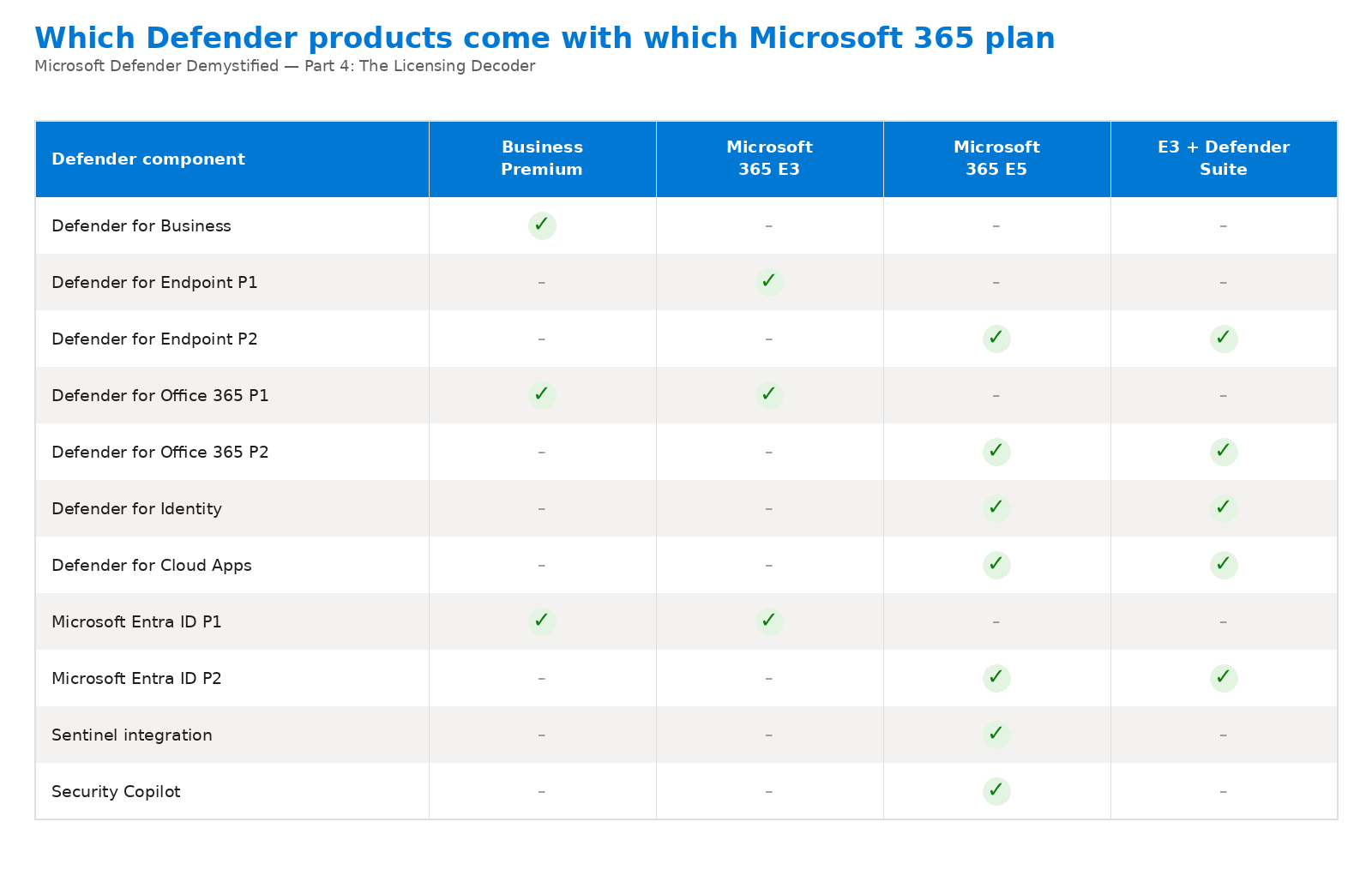
📷 Εικόνα 1: Ποια προϊόντα Defender έρχονται με ποιο πλάνο Microsoft 365.
Αυτό περιλαμβάνει σήμερα κάθε βασικό πλάνο Microsoft 365 από την οικογένεια του Defender, μετά την ενημέρωση πακέτων του Ιουλίου 2026, που πρόσθεσε ουσιαστικές δυνατότητες ασφάλειας στα χαμηλότερα πλάνα.
Microsoft 365 Business Basic: 7 $ ανά χρήστη τον μήνα
- Έλεγχος URL με Safe Links στο Outlook (προστέθηκε με την ενημέρωση του 2026).
Αυτό είναι όλο από την οικογένεια του Defender. Το πλάνο είναι για απλούς λογαριασμούς συνεργασίας που σχεδόν δεν χρειάζονται εργαλεία ασφάλειας.
Microsoft 365 Business Standard: 14 $ ανά χρήστη τον μήνα
- Έλεγχος URL με Safe Links στο Outlook.
Παρόμοια εικόνα. Το Business Standard είναι πλάνο παραγωγικότητας, όχι ασφάλειας.
Microsoft 365 Business Premium: 22 $ ανά χρήστη τον μήνα
Αυτό είναι το ιδανικό σημείο για την ασφάλεια σε οργανισμούς κάτω από 300 χρήστες. Αξίζει να σημειώσεις ότι η τιμή του δεν άλλαξε στην ενημέρωση του Ιουλίου 2026, ενώ το E3 και το E5 ακρίβυναν, οπότε η διαφορά στην αξία μεγάλωσε. Τι παίρνεις:
- Microsoft Defender for Business: μια απλοποιημένη εμπειρία Microsoft Defender for Endpoint, με ευκολότερη εγκατάσταση και ρυθμίσεις φιλικές για μικρές επιχειρήσεις.
- Microsoft Defender for Office 365 Plan 1: Safe Links, Safe Attachments, anti-phishing.
- Microsoft Entra ID P1: Conditional Access, επιβολή MFA.
- Microsoft Intune Plan 1: πλήρη διαχείριση συσκευών και εφαρμογών.
Για μια μικρή ή μεσαία επιχείρηση, μία άδεια των 22 $ αντικαθιστά ό,τι παλιά ήθελε ξεχωριστό antivirus, email security gateway, προϊόν MDM και εργαλείο διαχείρισης ταυτοτήτων. Το μόνο πραγματικό όριο είναι οι 300 χρήστες. Μόλις τους ξεπεράσεις, περνάς στα πλάνα Enterprise.
Ειλικρινά, αν κάποιος με ρωτήσει ποια επένδυση ασφάλειας δίνει την περισσότερη αξία για τα χρήματα σε όλο τον κατάλογο της Microsoft, αυτή είναι η απάντησή μου. Και με διαφορά.
Microsoft 365 E3: 39 $ ανά χρήστη τον μήνα
Το E3 είναι το βασικό πλάνο παραγωγικότητας για επιχειρήσεις. Μετά την ενημέρωση του Ιουλίου 2026 περιλαμβάνει αισθητά περισσότερη ασφάλεια απ’ ό,τι παλιά:
- Microsoft Defender for Endpoint Plan 1: προληπτική προστασία endpoints.
- Microsoft Defender for Office 365 Plan 1 (νέο από το 2026): Safe Links, Safe Attachments, anti-phishing.
- Microsoft Entra ID P1: Conditional Access, MFA, βασική διακυβέρνηση ταυτοτήτων.
- Microsoft Intune Plan 1 και Plan 2: μαζί με Remote Help και Advanced Analytics.
- Windows 11 Enterprise.
Το E3 ταιριάζει αν θέλεις παραγωγικότητα επιπέδου επιχείρησης με βασική ασφάλεια, και την επιλογή να προσθέσεις προχωρημένη ασφάλεια χωριστά.
Microsoft 365 E5: 60 $ ανά χρήστη τον μήνα
Το E5 είναι η πλήρης στοίβα ασφάλειας σε ένα SKU ανά χρήστη. Ό,τι έχει το E3, και επιπλέον:
- Microsoft Defender for Endpoint Plan 2: πλήρες EDR, αυτοματοποιημένη διερεύνηση και απόκριση, διαχείριση ευπαθειών.
- Microsoft Defender for Office 365 Plan 2: προσθέτει Attack simulation training και Threat Explorer.
- Microsoft Defender for Identity: προστασία για το on-premises AD και το Microsoft Entra ID.
- Microsoft Defender for Cloud Apps: το CASB για ορατότητα και έλεγχο στις εφαρμογές SaaS.
- Microsoft Entra ID P2: Privileged Identity Management, Identity Protection.
- Microsoft Sentinel: όχι το ίδιο το SIEM, αλλά δωρεάν εισαγωγή ορισμένων δεδομένων του Microsoft 365 (δες τη σημείωση παρακάτω).
- Microsoft Security Copilot (περιλαμβάνεται από τον Νοέμβριο του 2025, με μηνιαίο όριο 400 SCUs ανά 1.000 άδειες).
- Microsoft Purview: προχωρημένη συμμόρφωση, eDiscovery (Premium), Insider Risk Management.
- Microsoft Cloud PKI (προστέθηκε το 2026).
- Microsoft Power BI Pro.
Το E5 είναι για οργανισμούς που θέλουν ενιαία στοίβα ασφάλειας και συμμόρφωσης από έναν κατασκευαστή, αντί να ενώνουν μεμονωμένα προϊόντα. Η διαφορά των 21 $ από το E3 ακούγεται πολλή, μέχρι να κοστολογήσεις χωριστά ένα SIEM, ένα EDR, ένα CASB, προστασία ταυτοτήτων, Power BI και τώρα Security Copilot. Τα ποσά ανεβαίνουν γρήγορα.
Πρόσεξε μια λεπτομέρεια για το Sentinel: η άδεια E5 δίνει δωρεάν εισαγωγή ορισμένων δεδομένων του Microsoft 365, αλλά το Microsoft Sentinel χρεώνεται κατά βάση με τον όγκο των δεδομένων που συλλέγεις στο Azure. Λογάριασέ το χωριστά.
Microsoft 365 E7: 99 $ ανά χρήστη τον μήνα (νέο το 2026)
Το νέο κορυφαίο πλάνο. Ό,τι έχει το E5, και επιπλέον Microsoft 365 Copilot, Microsoft Entra Suite και Microsoft Agent 365. Είναι για επιχειρήσεις με έντονη χρήση AI και δεν είναι κυρίως αναβάθμιση ασφάλειας. Το E5 σου δίνει ήδη ολόκληρο το Defender.
Τα add-ons Defender Suite: ευελιξία που πραγματικά χρησιμεύει
Για το E3 υπήρχε εδώ και χρόνια το add-on Microsoft 365 E5 Security, που από την 1η Οκτωβρίου 2025 λέγεται Microsoft Defender Suite. Το πραγματικά νέο είναι ότι από το φθινόπωρο του 2025 υπάρχει αντίστοιχο add-on και για το Business Premium. Έτσι προσθέτεις ασφάλεια επιπέδου E5 σε χαμηλότερα πλάνα, χωρίς να δεσμευτείς σε E5 για όλους.
- Microsoft Defender Suite (πρώην «Microsoft 365 E5 Security»): προσθέτει στο Microsoft 365 E3 ό,τι λείπει: Defender for Endpoint Plan 2, Defender for Office 365 Plan 2, Defender for Identity, Defender for Cloud Apps και Microsoft Entra ID P2.
- Microsoft Defender Suite for Business Premium: η ίδια ιδέα για πελάτες Business Premium. Πρόσεξε ότι από την 1η Οκτωβρίου 2025 το Business Premium δεν είναι επιλέξιμη προϋπόθεση για το κανονικό Microsoft Defender Suite. Για πελάτες Business Premium το σωστό add-on είναι το Defender Suite for Business Premium.
Μια μικρή αλλά σημαντική λειτουργική σημείωση από την τεκμηρίωση αδειοδότησης της Microsoft: ένα tenant που καταλήγει να έχει και Microsoft Defender for Business (από το Business Premium) και Defender for Endpoint Plan 2 (από το add-on Defender Suite) χρησιμοποιεί από προεπιλογή την εμπειρία του Defender for Business. Σχεδίασε ανάλογα αν συνδυάζεις.
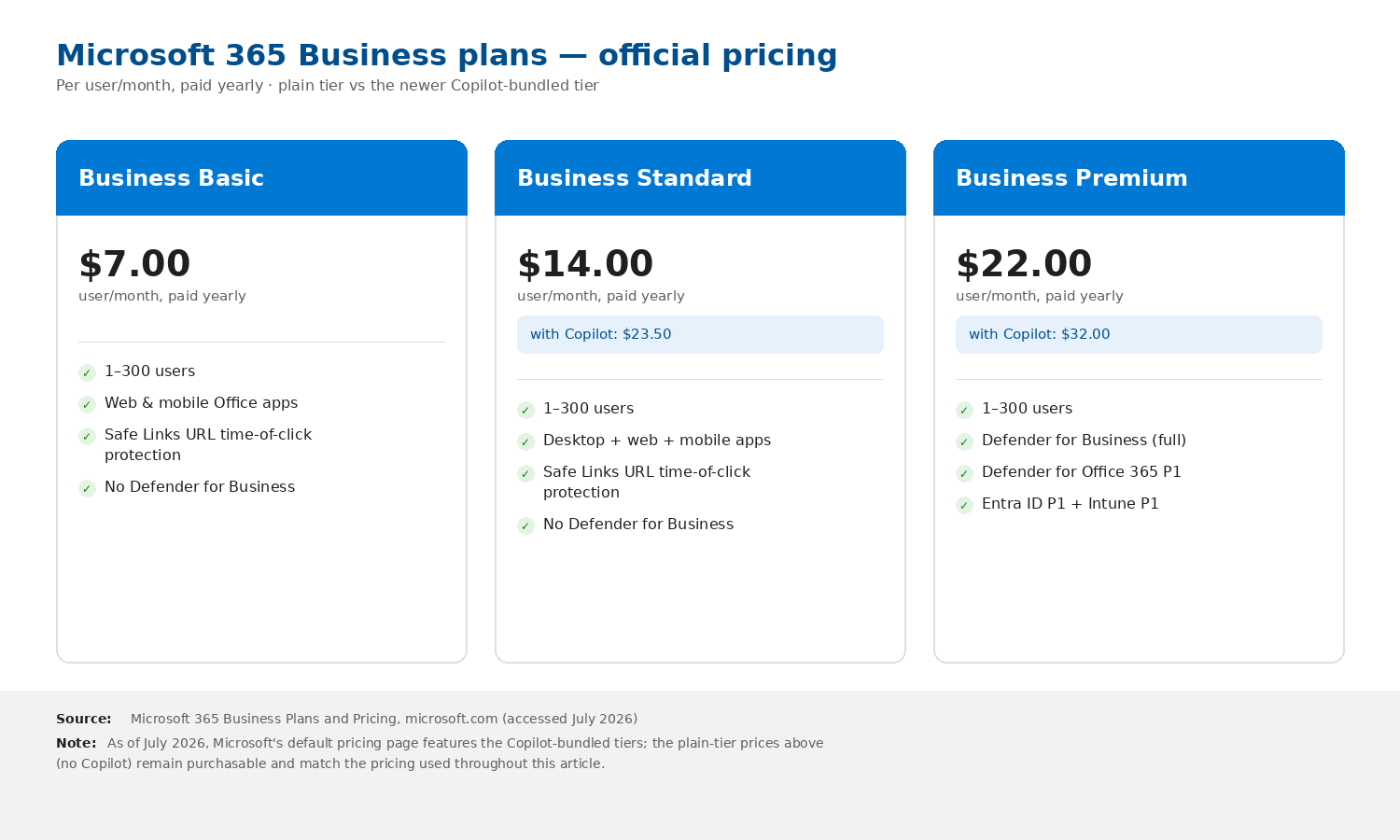
📷 Εικόνα 2: Οι επίσημες τιμές του Microsoft 365 Business, το απλό πλάνο και η έκδοση με Copilot.
Τρία ρεαλιστικά σενάρια
Σενάριο 1: η μικρή εταιρεία (50 άτομα)
Προφίλ: 50 υπάλληλοι γραφείου, καμία on-premises υποδομή, υβριδική εργασία, υποχρεώσεις από τον GDPR, χωρίς ειδική ομάδα ασφάλειας.
Πρόταση: Microsoft 365 Business Premium. Αυτή είναι όλη η απάντηση.
Με περίπου 1.100 $ τον μήνα συνολικά, παίρνεις πραγματικά ισχυρή ασφάλεια: προστασία endpoints, προστασία email, Conditional Access, MFA, MDM. Δεν θα το ξεπεράσεις μέχρι να φτάσεις τους 300 χρήστες. Για όποιον του ζητούν να ασφαλίσει μια μικρή εταιρεία με ρεαλιστικό προϋπολογισμό, είναι η πιο καθαρή πρόταση που μπορεί να κάνει.
Αν διαχειρίζεσαι και πολύ ευαίσθητα δεδομένα (νομικά, υγείας, χρηματοοικονομικών συμβουλών), σκέψου να προσθέσεις το add-on Microsoft Defender Suite for Business Premium. Παίρνεις ολόκληρη τη στοίβα του Defender με τιμή φιλική για μικρές επιχειρήσεις.
Σενάριο 2: ο μεσαίος οργανισμός (500 άτομα)
Προφίλ: 500 άτομα, μείγμα υπαλλήλων γραφείου και εργαζομένων στην παραγωγή, on-premises Active Directory, Microsoft Entra ID που μεγαλώνει, ISO 27001 στο πεδίο εφαρμογής, βασική ή σημαντική οντότητα του ν. 5160/2024 με υποχρεώσεις από την ΚΥΑ 1689/2025, μικρή αλλά πραγματική ομάδα ασφάλειας.
Πρόταση: Microsoft 365 E3 με το add-on Microsoft Defender Suite για τους υπαλλήλους γραφείου, Microsoft 365 F3 για τους εργαζόμενους στην παραγωγή.
Γιατί αυτό είναι καλύτερο από E5 για όλους:
- Οι εργαζόμενοι στην παραγωγή (ας πούμε 200 από τους 500) δεν χρειάζονται πλήρες E3 ή E5. Το F3 με 10 $ ανά χρήστη τον μήνα είναι το σωστό.
- Οι 300 υπάλληλοι γραφείου παίρνουν E3 (39 $) με το add-on Defender Suite, που τους δίνει ασφάλεια ισοδύναμη με το E5 με χαμηλότερο συνολικό κόστος απ’ ό,τι E5 για όλους.
- Αν δεν έχεις SOC 24x7 εσωτερικά, το Microsoft Defender Experts Suite προσθέτει managed υπηρεσίες XDR από πάνω.
Αυτή η προσέγγιση (άδεια ανάλογα με τον ρόλο, αντί για E5 σε όλους) εξοικονομεί αισθητό ποσό στους μεσαίους οργανισμούς, στα έργα που έχω δει από 15% έως 30%. Αξίζει τα τριάντα λεπτά για να κάνεις την ανάλυση.
Σενάριο 3: η μεγάλη επιχείρηση (5.000 άτομα, multicloud)
Προφίλ: 5.000 άτομα, πολλές επιχειρηματικές μονάδες, υβριδικό AD με Microsoft Entra ID, πλήρης ομάδα SOC, υποχρεώσεις από ISO 27001, ΚΥΑ 1689/2025, GDPR και DORA, workloads τόσο στο Microsoft Azure όσο και στο Amazon Web Services.
Πρόταση: ένα κλιμακωτό μείγμα:
- E5 για τη διοίκηση, το νομικό, το οικονομικό, το IT και την ομάδα ασφάλειας (περίπου 5 έως 10% των χρηστών), για Microsoft Security Copilot, eDiscovery (Premium) και τις υπόλοιπες δυνατότητες του Microsoft Purview. Το Privileged Identity Management το έχουν ήδη και οι χρήστες με Defender Suite, μέσω του Entra ID P2.
- E3 με το add-on Defender Suite για την πλειονότητα (περίπου 80%) των υπαλλήλων γραφείου.
- F1 ή F3 για τους εργαζόμενους πρώτης γραμμής.
- Πλάνα του Microsoft Defender for Cloud (Defender CSPM, Defender for Servers Plan 2, Defender for Storage και άλλα όπου χρειάζεται) για την πλευρά του Azure.
- Microsoft Sentinel ως SIEM, μέσα στο ενιαίο Defender portal.
Το λάθος που κάνουν πολλές μεγάλες επιχειρήσεις είναι το E5 για όλους, χωρίς να ελέγξουν ποιες δυνατότητες χρησιμοποιούνται πραγματικά. Συχνά ένα σημαντικό μέρος των αδειών E5 πληρώνεται για δυνατότητες που κανείς δεν χρησιμοποιεί, και αυτό είναι πραγματική ευκαιρία εξοικονόμησης όποτε κάποιος κάνει σωστά την ανάλυση.
Και το κόστος του Microsoft Defender for Cloud;
Μια γρήγορη υπενθύμιση από το Μέρος 3:
- Foundational CSPM: δωρεάν για κάθε Azure subscription, AWS account ή GCP project που συνδέεις.
- Defender CSPM: (επί πληρωμή) περίπου 5 $ ανά πόρο που χρεώνεται, τον μήνα.
- Πλάνα CWPP: (Servers, Storage, Containers, Databases και τα υπόλοιπα) το καθένα με τη δική του τιμή ανά πόρο.
Χρησιμοποίησε τον επίσημο τιμοκατάλογο πριν ενεργοποιήσεις οτιδήποτε. Το κόστος μεγαλώνει μαζί με την υποδομή, και σε μεγάλα περιβάλλοντα ανεβαίνει γρήγορα.
Μια ροή απόφασης που χρησιμοποιείς στην πράξη
Αν κρατήσεις ένα πράγμα από αυτό το άρθρο, κράτα αυτό:
- Κάτω από 300 χρήστες, χωρίς ιδιαίτερο βάρος συμμόρφωσης; → Microsoft 365 Business Premium.
- Κάτω από 300 χρήστες, ρυθμιζόμενος κλάδος ή ευαίσθητα δεδομένα; → Business Premium με το add-on Defender Suite for Business Premium.
- Πάνω από 300 χρήστες, βασικές ανάγκες ασφάλειας, θέλεις ευελιξία; → E3 με το add-on Defender Suite για τους χρήστες που το χρειάζονται.
- Πάνω από 300 χρήστες, θέλεις τα πάντα σε ένα SKU; → E5, αλλά με άδεια ανάλογα με τον ρόλο, όχι σε όλους.
- Εργαζόμενοι πρώτης γραμμής σε οποιοδήποτε από τα παραπάνω; → F1 ή F3 με τα κατάλληλα add-ons ασφάλειας.
- Έχεις workloads σε Azure, AWS ή GCP; → Ενεργοποίησε σήμερα το Foundational CSPM (δωρεάν) και μετά αξιολόγησε τα επί πληρωμή πλάνα.
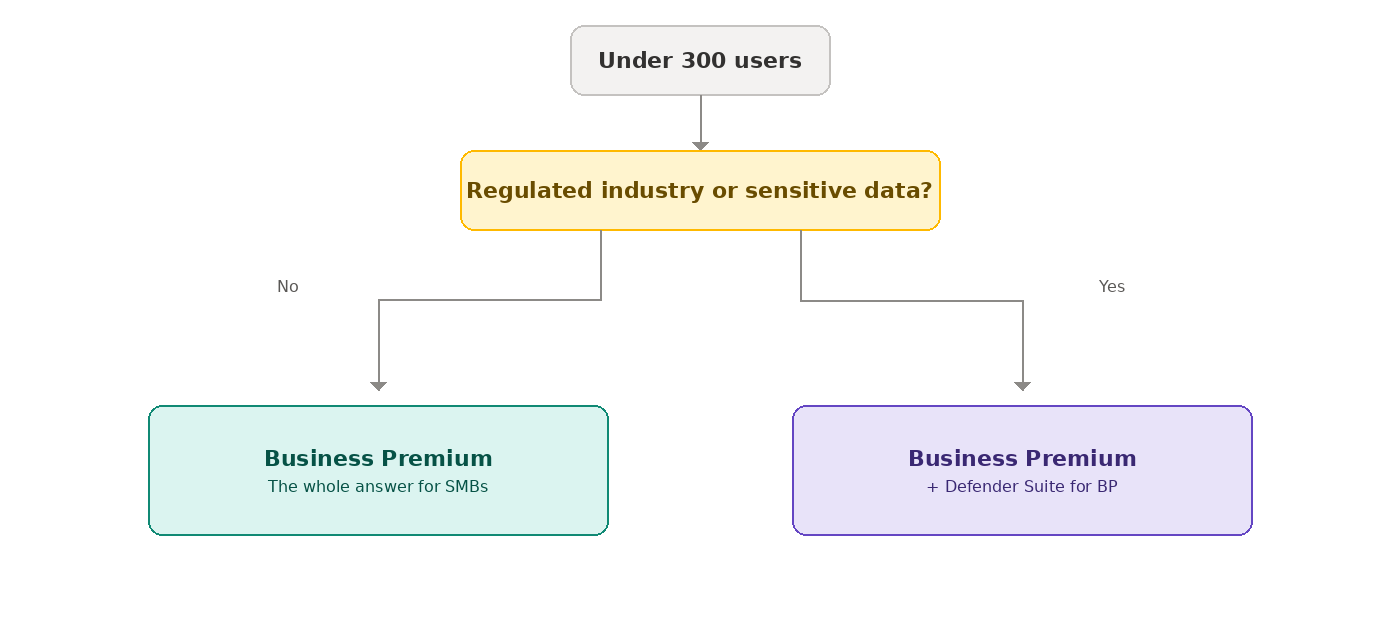
📷 Εικόνα 3α: Κάτω από 300 χρήστες: Business Premium ή Business Premium με Defender Suite.
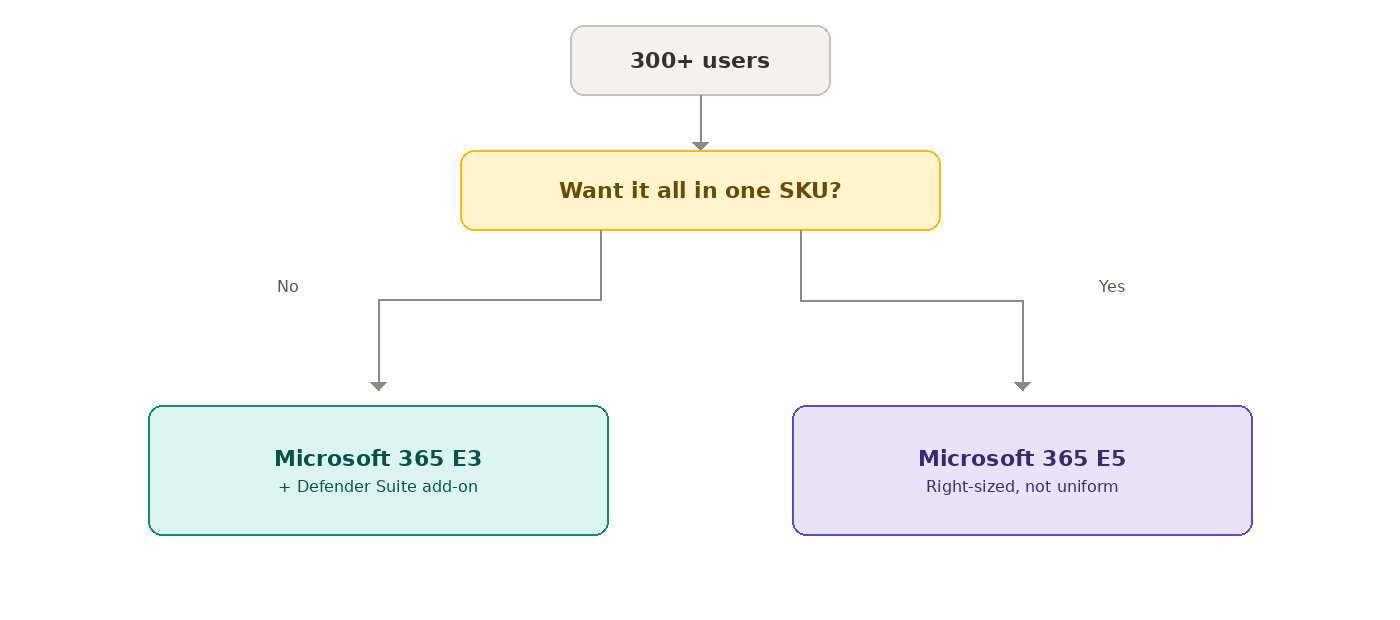
📷 Εικόνα 3β: Πάνω από 300 χρήστες: E3 με Defender Suite ή E5 ανάλογα με τον ρόλο.
Ποια άδεια χρειάζεσαι για ποια απαίτηση
Η άδεια είναι και θέμα συμμόρφωσης. Στους οδηγούς για την ΚΥΑ 1689/2025, την Οδηγία NIS2, το ISO/IEC 27001 και τον GDPR, όπου η απαίτηση χρειάζεται άδεια πέρα από τη βασική, υπάρχει γραμμή «Επιπλέον άδεια» που τη λέει ρητά. Το checklist σε Excel κάθε οδηγού έχει την ίδια στήλη, οπότε βλέπεις με μια ματιά πού σε φτάνει η άδεια που έχεις και πού όχι.
Τι ακολουθεί
Στο Μέρος 5, το τελευταίο της σειράς, ανοίγουμε μαζί το Microsoft Defender portal στο security.microsoft.com για μια ξενάγηση. Πού βρίσκεται κάθε workload, πού ζει πλέον το Microsoft Secure Score, πώς ρυθμίζεις τους σωστούς ρόλους, και ένα πρακτικό πρόγραμμα για την «πρώτη ώρα στο portal» που ακολουθείς από σήμερα.
🔗 Διάλεξες άδεια. Και τώρα; Η επόμενη ερώτηση είναι τι κάνεις με αυτήν. Η σειρά Microsoft Secure Score ως εργαλείο GRC για ISO 27001 & NIS2 δείχνει πώς το telemetry του Microsoft Defender έγινε ένα πρόγραμμα συμμόρφωσης που βραβεύτηκε, από την αρχή μέχρι το τέλος.
Ακολούθησέ με στο LinkedIn για ειδοποιήσεις νέων άρθρων, ή γράψου στο RSS στην κορυφή της σελίδας.
Πηγές και επαλήθευση
Επιπλέον πηγές: