
Πού είμαστε μέχρι τώρα
Το Μέρος 1 μας έδωσε τον χάρτη όλης της οικογένειας. Το Μέρος 2 μπήκε σε βάθος στα τέσσερα βασικά workloads του XDR. Τώρα περνάμε στο προϊόν που η ίδια η Microsoft τεκμηριώνει χωριστά από την υπόλοιπη οικογένεια στη σελίδα του Microsoft Defender, και αυτό που βλέπω να μπερδεύεται με όλα τα υπόλοιπα πιο συχνά από κάθε άλλο: το Microsoft Defender for Cloud.
Θα το πω καθαρά από την αρχή, γιατί είναι η πιο δαπανηρή παρανόηση στις συζητήσεις για το Microsoft Security: το Microsoft Defender for Cloud είναι διαφορετικό προϊόν από το Microsoft Defender XDR. Άλλη αδειοδότηση. Άλλη χρέωση. Άλλο κοινό. Και η ρύθμισή του γίνεται σε άλλο portal.
Κάθε επαγγελματίας στο Microsoft Security θα κάνει αυτή τη συζήτηση κάποια στιγμή, συνήθως με κάποιον που κρατά ένα τιμολόγιο. Ας σε γλιτώσω από αυτό.
Microsoft Defender for Cloud και Microsoft Defender XDR: τι διαφέρει
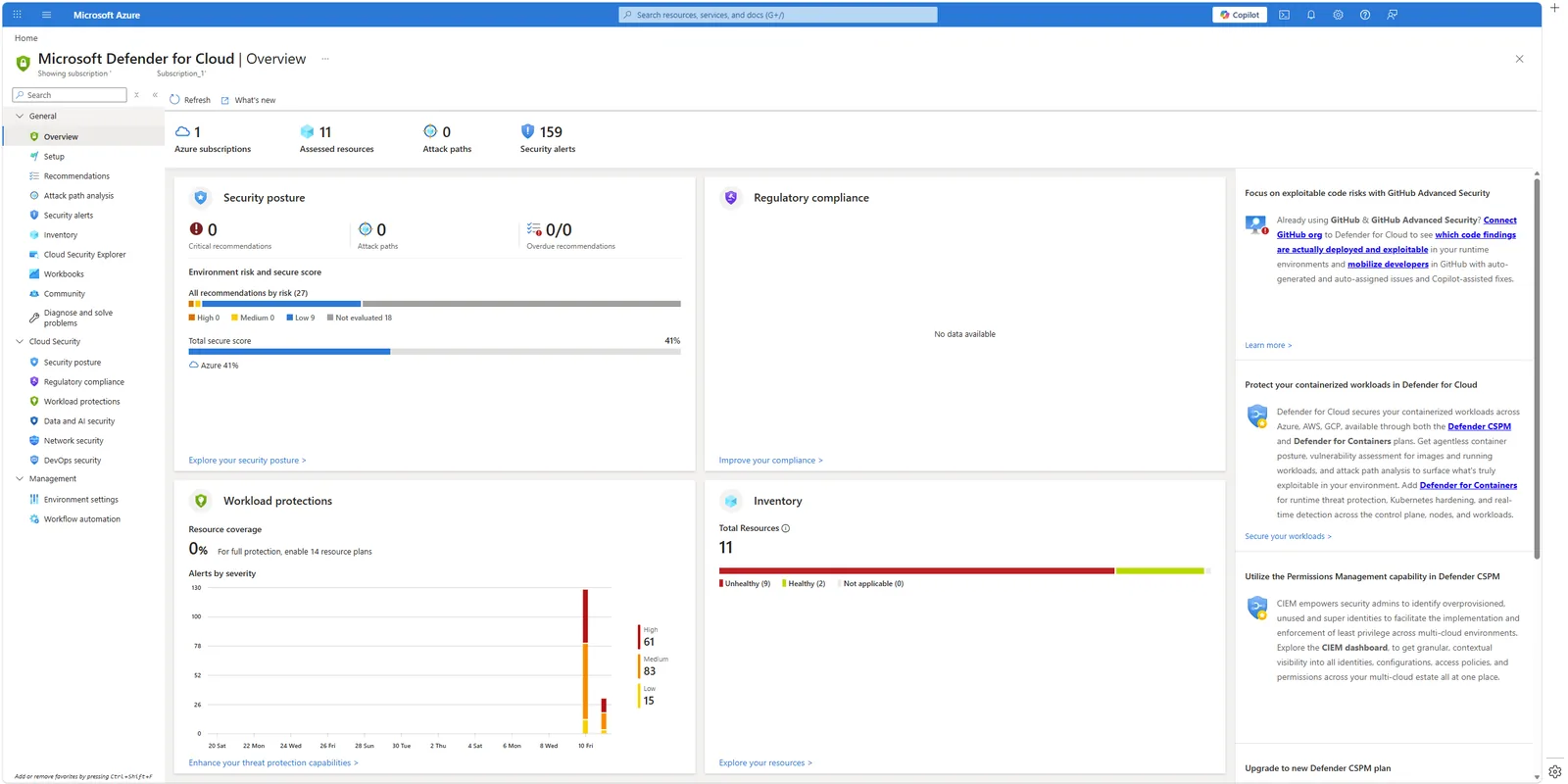
📷 Εικόνα 1: Η επισκόπηση του Microsoft Defender for Cloud στο Azure portal. Άλλο portal από το Microsoft Defender XDR στο security.microsoft.com.
Ό,τι είδαμε στο Μέρος 2 ζούσε στο security.microsoft.com και αδειοδοτούνταν ανά χρήστη, ως μέρος ενός πλάνου Microsoft 365. Το Microsoft Defender for Cloud ρυθμίζεται στο Azure portal στο portal.azure.com και χρεώνεται ανά πόρο (ανά VM, ανά storage account, ανά βάση δεδομένων), ως μέρος της κατανάλωσης στο Azure.
Η άδεια Microsoft 365 E5 δεν σου δίνει Microsoft Defender for Cloud. Το Microsoft Defender for Cloud δεν σου δίνει Microsoft Defender XDR. Είναι δύο πραγματικά ξεχωριστά προϊόντα που απλώς μοιράζονται ένα brand.
Διαφέρει και αυτό που προστατεύουν. Τα τέσσερα workloads του Μέρους 2 προστατεύουν ό,τι αγγίζουν οι χρήστες: συσκευές, email, ταυτότητες, SaaS. Το Microsoft Defender for Cloud προστατεύει υποδομή: τα VMs, τα containers, τις βάσεις δεδομένων, το storage και, όλο και περισσότερο, τις υπηρεσίες AI πάνω στις οποίες τρέχουν οι εφαρμογές σου. Άλλο πρόβλημα, άλλο εργαλείο.
Η Microsoft ονομάζει αυτή την κατηγορία CNAPP (Cloud Native Application Protection Platform). Είναι όρος της αγοράς για ένα προϊόν που ενώνει διάφορους κλάδους της ασφάλειας στο cloud:
- CSPM (Cloud Security Posture Management): βρίσκεις τις λάθος ρυθμίσεις πριν τις βρουν οι επιτιθέμενοι.
- CWPP (Cloud Workload Protection): ανίχνευση απειλών στα workloads την ώρα που τρέχουν.
- DevSecOps: η ασφάλεια μπαίνει νωρίτερα στη διαδικασία ανάπτυξης.
- CIEM (Cloud Infrastructure Entitlement Management): διαχείριση δικαιωμάτων στους πόρους του cloud.
Δεν χρειάζεται να θυμάσαι τα ακρωνύμια. Αυτό που πρέπει να θυμάσαι είναι η δομή δύο επιπέδων με την οποία πωλείται το Microsoft Defender for Cloud. Αυτό είναι το πρακτικό κομμάτι.
Επίπεδο 1: CSPM, το επίπεδο της στάσης ασφάλειας
Το πρώτο που κάνει το Microsoft Defender for Cloud, μόλις συνδέσεις ένα Azure subscription, ένα AWS account ή ένα GCP project, είναι να αξιολογήσει τη στάση ασφάλειάς σου απέναντι σε ένα baseline. Αυτό είναι το επίπεδο CSPM, και έρχεται σε δύο εκδόσεις.
Foundational CSPM: δωρεάν, αυτόματο, multicloud
Κάθε περιβάλλον που συνδέεις παίρνει Foundational CSPM χωρίς κόστος. Τι περιλαμβάνει:
- Απογραφή πόρων σε Azure, AWS και GCP.
- Συνεχή security recommendations με βάση το Microsoft Cloud Security Benchmark.
- Ένα Secure Score για την υποδομή cloud, το αντίστοιχο του Microsoft Secure Score στο Microsoft 365, για το οποίο έχω γράψει στη σειρά για το Secure Score.
- Αξιολόγηση κανονιστικής συμμόρφωσης με βάση το ίδιο το Microsoft Cloud Security Benchmark. Πρόσεξε ότι για να προσθέσεις άλλα πρότυπα στο compliance dashboard, όπως ISO 27001, NIST CSF ή PCI DSS, χρειάζεσαι το επί πληρωμή Defender CSPM. Αυτό εκπλήσσει πολλούς, οπότε λογάριασέ το αν στόχος σου είναι τα compliance dashboards.
Αυτό μόνο του αξίζει να το ενεργοποιήσεις. Είναι δωρεάν, θέλει λίγα λεπτά, και μέσα σε λίγες ώρες θα έχεις καθαρότερη εικόνα του cloud σου απ’ ό,τι φτιάχνουν οι περισσότεροι οργανισμοί ποτέ.
Αν η εταιρεία σου έχει οποιαδήποτε παρουσία σε Azure, AWS ή GCP, ακόμη κι ένα subscription που άνοιξε κάποιος για ένα δοκιμαστικό project και δεν το θυμάται κανείς, ενεργοποίησε σήμερα το Foundational CSPM. Θα σου πει πράγματα που δεν ήξερες και δεν θα σου κοστίσει τίποτα.
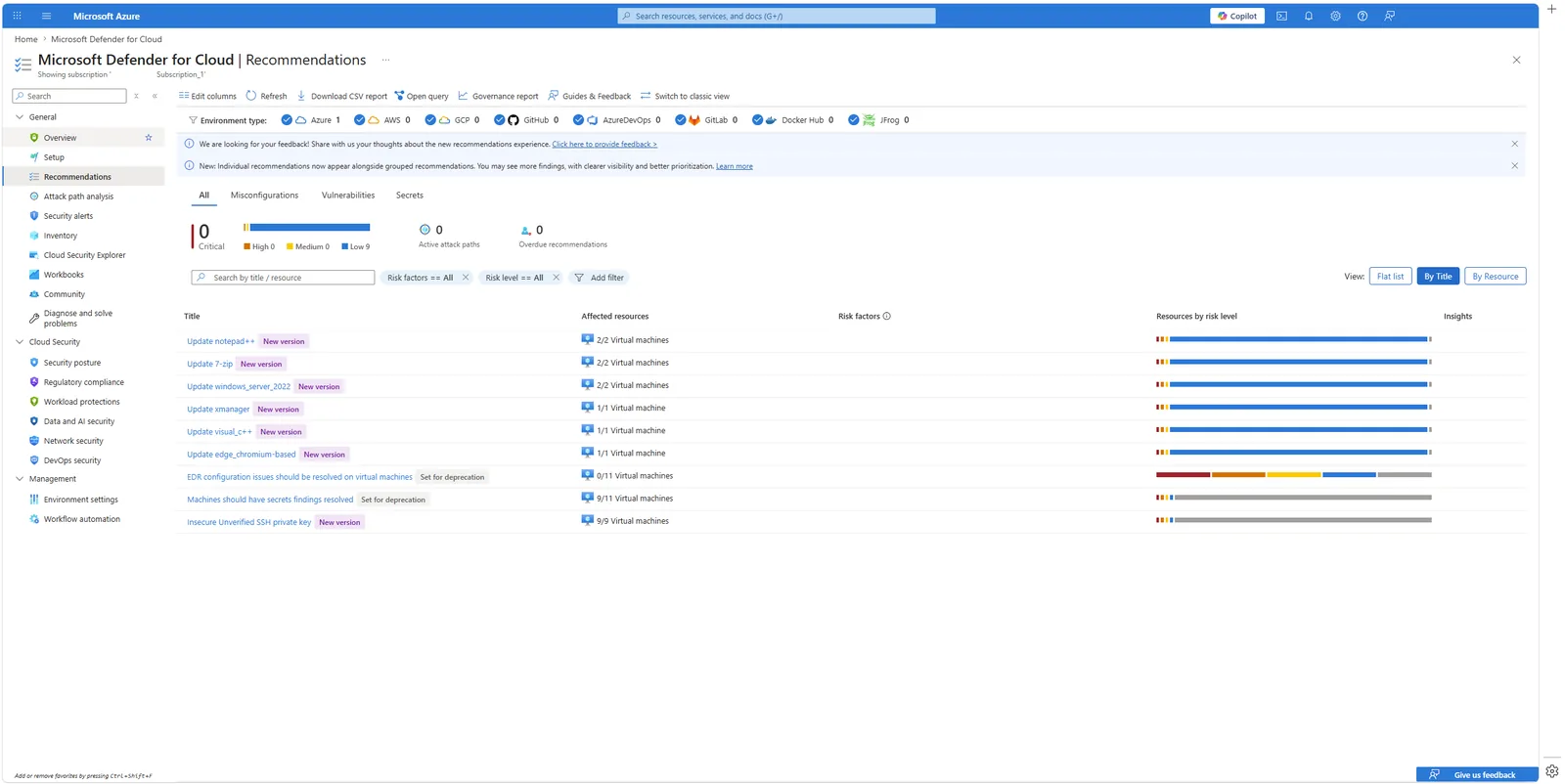
📷 Εικόνα 2: Τα recommendations του Microsoft Cloud Security Benchmark.
Defender CSPM: το επί πληρωμή επίπεδο
Αν θέλεις προληπτική ανάλυση από τη σκοπιά του επιτιθέμενου, που είναι πραγματική αναβάθμιση σε σχέση με μια λίστα recommendations, ενεργοποιείς το επί πληρωμή Defender CSPM. Τι προσθέτει:
- Agentless σάρωση ευπαθειών στα VMs και στα container images, χωρίς επιβάρυνση στην απόδοση.
- Attack path analysis: η Microsoft φτιάχνει γράφημα του cloud σου και σου δείχνει τις πραγματικές διαδρομές που θα ακολουθούσε ένας επιτιθέμενος για να φτάσει στα ευαίσθητα δεδομένα σου. Είναι διαφορετικός τρόπος να σκέφτεσαι τον κίνδυνο.
- Cloud Security Explorer: ένα γράφημα γνώσης του cloud σου στο οποίο κάνεις ερωτήματα.
- Εντοπισμό ευαίσθητων δεδομένων σε storage και βάσεις δεδομένων.
- Compliance dashboards για πρότυπα πέρα από το MCSB: ISO 27001, NIST CSF, PCI DSS, CIS Benchmarks και άλλα.
- AI security posture management για οργανισμούς που τρέχουν workloads παραγωγικής AI.
- DevOps security με σχόλια στα pull requests και αντιστοίχιση από τον κώδικα στο cloud.
Η τιμή καταλόγου είναι περίπου 5 δολάρια ανά πόρο που χρεώνεται, τον μήνα, για πόρους Compute, Databases, Storage και Serverless. Χρησιμοποίησε τον επίσημο τιμοκατάλογο πριν το ενεργοποιήσεις, γιατί το κόστος μεγαλώνει μαζί με την υποδομή σου.
Επίπεδο 2: CWPP, τα workload protection plans
Εκεί που το CSPM σου λέει «αυτό το VM είναι λάθος ρυθμισμένο», το CWPP σου λέει «αυτό το VM δέχεται επίθεση τώρα». Είναι σημαντική διάκριση.
Η προστασία των workloads δεν είναι ένα πλάνο. Είναι ξεχωριστά πλάνα ανά τύπο πόρου, που ενεργοποιούνται ανεξάρτητα, το καθένα με τη δική του τιμή και τις δικές του ανιχνεύσεις. Αυτά είναι τα πλάνα που θα βρεις στα Environment settings:
- Microsoft Defender for Servers: VMs με Windows και Linux, on-premises και σε άλλα clouds. Και τα δύο plans περιλαμβάνουν τον agent του Microsoft Defender for Endpoint (EDR) σε κάθε VM που προστατεύεται, κάτι πολύ χρήσιμο αν είσαι ήδη σε αυτό το οικοσύστημα. Το Plan 2 περιλαμβάνει και ανίχνευση απειλών στο DNS, αφού το παλιό αυτόνομο πλάνο Microsoft Defender for DNS σταμάτησε να διατίθεται σε νέες συνδρομές τον Αύγουστο του 2023.
- Microsoft Defender for Containers: clusters Kubernetes (AKS, EKS, GKE) και container registries.
- Microsoft Defender for Storage: Azure Blob Storage, Azure Files και Azure Data Lake Storage Gen2 (τα queues και τα tables δεν καλύπτονται), με σάρωση για malware κατά το upload στο Blob Storage.
- Microsoft Defender for SQL: στην ουσία δύο πλάνα, ένα για τις υπηρεσίες Azure SQL (Azure SQL Database, Managed Instance, elastic pools, Synapse dedicated pools) και ένα για SQL Server σε μηχανήματα, στο Azure ή μέσω Azure Arc.
- Microsoft Defender for open-source relational databases: PostgreSQL και MySQL (Flexible Server) στο Azure, και instances του AWS RDS (PostgreSQL, MySQL, MariaDB, Aurora PostgreSQL και Aurora MySQL).
- Microsoft Defender for Azure Cosmos DB: η NoSQL βάση της Microsoft έχει δικό της πλάνο (δεν είναι ούτε open-source ούτε relational, οπότε μην την ψάχνεις στο προηγούμενο).
- Microsoft Defender for App Service: web apps στο Azure App Service.
- Microsoft Defender for Key Vault: Azure Key Vault.
- Microsoft Defender for Resource Manager: το ίδιο το control plane του Azure.
- Microsoft Defender for APIs: endpoints του Azure API Management.
- Microsoft Defender for AI Services: workloads Azure OpenAI και Azure AI Services. Είναι από τα νεότερα πλάνα και θα γίνεται όλο και πιο σημαντικό.
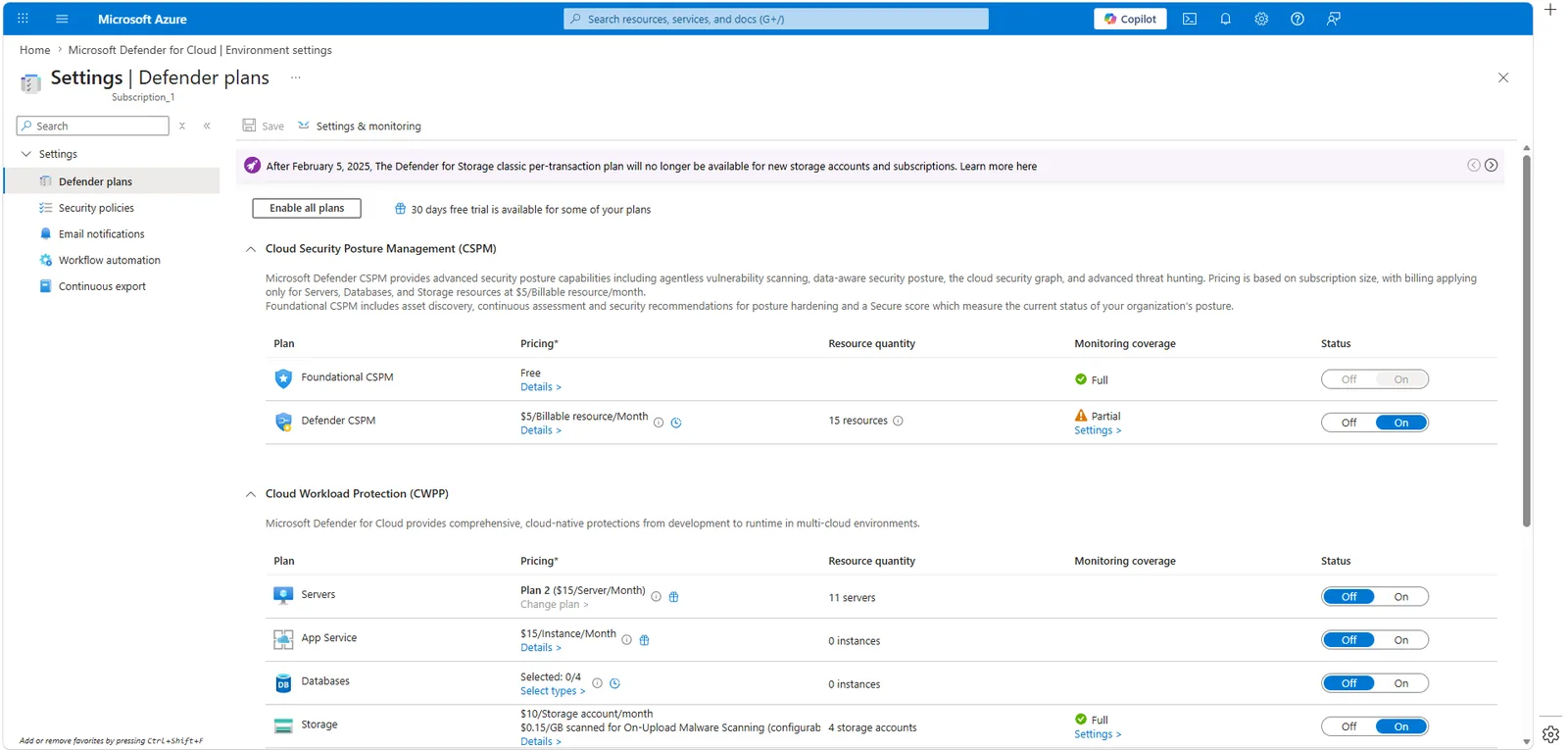
📷 Εικόνα 3: Η σελίδα Environment settings με τα ενεργά πλάνα.
Κάθε πλάνο ενεργοποιεί επιπλέον ανιχνεύσεις της Microsoft για τον συγκεκριμένο τύπο πόρου. Ενεργοποιείς μόνο ό,τι χρειάζεσαι. Μια startup με 10 VMs και ένα storage account μπορεί να ενεργοποιήσει μόνο το Microsoft Defender for Servers Plan 2 και το Microsoft Defender for Storage. Μια μεγάλη τράπεζα με εκατοντάδες βάσεις δεδομένων και πλατφόρμα Kubernetes θα ενεργοποιήσει σχεδόν τα πάντα.
Η εικόνα του multicloud
Το Microsoft Defender for Cloud είναι πραγματικά multicloud. Η σύνδεση ενός AWS account ή ενός GCP project θέλει λίγα λεπτά μέσα από τους native connectors: ένα IAM role στο AWS, ένα service account στο GCP, και τελείωσες.
Μόλις συνδεθεί, το Foundational CSPM τρέχει αμέσως σε όλο το multicloud περιβάλλον. Το επί πληρωμή επίπεδο και τα περισσότερα πλάνα CWPP, κυρίως το Microsoft Defender for Servers και το Microsoft Defender for Containers, επεκτείνονται σε AWS και GCP. Η ίδια πλατφόρμα που προστατεύει τους πόρους σου στο Azure μπορεί να προστατεύει το Linux VM σου στο EC2 και το GKE cluster σου στο Google Cloud.
Αυτό μετράει περισσότερο κάθε χρόνο, γιατί οι περισσότεροι οργανισμοί δεν ζουν σε ένα cloud, ακόμη κι όταν νομίζουν ότι ζουν. Κάνε μια γρήγορη απογραφή. Θα βρεις AWS accounts σε μια θυγατρική, ένα GCP project που έστησε κάποιος για ένα πείραμα ανάλυσης δεδομένων, ίσως κι ένα VM σε άλλον πάροχο για ένα landing page του marketing. Ο ν. 5160/2024 και η ΚΥΑ 1689/2025, όπως και η DORA για τον χρηματοπιστωτικό τομέα, δεν κοιτάνε σε ποιο cloud τρέχει το workload. Κοιτάνε αν παρακολουθείται και αν τα περιστατικά αναφέρονται εγκαίρως.
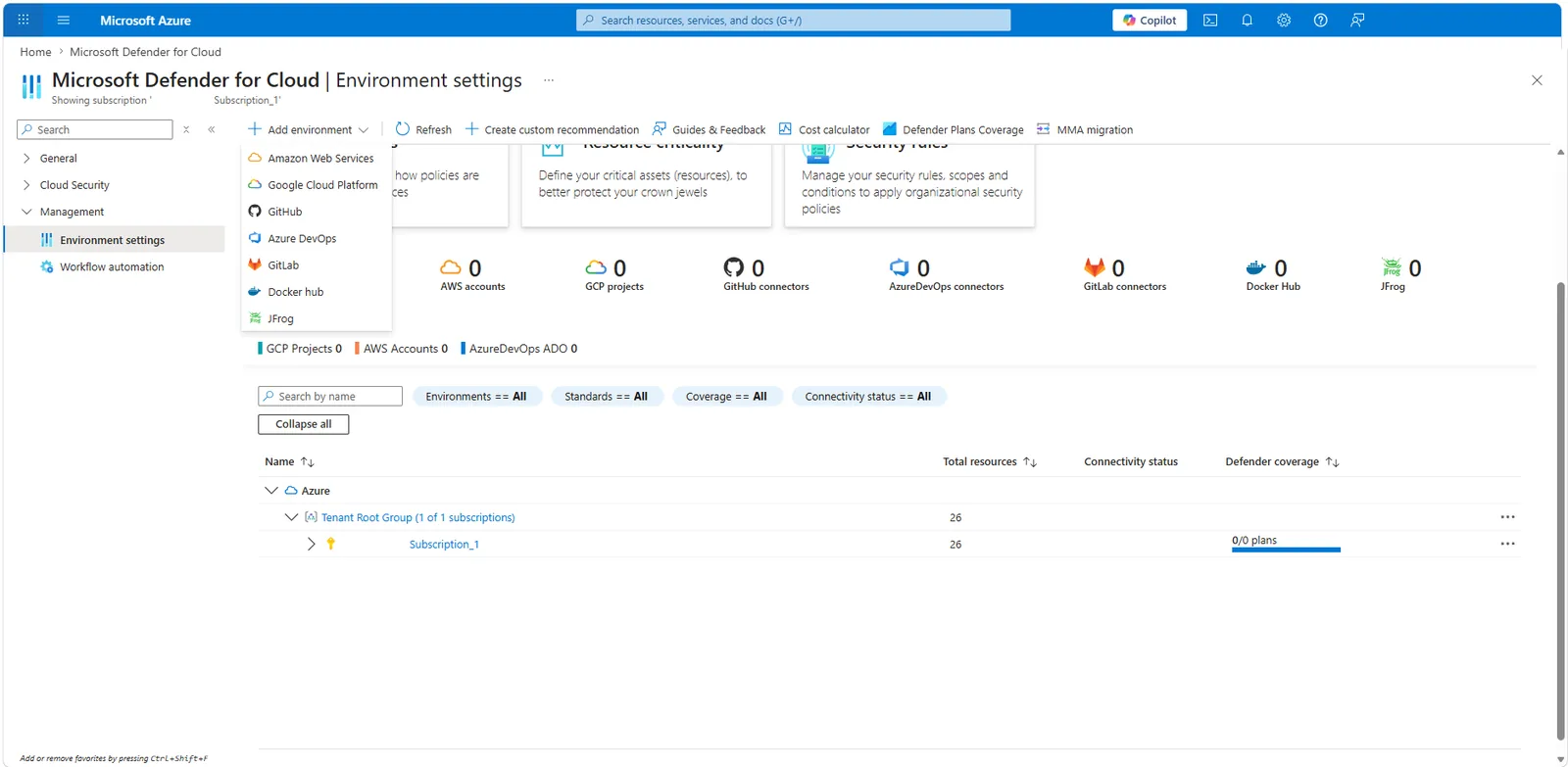
📷 Εικόνα 4: Τα περιβάλλοντα multicloud στο Microsoft Defender for Cloud.
Πώς φτάνουν όλα αυτά στο ενιαίο Microsoft Defender portal
Μέχρι πρόσφατα, το όριο ήταν σκληρό. Το Microsoft Defender for Cloud ζούσε στο Azure και το Microsoft Defender XDR στο Microsoft 365. Οι ομάδες SOC άλλαζαν συνεχώς κονσόλα, και αυτή ακριβώς η τριβή οδηγεί σε incidents που χάνονται.
Αυτό αλλάζει, και είναι από τις σημαντικότερες βελτιώσεις του Microsoft Security των τελευταίων ετών.
Η Microsoft έχει ενσωματώσει τα σήματα του Microsoft Defender for Cloud κατευθείαν στο ενιαίο Microsoft Defender portal στο security.microsoft.com. Τα incidents του cloud εμφανίζονται πλέον στην ίδια ουρά με τα incidents του Microsoft 365, συσχετίζονται με τα σήματα ταυτότητας και email, και βρίσκονται στην ίδια ενιαία εμπειρία SecOps.
Στην πράξη, μια επίθεση που ξεκινά με ένα phishing email (Microsoft Defender for Office 365), περνά από ένα παραβιασμένο laptop (Microsoft Defender for Endpoint) και μετά στοχεύει ένα VM στο Azure (Microsoft Defender for Servers στο Microsoft Defender for Cloud) είναι πλέον ένα incident. Όχι ασύνδετα alerts από δύο προϊόντα σε διαφορετικές κονσόλες. Μία ιστορία, ένα χρονολόγιο, μία ροή απόκρισης.
Το όραμα του CNAPP για το οποίο μιλά η Microsoft εδώ και χρόνια γίνεται επιτέλους μία λειτουργική εμπειρία. Πήρε καιρό, αλλά είναι εδώ. Η ρύθμιση των πλάνων γίνεται ακόμη στο Azure portal.
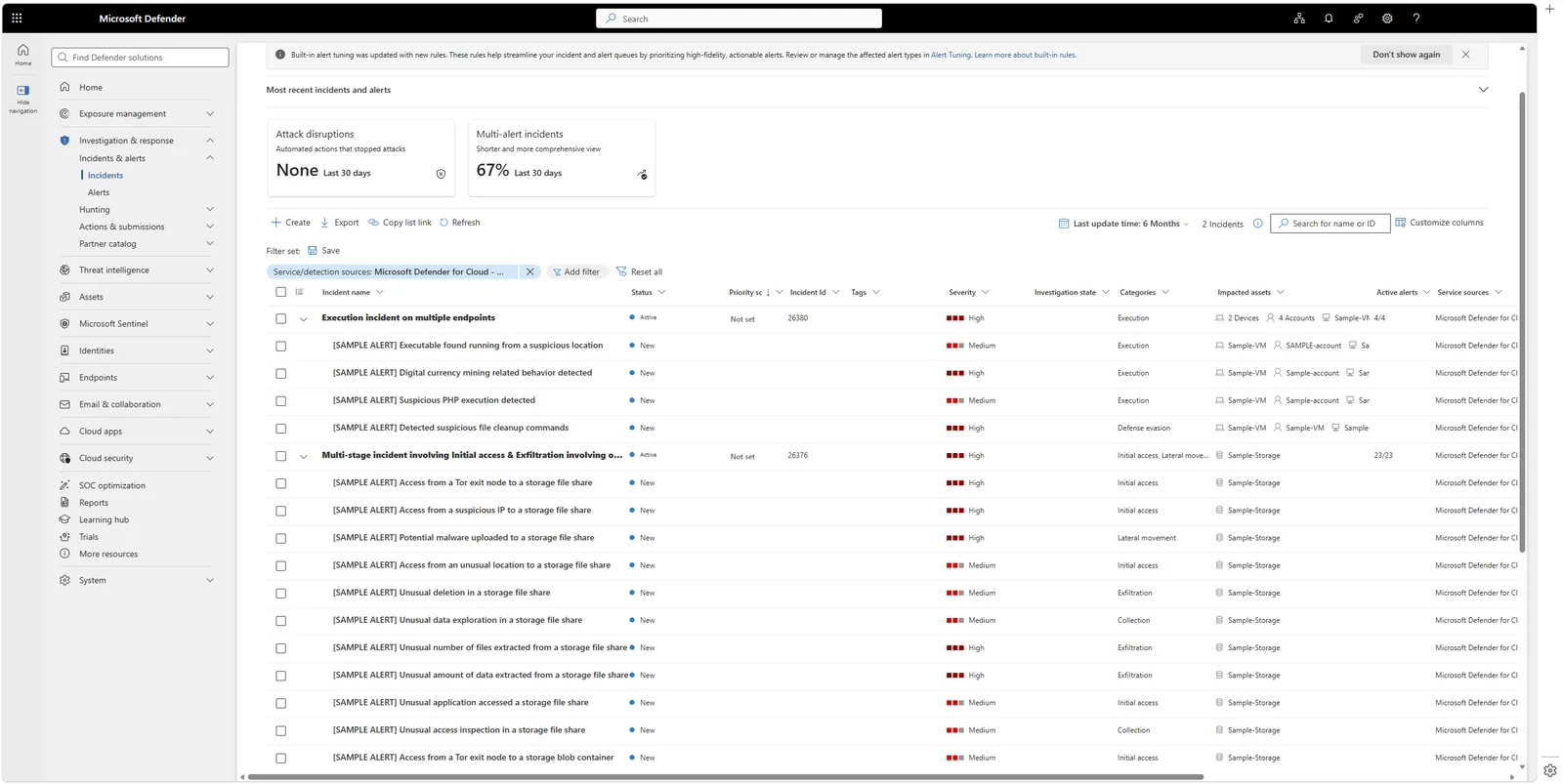
📷 Εικόνα 5: Ένα incident του Defender for Cloud μέσα στο ενιαίο Defender portal.
Χρειάζομαι το Microsoft Defender for Cloud; Μια γρήγορη λίστα
- Έχεις έστω και ένα Azure subscription; Ενεργοποίησε σήμερα το Foundational CSPM. Είναι δωρεάν.
- Έχεις workloads παραγωγής σε Azure, AWS ή GCP; Αξιολόγησε τα σχετικά πλάνα CWPP.
- Έχεις υποχρεώσεις ISO 27001 ή ΚΥΑ 1689/2025 που καλύπτουν cloud workloads; Ως ελάχιστο θέλεις μάλλον Foundational CSPM, Microsoft Defender for Servers και Microsoft Defender for Storage.
- Θέλεις μία εικόνα για όλα τα clouds; Είναι από τα λίγα προϊόντα που το προσφέρουν πραγματικά από άκρη σε άκρη.
- Δεν έχεις καθόλου cloud και είσαι εντελώς on-premises; Δεν το χρειάζεσαι τώρα. Εστίασε στο Microsoft Defender XDR για endpoints, email, ταυτότητες και SaaS.
Στη συμμόρφωση, το Defender for Cloud υποστηρίζει κυρίως την ασφαλή παραμετροποίηση του άρθρου 14 και τη διαχείριση ευπαθειών του άρθρου 17 της ΚΥΑ 1689/2025. Στο ISO/IEC 27001 αντιστοιχεί στα controls A.5.23 (Information security for use of cloud services), A.8.8 (Management of technical vulnerabilities) και A.8.9 (Configuration management).
Οι συγκεκριμένες αποφάσεις αδειοδότησης (ποιο πλάνο, για ποιον πόρο, με ποιον προϋπολογισμό) είναι αυτό που εξετάζουμε στο Μέρος 4.
Τι ακολουθεί
Στο Μέρος 4 απαντάμε στην ερώτηση με την οποία έρχονται οι περισσότεροι αναγνώστες: «Ποιο Microsoft Defender χρειάζομαι, και ποιο πλάνο να αγοράσω;» Ένας πρακτικός οδηγός με τρία πραγματικά σενάρια.
🔗 Θέλεις να δεις τη συνεχή αξιολόγηση και στο Microsoft 365; Η λογική του Microsoft Cloud Security Benchmark, δηλαδή συνεχής αξιολόγηση απέναντι σε έναν κατάλογο controls που συντηρείται, μπορεί να γίνει ολόκληρο πρόγραμμα GRC. Δες τη σειρά Microsoft Secure Score ως εργαλείο GRC για ISO 27001 & NIS2.
Ακολούθησέ με στο LinkedIn για ειδοποιήσεις νέων άρθρων, ή γράψου στο RSS στην κορυφή της σελίδας.
Συχνές ερωτήσεις
Είναι δωρεάν το Microsoft Defender for Cloud; Εν μέρει. Το Foundational CSPM (απογραφή πόρων, security recommendations, Secure Score και αξιολόγηση με βάση το Microsoft Cloud Security Benchmark) είναι δωρεάν σε κάθε subscription που συνδέεις. Το Defender CSPM και όλα τα workload protection plans είναι επί πληρωμή, με χρέωση ανά πόρο μέσω της κατανάλωσης στο Azure.
Περιλαμβάνεται το Microsoft Defender for Cloud στο Microsoft 365 E5; Όχι. Το Microsoft 365 E5 περιλαμβάνει τα workloads του Defender XDR (Endpoint, Office 365, Identity, Cloud Apps), με άδεια ανά χρήστη. Το Microsoft Defender for Cloud χρεώνεται ανά πόρο μέσω του Azure subscription και είναι ξεχωριστή αγορά.
Δουλεύει το Microsoft Defender for Cloud με AWS και GCP; Ναι. Οι native connectors συνδέουν AWS accounts και GCP projects σε λίγα λεπτά, και τόσο τα επίπεδα CSPM όσο και τα κύρια workload protection plans επεκτείνονται πέρα από το Azure: το Servers και το Containers σε AWS και GCP, το open-source relational databases μόνο σε AWS.
Ποια η διαφορά ανάμεσα στο Defender for Cloud και στο Defender XDR; Το Defender XDR προστατεύει ό,τι αγγίζουν οι χρήστες (συσκευές, email, ταυτότητες, εφαρμογές SaaS), ζει στο security.microsoft.com και αδειοδοτείται ανά χρήστη. Το Defender for Cloud προστατεύει υποδομή (VMs, containers, βάσεις δεδομένων, storage, υπηρεσίες AI), ρυθμίζεται από το Azure portal και χρεώνεται ανά πόρο, αλλά τα incidents του εμφανίζονται πλέον και στο ενιαίο Defender portal.
Πηγές και επαλήθευση
Επιπλέον πηγές: