
Συνεχίζοντας από το Μέρος 1
Στο Μέρος 1 είπα ότι το Microsoft Defender XDR είναι ο μαέστρος μιας ορχήστρας και τα επιμέρους προϊόντα ασφάλειας της Microsoft είναι τα όργανα. Είναι μια βολική μεταφορά, αλλά ήρθε η ώρα να γνωρίσουμε τα όργανα.
Στον πυρήνα του Microsoft Defender XDR υπάρχουν τέσσερα. Το καθένα πωλείται χωριστά, έχει τη δική του ομάδα ανάπτυξης στη Microsoft, τη δική του ενότητα στο portal, και θα μπορούσε να προστατεύει ένα tenant μόνο του. Αυτό που τα κάνει XDR (Extended Detection and Response) είναι ό,τι συμβαίνει όταν αρχίζουν να μοιράζονται σήματα. Θα φτάσουμε εκεί στο τέλος.
Πρώτα, ας γνωρίσουμε το καθένα.
Microsoft Defender for Endpoint: EDR και παρακολούθηση συμπεριφοράς
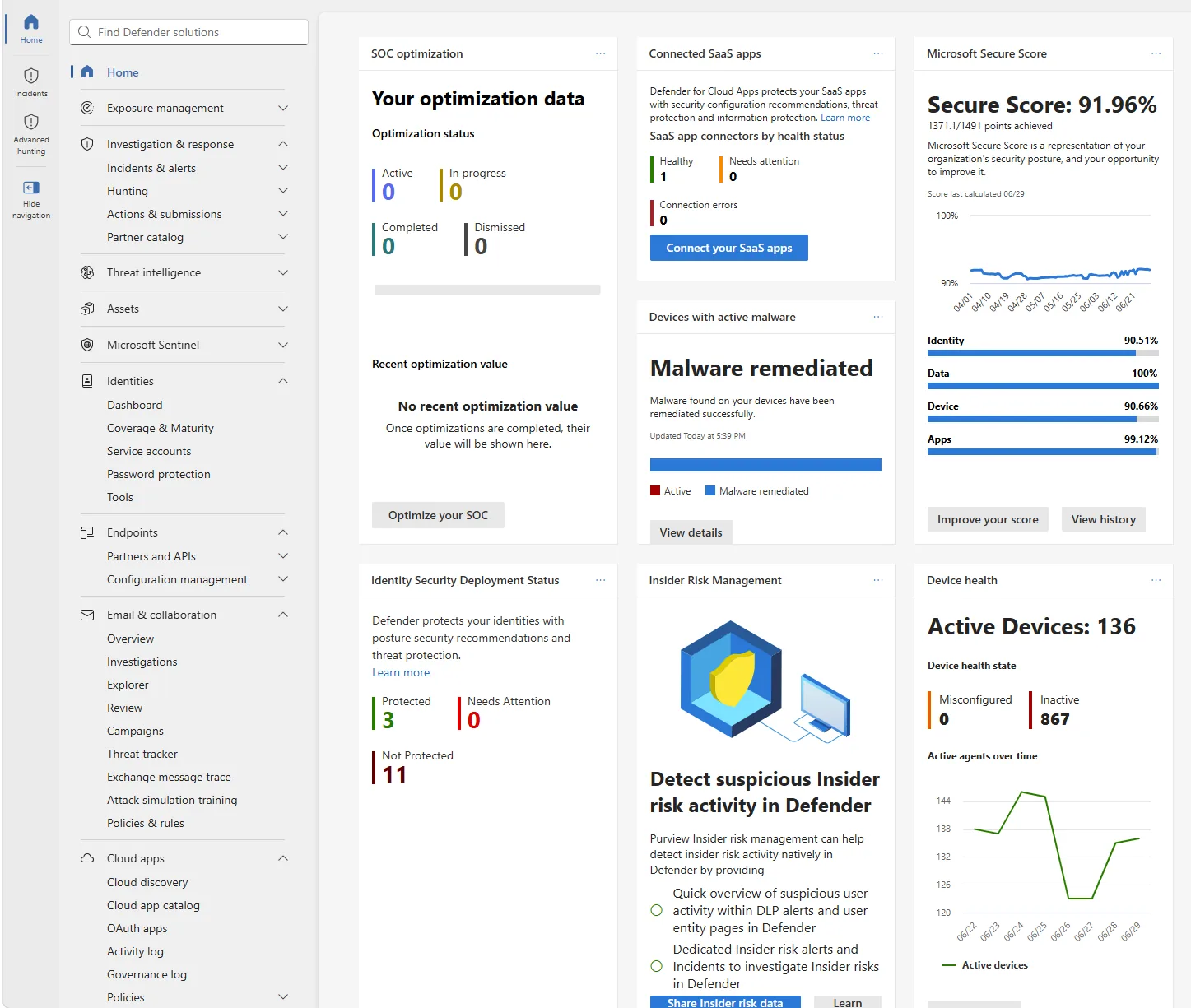
📷 Εικόνα 1: Το ενιαίο Microsoft Defender portal στο security.microsoft.com, μία κονσόλα για τα τέσσερα workloads του XDR.
Το Microsoft Defender for Endpoint είναι μάλλον αυτό που έχεις ήδη ακούσει. Προστατεύει τις συσκευές: Windows 10 και 11, Windows Server, macOS, Linux, iOS, Android. Αν κάποιος δουλεύει πάνω σε μια συσκευή, το Microsoft Defender for Endpoint την παρακολουθεί.
Τι σημαίνει «παρακολουθεί» το 2026; Αρκετά πράγματα:
- Next-generation antivirus που πιάνει ό,τι ξεφεύγει από τα παραδοσιακά antivirus με signatures.
- EDR (Endpoint Detection and Response), δηλαδή συνεχής παρακολούθηση της συμπεριφοράς, που εντοπίζει μια επίθεση ενώ εξελίσσεται και όχι μόνο ένα γνωστό κακόβουλο αρχείο.
- Κανόνες Attack Surface Reduction που κλείνουν τους δρόμους που χρησιμοποιούν οι επιτιθέμενοι (κακόβουλα macros, κλοπή credentials, ύποπτα scripts).
- Automated Investigation and Remediation, που κάνει τα πρώτα 15 λεπτά του triage ενώ οι αναλυτές σου διαβάζουν ακόμη το alert.
- Μέρος του Microsoft Defender Vulnerability Management (στο Plan 2).
Ένα συγκεκριμένο παράδειγμα. Κάποιος στο λογιστήριο ανοίγει ένα τιμολόγιο που αποδεικνύεται dropper για ransomware. Μέσα σε δευτερόλεπτα, το Microsoft Defender for Endpoint αναγνωρίζει την ύποπτη συμπεριφορά, απομονώνει τη συσκευή από το δίκτυο για να μην εξαπλωθεί η μόλυνση, και σταματά την κακόβουλη διεργασία. Ανοίγει αυτόματα μια διερεύνηση που ακολουθεί τα ίχνη προς τα πίσω (πώς έφτασε αυτό στη συσκευή;) και συχνά βρίσκει ότι το αρχικό email υπάρχει ακόμη σε άλλα inbox, οπότε η πλατφόρμα μπορεί να το βάλει σε καραντίνα.
Πρόσεξε τη φράση «το αρχικό email». Αυτό το Microsoft Defender for Endpoint δεν το βλέπει μόνο του. Το σήμα ήρθε από αλλού. Κράτα το στο μυαλό σου.
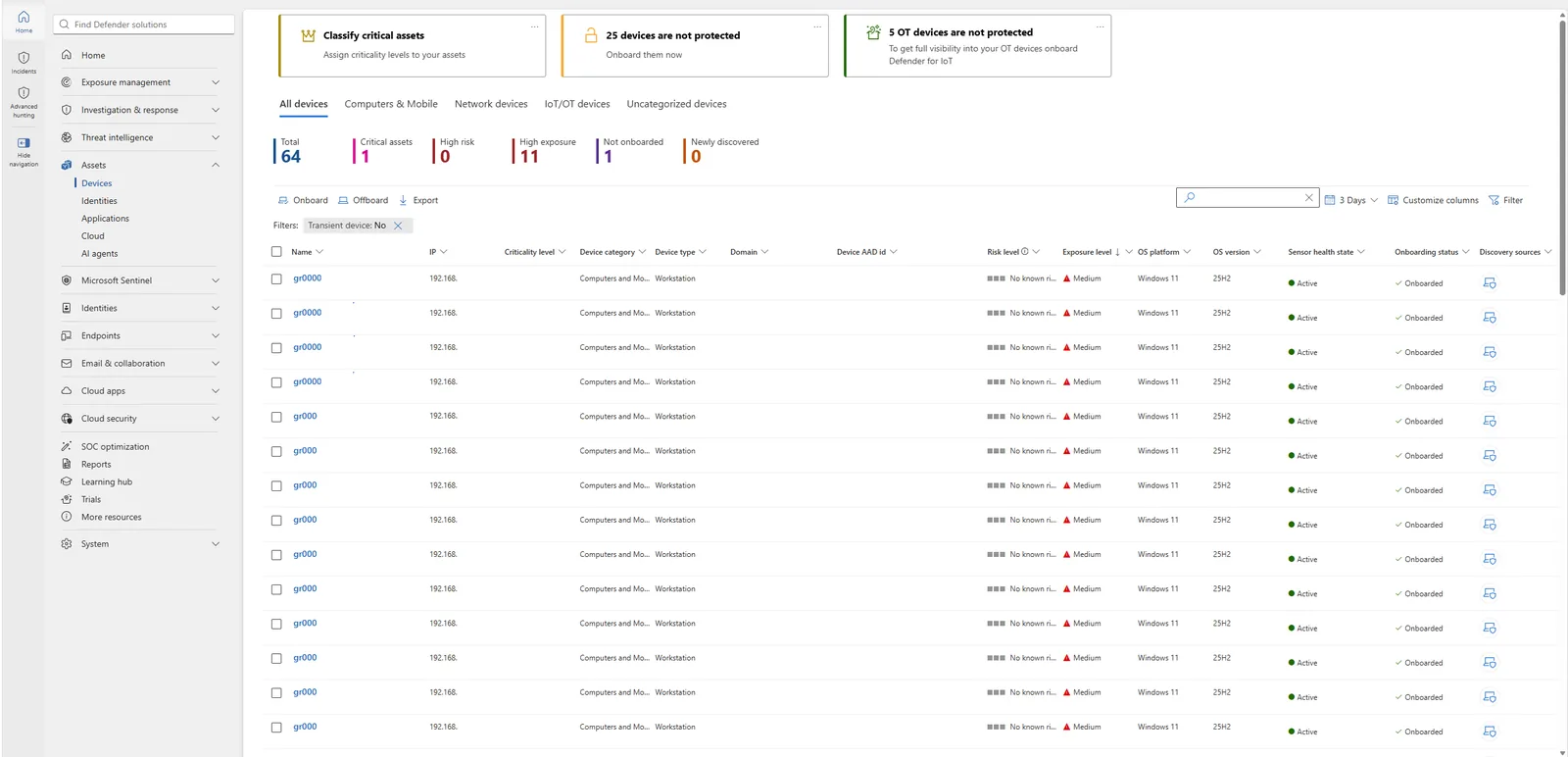
📷 Εικόνα 2: Το device inventory (Assets, Devices) με βαθμολογία κινδύνου και έκθεσης ανά συσκευή.
📖 Αναλυτικά: Microsoft Defender for Endpoint: Τι είναι, τι κάνει και πώς να το αναπτύξετε στην πράξη.
Microsoft Defender for Office 365: Safe Links, Safe Attachments και anti-phishing
Το Microsoft Defender for Office 365 προστατεύει τα εργαλεία στα οποία ζουν οι περισσότεροι εργαζόμενοι: email, Microsoft Teams, SharePoint Online και OneDrive for Business. Εδώ ξεκινά συνήθως η σύγχρονη επίθεση. Αν ρωτήσεις οποιονδήποτε επικεφαλής SOC από πού έρχονται τα alerts του, το email θα είναι στις τρεις πρώτες θέσεις σχεδόν πάντα.
Μερικά από όσα κάνει το Microsoft Defender for Office 365 και αξίζει να ξέρεις:
- Safe Links: ελέγχει κάθε URL των εισερχόμενων email τη στιγμή του κλικ και όχι μόνο κατά την παράδοση. Αυτό μετράει, γιατί οι επιτιθέμενοι ξέρουν ότι υπάρχει έλεγχος κατά την παράδοση. Στέλνουν links που τη Δευτέρα οδηγούν σε μια αθώα σελίδα και την Τετάρτη γίνονται σελίδα κλοπής credentials.
- Safe Attachments: ανοίγει τα συνημμένα σε sandbox πριν τα δώσει στον χρήστη. Αν κάποιος σου προωθήσει μια «τριμηνιαία αναφορά» που τρέχει PowerShell μόλις ανοίξει, το sandbox το καταλαβαίνει πρώτο.
- Πολιτικές anti-phishing με προστασία από impersonation. Αυτές πιάνουν το email «Καλημέρα, είμαι ο CEO, χρειάζομαι να αγοράσεις gift cards για τη συνάντηση με τον πελάτη», ακόμη κι όταν έρχεται από domain που μοιάζει αξιόπιστο.
- Attack simulation training: σου επιτρέπει να τρέχεις ρεαλιστικές προσομοιώσεις phishing στους δικούς σου χρήστες για εκπαίδευση. Είναι χρήσιμο, και μερικές φορές σε προσγειώνει.
Ένα συγκεκριμένο παράδειγμα. Ένα spear-phishing email που υποδύεται τον CEO φτάνει στο inbox του οικονομικού διευθυντή με ένα ψεύτικο τιμολόγιο συνημμένο. Το Microsoft Defender for Office 365 αναγνωρίζει το μοτίβο impersonation, ανοίγει το συνημμένο σε sandbox, βρίσκει ότι είναι εργαλείο κλοπής credentials και αφαιρεί το email από κάθε inbox πριν το ανοίξει κανείς. Αν είχε ήδη γίνει κλικ, εκεί η παράδοση του σήματος στο Microsoft Defender for Endpoint γίνεται πολύτιμη.
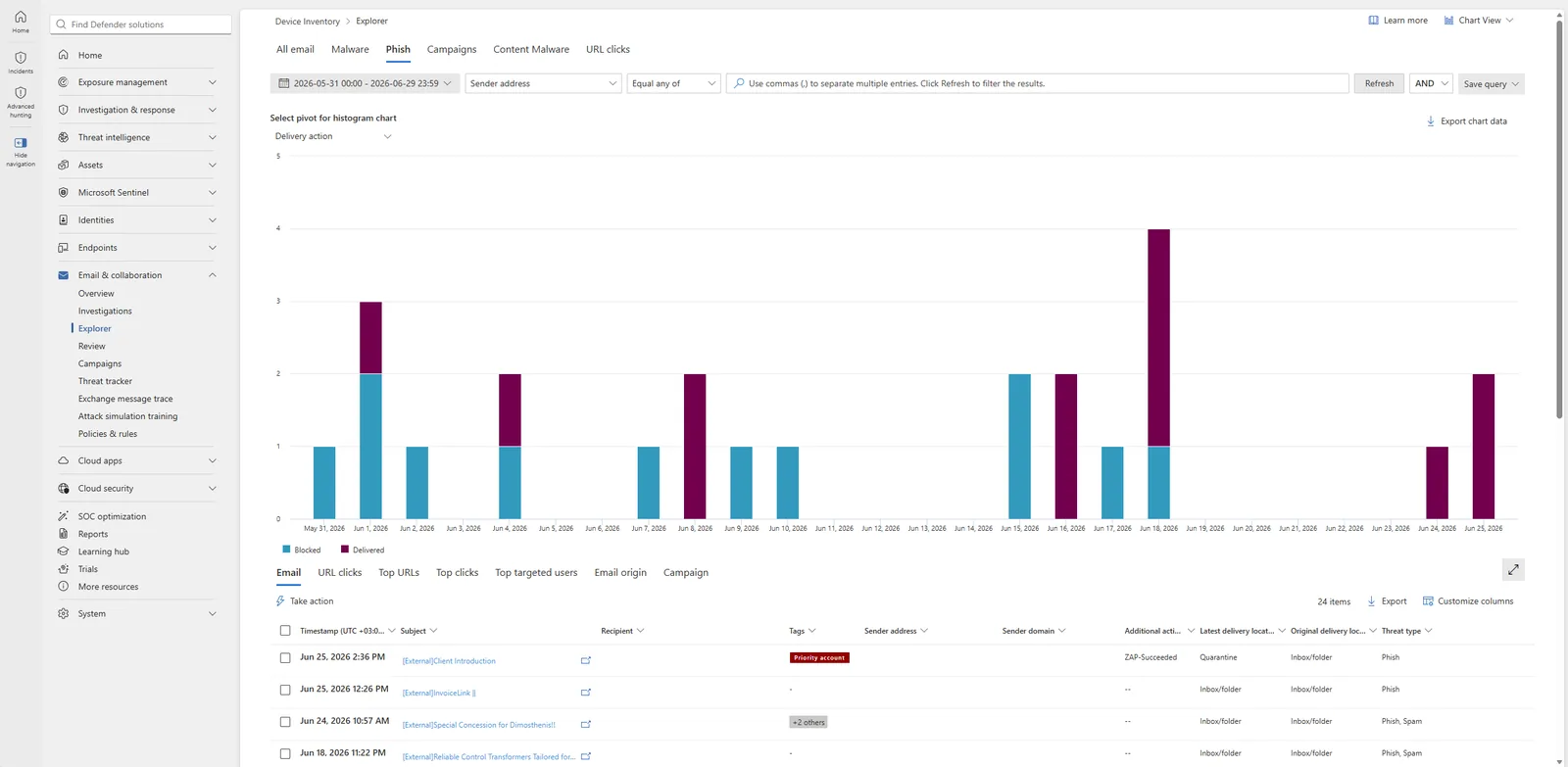
📷 Εικόνα 3: Το Threat Explorer (Email & collaboration, Explorer), εντοπισμοί phishing στον χρόνο, μπλοκαρισμένα και παραδομένα.
📖 Αναλυτικά: Microsoft Defender for Office 365: Από τις preset policies στην προχωρημένη παραμετροποίηση.
Microsoft Defender for Identity: ανίχνευση lateral movement και pass-the-hash
Αυτό είναι το workload που βρίσκω πιο ενδιαφέρον, γιατί πιάνει κάτι που τα άλλα δύο δεν μπορούν: τι κάνει ένας επιτιθέμενος αφού έχει ήδη έγκυρα credentials.
Το Microsoft Defender for Identity παρακολουθεί το on-premises Active Directory και τις υβριδικές ταυτότητες που συγχρονίζεις στο Microsoft Entra ID. Για επιθέσεις σε ταυτότητες που υπάρχουν μόνο στο cloud, υπεύθυνο είναι το Microsoft Entra ID Protection, ξεχωριστό προϊόν. Ελαφριοί sensors εγκατεστημένοι στους domain controllers και, όπου υπάρχουν, στους servers AD FS, AD CS και Microsoft Entra Connect, στέλνουν telemetry στο Microsoft Defender portal. Εκεί η πλατφόρμα ψάχνει πράγματα που δεν φαίνονται ασυνήθιστα σε κανένα log μόνο του, αλλά είναι πολύ ασυνήθιστα όταν τα δεις στο σύνολό τους.
Τι πράγματα;
- Επιθέσεις pass-the-hash και pass-the-ticket.
- Kerberoasting και AS-REP roasting.
- Πλαστά golden tickets και silver tickets.
- LDAP reconnaissance από λογαριασμούς που δεν έχουν λόγο να απαριθμούν τον κατάλογο.
- Κλιμάκωση δικαιωμάτων μέσω αλλαγών σε ευαίσθητες ομάδες.
- Διαδρομές lateral movement με παραβιασμένους λογαριασμούς.
Ένα σενάριο για να γίνει πιο απτό. Ένας επιτιθέμενος έχει παραβιάσει έναν σταθμό εργασίας και θέλει να κινηθεί πλευρικά. Τρέχει ένα εργαλείο που εξάγει NTLM hashes από τη μνήμη και προσπαθεί να χρησιμοποιήσει ένα από αυτά για να συνδεθεί σε έναν file server. Από τη σκοπιά του endpoint, τίποτα δεν φαίνεται ασυνήθιστο: ο file server απλώς είδε μια επιτυχημένη σύνδεση. Το Microsoft Defender for Identity όμως, στον domain controller, βλέπει τη μορφή της αυθεντικοποίησης και λέει στάσου, έτσι δεν συνδέεται συνήθως αυτός ο χρήστης. Το alert βγαίνει, το SOC το βλέπει μέσα σε δευτερόλεπτα, και ο περιορισμός γίνεται πριν ο επιτιθέμενος φτάσει σε κάτι προνομιακό.
Για κάθε οργανισμό με ουσιαστικό on-premises AD, δηλαδή για τη συντριπτική πλειονότητα των μεσαίων και μεγάλων επιχειρήσεων, αυτό το workload δεν είναι προαιρετικό.
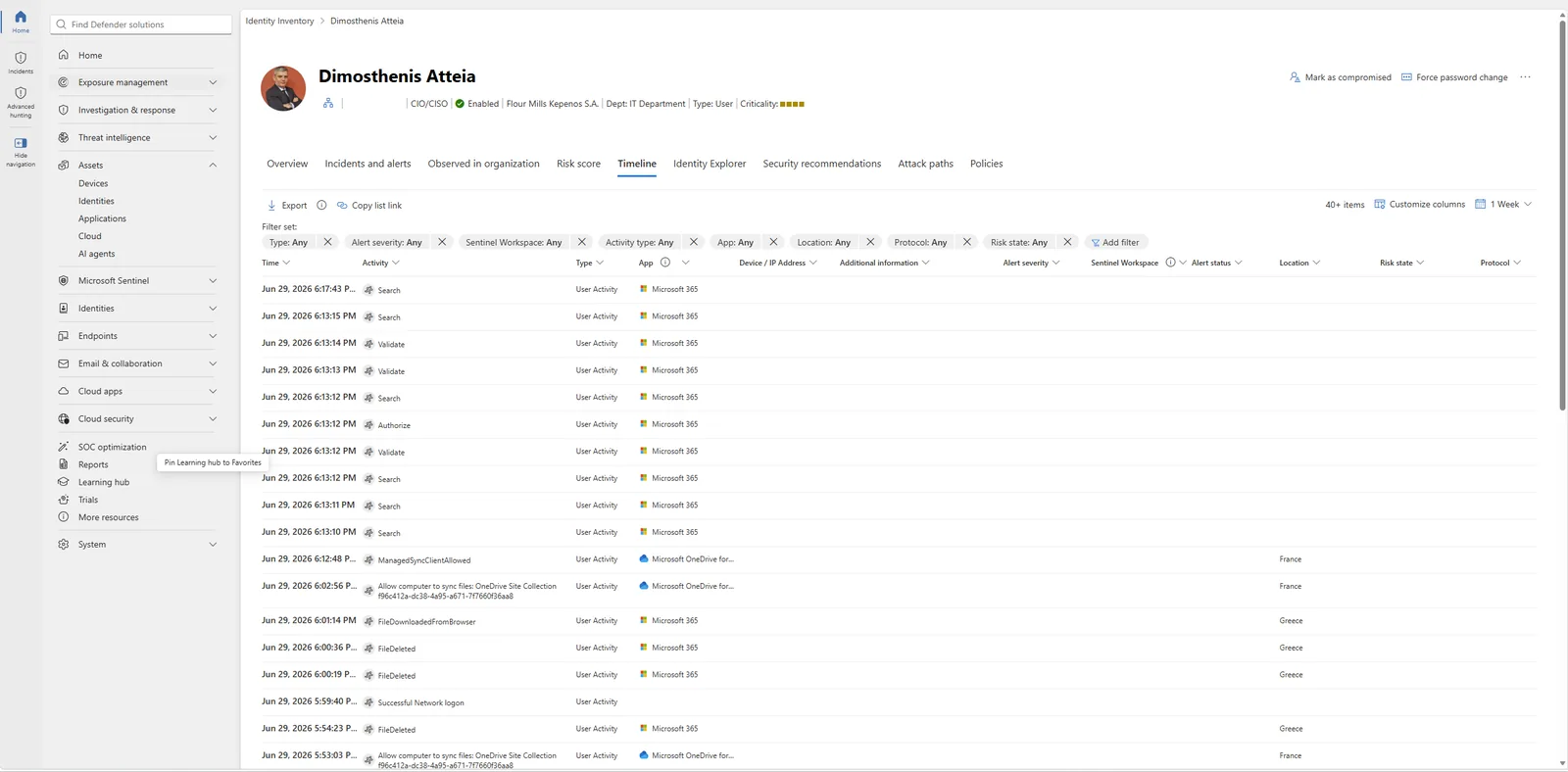
📷 Εικόνα 4: Το timeline του Defender for Identity στη σελίδα μιας ταυτότητας (Assets, Identities, χρήστης, Timeline).
Microsoft Defender for Cloud Apps: εντοπισμός shadow IT και έλεγχοι CASB
Το Microsoft Defender for Cloud Apps είναι ένα CASB (Cloud Access Security Broker). Δηλαδή κάθεται ανάμεσα στους χρήστες και στις εφαρμογές SaaS που χρησιμοποιούν, και σου δίνει ορατότητα, διακυβέρνηση και προστασία από απειλές, τόσο σε υπηρεσίες της Microsoft όσο και τρίτων.
Γιατί είναι ξεχωριστό προϊόν; Γιατί άλλαξε ο τρόπος που δουλεύουμε, και η ασφάλεια έπρεπε να τον προλάβει.
Τι κάνει στην καθημερινότητα:
- Εντοπισμός shadow IT: βρίσκει τις εφαρμογές SaaS που χρησιμοποιούν ήδη οι χρήστες σου χωρίς έγκριση. Ο αριθμός είναι πάντα μεγαλύτερος απ’ όσο νομίζεις. Έχω δει tenants όπου το IT πίστευε ότι τρέχουν 40 εφαρμογές και η πραγματικότητα ήταν πάνω από 200.
- App governance: δείχνει τις επικίνδυνες εφαρμογές OAuth στις οποίες έχουν δώσει συγκατάθεση οι χρήστες. Είναι από τους πιο υποτιμημένους δρόμους επίθεσης των τελευταίων ετών.
- Conditional Access App Control: εφαρμόζει πολιτικές σε πραγματικό χρόνο σε επικίνδυνα sessions. Για παράδειγμα: «μπορείς να διαβάσεις αυτό το έγγραφο στον browser, αλλά δεν μπορείς να το κατεβάσεις σε μη διαχειριζόμενη συσκευή».
- Επέκταση της προστασίας πληροφοριών: παίρνει τις πολιτικές του Microsoft Purview και τις εφαρμόζει σε εφαρμογές SaaS τρίτων, όπως Salesforce ή Box.
- Ανίχνευση ασυνήθιστης συμπεριφοράς χρηστών: συνδέσεις από αδύνατες αποστάσεις (impossible travel), μαζικά downloads, ασυνήθιστες ενέργειες διαχειριστών.
Το παράδειγμα που μου αρέσει εδώ: ένας χρήστης πέφτει θύμα phishing και δίνει συγκατάθεση OAuth σε μια κακόβουλη εφαρμογή που ζητά ευρεία πρόσβαση στο mailbox. Ο επιτιθέμενος δεν έκλεψε ποτέ τον κωδικό, αλλά τώρα διαβάζει κάθε email που λαμβάνει ο χρήστης. Το Microsoft Defender for Cloud Apps επισημαίνει τη συγκατάθεση, αναγνωρίζει την εφαρμογή ως κακόβουλη μέσω του threat intelligence της Microsoft, ανακαλεί τη συγκατάθεση και ειδοποιεί το SOC. Ο επιτιθέμενος μένει έξω μέσα σε λεπτά και όχι σε μέρες.
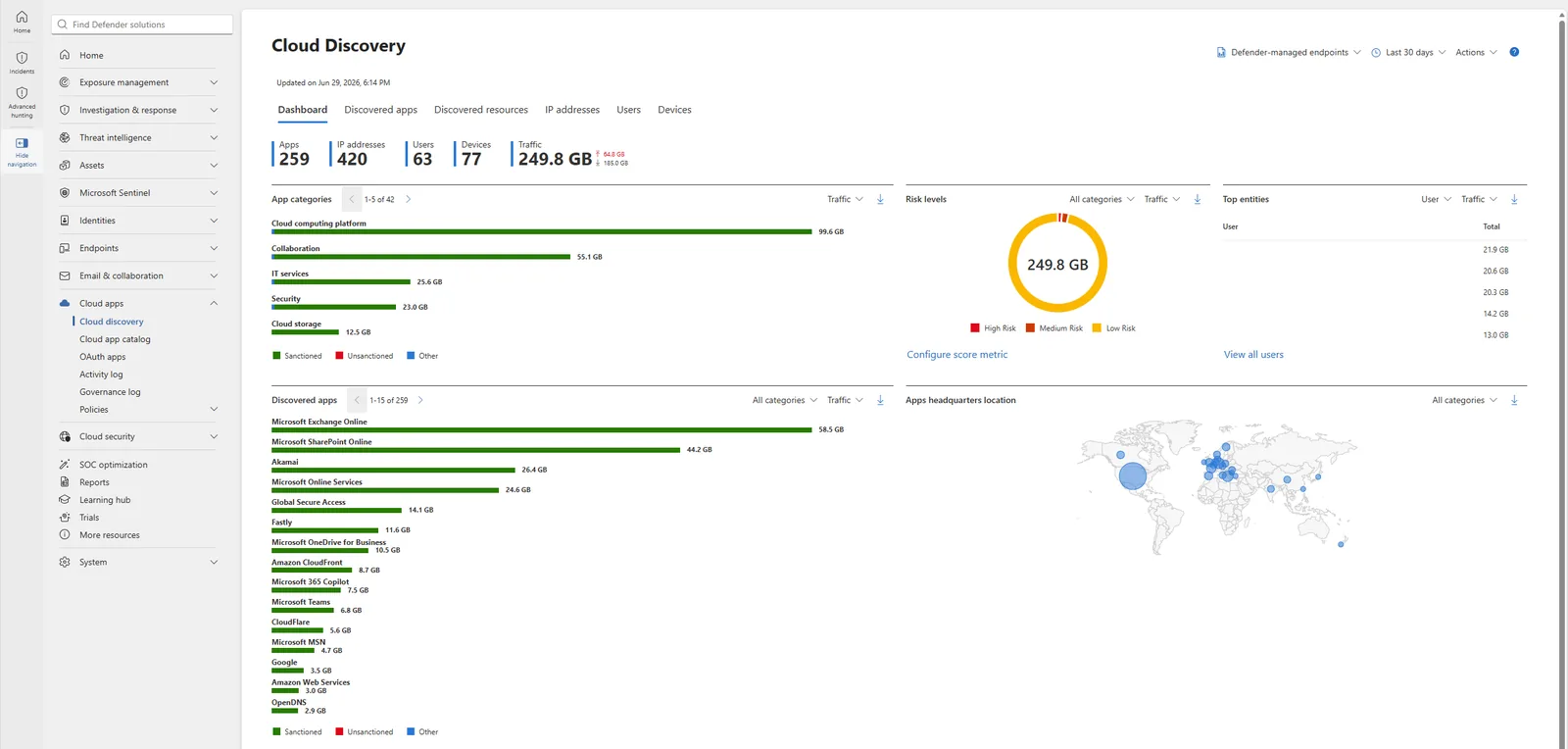
📷 Εικόνα 5: Το Cloud Discovery dashboard (Cloud apps, Cloud discovery), 259 εφαρμογές που εντοπίστηκαν, το κλασικό κενό του shadow IT.
Πώς συσχετίζει το Microsoft Defender XDR τα σήματα: ένα πραγματικό παράδειγμα επίθεσης σε πολλά στάδια
Όλα τα παραπάνω ήταν τέσσερα προϊόντα που κάνουν τέσσερις διαφορετικές δουλειές. Αυτό είναι χρήσιμο. Δεν είναι όμως ακόμη XDR.
Το XDR (Extended Detection and Response) είναι αυτό που συμβαίνει όταν τα τέσσερα προϊόντα μοιράζονται σήματα σε πραγματικό χρόνο, και μια επίθεση που αγγίζει πολλά σημεία γίνεται ένα incident με μία ιστορία επίθεσης.
Ας δούμε πώς φαίνεται αυτό στην πράξη, γιατί αυτό είναι το κομμάτι που δικαιολογεί όλη την επένδυση.
Φαντάσου μια αρκετά συνηθισμένη επίθεση σε πολλά στάδια:
- Ένα spear-phishing email φτάνει στο inbox ενός οικονομικού διευθυντή. Το Microsoft Defender for Office 365 επισημαίνει ύποπτες ενδείξεις, αλλά ο χρήστης, άνθρωπος όπως όλοι, κάνει κλικ.
- Το link κατεβάζει κάτι κακόβουλο στο laptop. Το Microsoft Defender for Endpoint πιάνει το dropper την ώρα που τρέχει, αλλά όχι πριν προλάβει να τρέξει στη μνήμη ένα εργαλείο κλοπής credentials.
- Τα κλεμμένα credentials χρησιμοποιούνται για σύνδεση στο Active Directory από ασυνήθιστη τοποθεσία. Το Microsoft Defender for Identity επισημαίνει το ασυνήθιστο μοτίβο σύνδεσης.
- Ο παραβιασμένος λογαριασμός αρχίζει να κατεβάζει μαζικά αρχεία από το SharePoint Online και από μια συνδεδεμένη εφαρμογή SaaS τρίτου. Το Microsoft Defender for Cloud Apps εντοπίζει την ασυνήθιστη δραστηριότητα.
Σε έναν κόσμο χωρίς XDR, το SOC σου βλέπει τέσσερα ξεχωριστά alerts σε τέσσερις κονσόλες, χωρίς προφανή σύνδεση μεταξύ τους. Πιθανότατα κλείνει τουλάχιστον τα τρία πρώτα ως θόρυβο χαμηλής βεβαιότητας, γιατί κανένα δεν μοιάζει μόνο του με ολοκληρωμένη επίθεση.
Στο Microsoft Defender XDR, τα τέσσερα alerts γίνονται ένα incident, με μία ιστορία επίθεσης, πλήρες χρονολόγιο, τα assets που επηρεάστηκαν και προτεινόμενες ενέργειες απόκρισης. Η πλατφόρμα μπορεί επίσης να διακόψει αυτόματα την επίθεση (automatic attack disruption): απενεργοποιεί τον παραβιασμένο λογαριασμό και απομονώνει τη συσκευή, ενώ η αυτοματοποιημένη διερεύνηση του Defender for Office 365 αφαιρεί τα σχετικά email από κάθε inbox, χωρίς να χρειαστεί κάποιος αναλυτής να ενώσει τα κομμάτια με το χέρι.
Γι’ αυτό πληρώνεις όταν επενδύεις στο Microsoft Defender XDR. Είναι και ο λόγος που η ανάπτυξη ενός μόνο workload, π.χ. μόνο του Microsoft Defender for Endpoint, που είναι συνηθισμένη αφετηρία, σου δίνει μικρό μέρος της αξίας της πλατφόρμας. Η συσχέτιση ανάμεσα στα προϊόντα είναι το ίδιο το προϊόν.
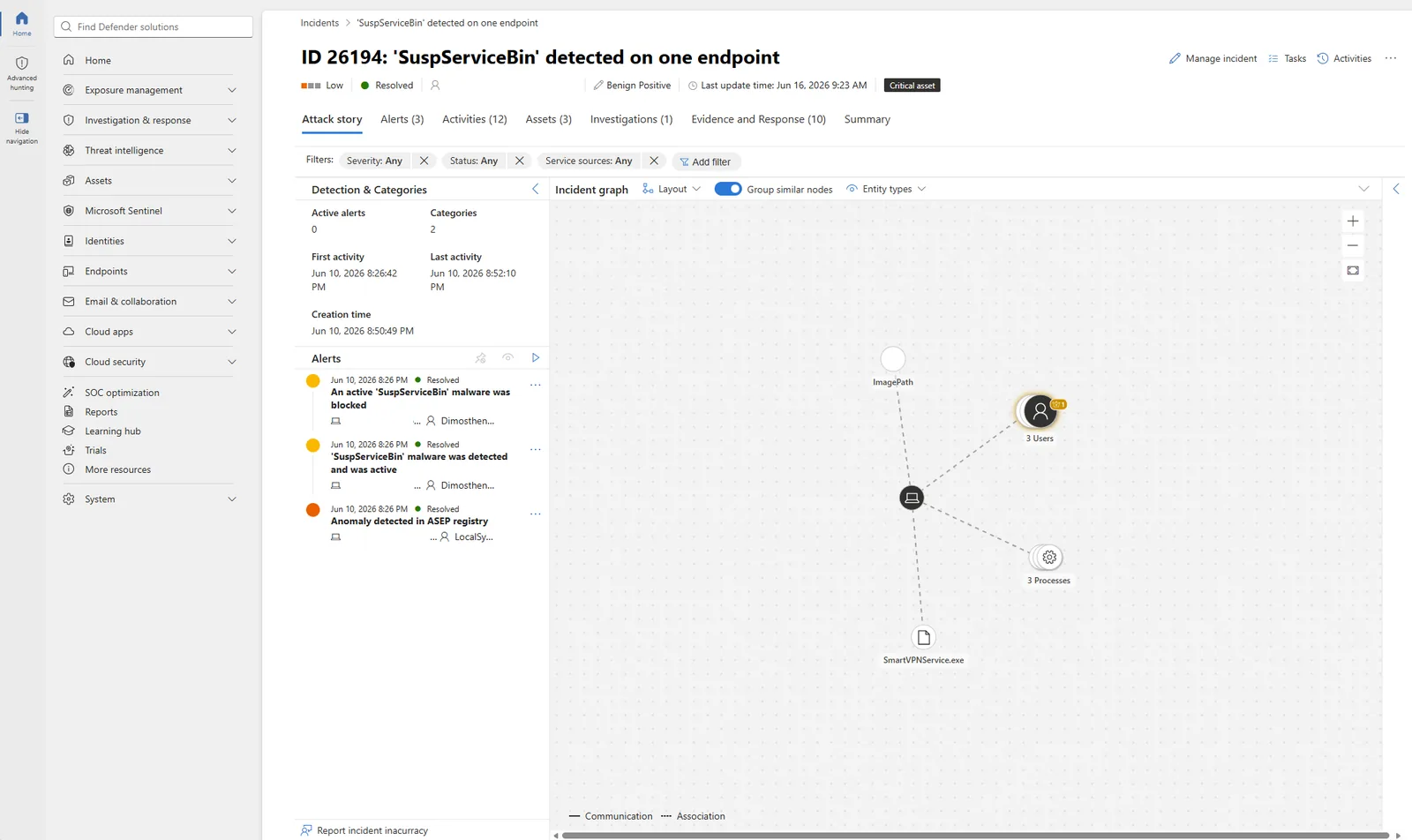
📷 Εικόνα 6: Η ιστορία επίθεσης ενός incident (Incidents, incident, Attack story) με το γράφημα συσχέτισης.
Πού συναντάς αυτά τα workloads στη συμμόρφωση
Αν ο οργανισμός σου είναι βασική ή σημαντική οντότητα, τα τέσσερα workloads υποστηρίζουν συγκεκριμένες απαιτήσεις του οδηγού της ΚΥΑ 1689/2025. Το Defender for Endpoint την ανίχνευση κακόβουλου λογισμικού (20.α). Το Defender for Office 365 το φιλτράρισμα των email (20.γ). Το Defender for Identity την καταγραφή δραστηριοτήτων για προνομιούχους λογαριασμούς (24.γ). Και το Defender XDR συνολικά τον τακτικό έλεγχο των καταγραφών και την ειδοποίηση (24.ε). Στο ISO/IEC 27001, τα αντίστοιχα controls είναι τα A.8.7 (Protection against malware), A.8.16 (Monitoring activities) και A.5.24 έως A.5.26 για τα περιστατικά.
Τι ακολουθεί
Στο Μέρος 3 αφήνουμε εντελώς τον κόσμο του Microsoft 365 και εξετάζουμε το Microsoft Defender for Cloud, το ξεχωριστό προϊόν που προστατεύει workloads στο Azure και σε άλλα clouds. Άλλη αδειοδότηση, άλλο κοινό, και ρύθμιση στο Azure portal.
🔗 Θέλεις να δεις τι μπορείς να χτίσεις πάνω σε αυτό; Το Microsoft Secure Score ζει στο ίδιο Microsoft Defender portal που γνωρίσαμε εδώ. Η σειρά Microsoft Secure Score ως εργαλείο GRC για ISO 27001 & NIS2 δείχνει πώς έγινε η μηχανή ενός προγράμματος συμμόρφωσης που βραβεύτηκε.
🔗 Θέλεις να ψάξεις μόνος σου στα δεδομένα; Η Βιβλιοθήκη KQL έχει έτοιμα Advanced Hunting queries για το Defender XDR, αντιστοιχισμένα σε απαιτήσεις και δοκιμασμένα σε πραγματικό tenant.
Ακολούθησέ με στο LinkedIn για ειδοποιήσεις νέων άρθρων, ή γράψου στο RSS στην κορυφή της σελίδας.
Ερωτήσεις που κάνουν συχνά οι ομάδες ασφάλειας
«Ποιο workload του Microsoft Defender να εγκαταστήσουμε πρώτο;»
Ξεκίνα με το Defender for Endpoint (προστασία συσκευών) και το Defender for Office 365 Plan 2 (ασφάλεια email). Αυτά τα δύο καλύπτουν τα σημεία από όπου ξεκινούν οι περισσότερες επιθέσεις. Πρόσθεσε το Identity και το Cloud Apps μόλις σταθεροποιηθεί η βασική κάλυψη.
«Ποια η διαφορά ανάμεσα στο Defender for Endpoint Plan 1 και Plan 2;»
Το Plan 1 εστιάζει στην πρόληψη: next-generation antivirus, attack surface reduction, device control, web και network protection, και χειροκίνητες ενέργειες απόκρισης, αλλά όχι EDR. Το Plan 2 προσθέτει την ίδια τη μηχανή EDR (συνεχή παρακολούθηση συμπεριφοράς με alerts και διατήρηση του telemetry), αυτοματοποιημένη διερεύνηση και αποκατάσταση, advanced hunting, Live Response και διαχείριση ευπαθειών. Οι περισσότερες επιχειρήσεις χρειάζονται το Plan 2 για ουσιαστική δουλειά SOC.
«Πόσο γρήγορα συσχετίζει το Microsoft Defender XDR ένα incident;»
Σχεδόν σε πραγματικό χρόνο. Η μηχανή συσχέτισης επεξεργάζεται τα σήματα μέσα σε δευτερόλεπτα έως λίγα λεπτά. Σε σύνθετες επιθέσεις, το incident μπορεί να εμπλουτίζεται για λίγο ακόμη, όσο η πλατφόρμα μαζεύει πλαίσιο και προσθέτει νέα alerts.
«Δουλεύει το Microsoft Defender XDR με εργαλεία ασφάλειας τρίτων;»
Ναι, μέσω του Microsoft Sentinel. Το Sentinel είναι το επίπεδο SIEM που συλλέγει logs τόσο από τα workloads του Microsoft Defender όσο και από εργαλεία τρίτων (firewalls, proxies, EDR άλλων κατασκευαστών), και δίνει ενιαίο hunting και συσχέτιση σε όλη τη στοίβα ασφάλειας.
«Μπορούμε να χρησιμοποιούμε τα workloads χωριστά, χωρίς XDR;»
Τεχνικά ναι, κάθε workload λειτουργεί μόνο του. Χάνεις όμως τη μηχανή συσχέτισης, την ενιαία ουρά incidents και την αυτοματοποιημένη απόκριση ανάμεσα στα προϊόντα. Η συσχέτιση του XDR είναι το ίδιο το προϊόν.