
Πόσα προϊόντα Microsoft Defender υπάρχουν τελικά;
Ασχολούμαι με την ασφάλεια αρκετά χρόνια, και θα παραδεχτώ κάτι που μου πήρε περισσότερο χρόνο απ’ όσο έπρεπε για να το ξεκαθαρίσω. Τον πρώτο χρόνο που δούλευα σε βάθος με το οικοσύστημα της Microsoft, κάθε φορά που κάποιος έλεγε «ας το δούμε στο Defender», έπρεπε πρώτα να σκεφτώ σιωπηλά «ποιο Defender εννοεί;».
Αν το έχεις νιώσει κι εσύ, δεν είσαι ο μόνος. Η Microsoft έχει βάλει το όνομα Defender σε τόσα διαφορετικά προϊόντα, που η σύγχυση είναι δομική και όχι κάτι για το οποίο πρέπει να ντρέπεσαι. Ακόμη και η σελίδα των προϊόντων Microsoft Defender στο Microsoft Learn παρουσιάζει οκτώ βασικά προϊόντα, δύο συγγενικά σε ξεχωριστή ενότητα, και μια εφαρμογή για καταναλωτές που ζει εντελώς έξω από αυτόν τον κόσμο.
Αυτό το άρθρο είναι η περιήγηση που θα ήθελα να έχω την πρώτη μέρα. Περνάμε την οικογένεια όπως την οργανώνει η ίδια η Microsoft, με μία ή δύο προτάσεις για το καθένα. Στο τέλος θα μπορείς να δεις οποιοδήποτε όνομα Defender και να ξέρεις περίπου τι κάνει, για ποιον είναι και αν σε αφορά.
Χωρίς marketing. Χωρίς σούπα από ακρωνύμια. Μόνο ένας χάρτης.
Η μεγάλη ομπρέλα: τι είναι το Microsoft Defender XDR;
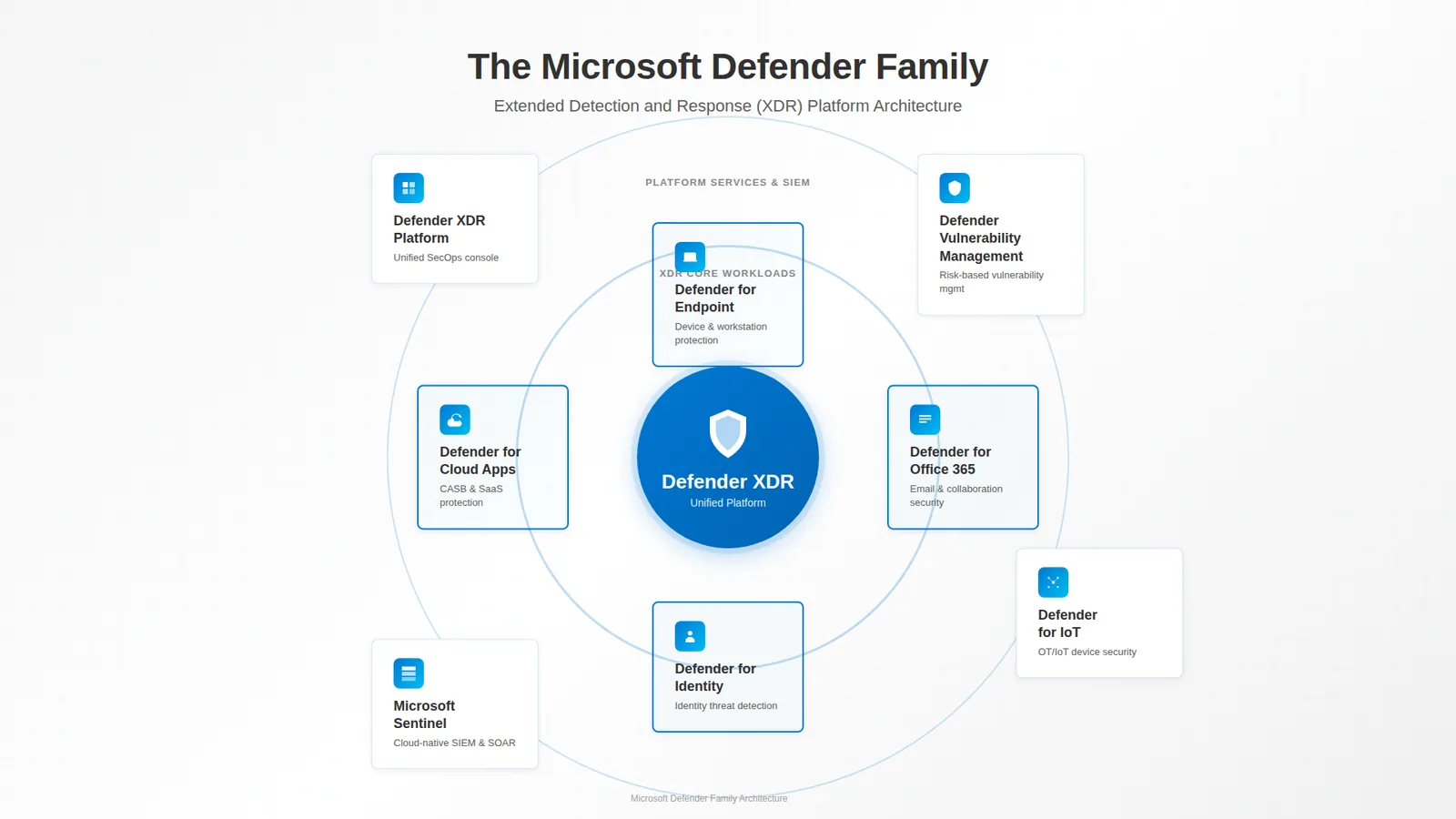
📷 Εικόνα 1: Η οικογένεια του Microsoft Defender, όπως την οργανώνει η Microsoft.
Όταν σε μια επιχείρηση κάποιος λέει σκέτο «Defender», σχεδόν πάντα εννοεί το Microsoft Defender XDR. Το Microsoft Defender XDR δεν είναι από μόνο του ένα προϊόν που κάνει κάτι. Είναι η ομπρέλα. Είναι το όνομα για το ενιαίο portal στο security.microsoft.com, την ενιαία ουρά incidents και τη μηχανή συσχέτισης που ενώνει τα σήματα των επιμέρους workloads σε μία ιστορία επίθεσης.
Σκέψου το έτσι: αν η ομάδα security operations είναι μια ορχήστρα, το Microsoft Defender XDR είναι ο μαέστρος. Η μουσική βγαίνει από τα όργανα, δηλαδή από τα τέσσερα workloads που βλέπουμε παρακάτω.
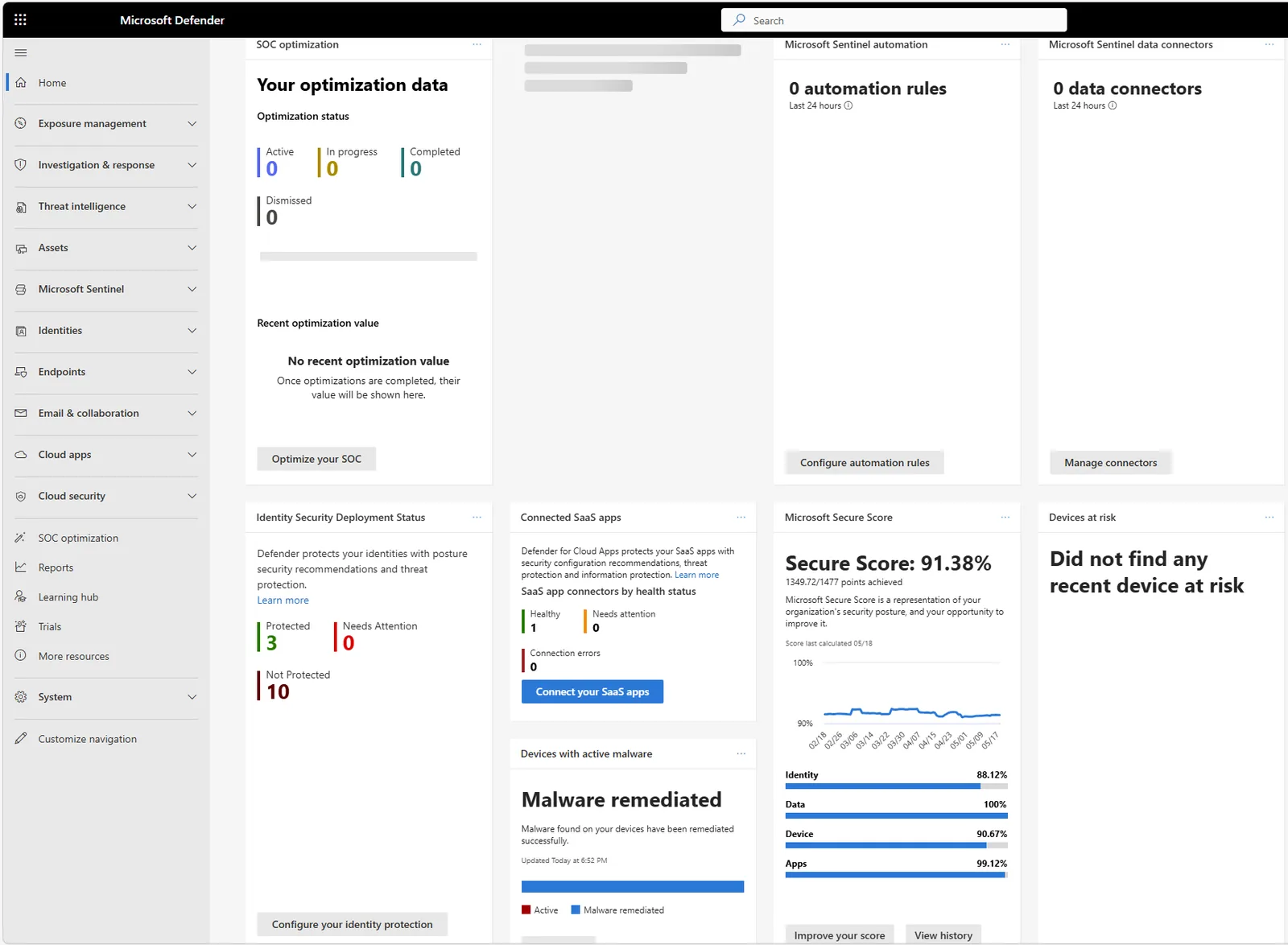
📷 Εικόνα 2: Το portal του Microsoft Defender XDR στο security.microsoft.com, το ενιαίο κέντρο security operations.
Τα τέσσερα βασικά workloads του XDR
Αυτά τα τέσσερα είναι τα κεντρικά προϊόντα ασφάλειας της Microsoft. Το καθένα πωλείται χωριστά ή μέσα στο Microsoft 365 E5, και το καθένα μπορεί να λειτουργήσει χωρίς τα άλλα. Μαζί όμως, κάτω από την ομπρέλα του XDR, δίνουν πολύ περισσότερα από το άθροισμά τους.
Microsoft Defender for Endpoint
Το Microsoft Defender for Endpoint προστατεύει τις συσκευές σου: laptops με Windows, Mac, servers με Linux, iPhone και Android. Αν ένας εργαζόμενος δουλεύει πάνω σε μια συσκευή, αυτό την παρακολουθεί. Κάνει next-generation antivirus, EDR (Endpoint Detection and Response), attack surface reduction και αυτοματοποιημένη διερεύνηση και αποκατάσταση. Είναι το σημείο από το οποίο ξεκινούν οι περισσότεροι οργανισμοί την πορεία τους στο Microsoft Security.
Πότε το χρειάζεσαι: τη στιγμή που καταλαβαίνεις ότι η προστασία των endpoints το 2026 σημαίνει πολλά περισσότερα από ένα antivirus.
📖 Αναλυτικά: σε τι διαφέρουν στην πράξη το Plan 1 και το Plan 2, πώς γίνεται η εγκατάσταση και τι ρυθμίζεις πρώτα: Microsoft Defender for Endpoint: Τι είναι, τι κάνει και πώς να το αναπτύξετε στην πράξη.
Microsoft Defender for Office 365
Το Microsoft Defender for Office 365 προστατεύει τα εργαλεία στα οποία περνούν τη μέρα τους οι περισσότεροι χρήστες: email, Microsoft Teams, SharePoint Online και OneDrive for Business. Ελέγχει κάθε URL των εισερχόμενων email τη στιγμή του κλικ και όχι μόνο κατά την παράδοση, ανοίγει τα ύποπτα συνημμένα σε sandbox, εντοπίζει απόπειρες business email compromise και, στο Plan 2, περιλαμβάνει attack simulation training αν θέλεις να δοκιμάσεις τους χρήστες σου.
Πότε το χρειάζεσαι: τη στιγμή που κάποιος από το λογιστήριο σού λέει για το «πολύ πειστικό» email στο οποίο κόντεψε να απαντήσει.
📖 Αναλυτικά: Plan 1 και Plan 2, οι πολιτικές που μετράνε, και η ρύθμιση των Safe Links και Safe Attachments βήμα βήμα: Microsoft Defender for Office 365: Από τις preset policies στην προχωρημένη παραμετροποίηση.
Microsoft Defender for Identity
Το Microsoft Defender for Identity παρακολουθεί την υποδομή ταυτοτήτων σου, το on-premises Active Directory και το Microsoft Entra ID, για επιθέσεις που γίνονται αφού έχει κλαπεί ένας κωδικός. Pass-the-hash, pass-the-ticket, Kerberoasting, πλαστά golden tickets, lateral movement, ύποπτο LDAP reconnaissance. Πράγματα που δεν φαίνονται ασυνήθιστα από τη σκοπιά ενός endpoint ή ενός email, αλλά είναι πολύ ασυνήθιστα για τον domain controller που βλέπει την κίνηση αυθεντικοποίησης.
Πότε το χρειάζεσαι: τη στιγμή που το μητρώο κινδύνων σου περιέχει ένα ρεαλιστικό σενάριο lateral movement. Για τους περισσότερους οργανισμούς με on-premises AD, αυτό ισχύει από την πρώτη μέρα.
Microsoft Defender for Cloud Apps
Το Microsoft Defender for Cloud Apps είναι ένα CASB (Cloud Access Security Broker). Με απλά λόγια, κάθεται ανάμεσα στους χρήστες και στις εφαρμογές SaaS που χρησιμοποιούν. Σου δείχνει το shadow IT, σου δίνει έλεγχο στις επικίνδυνες εφαρμογές OAuth και επεκτείνει τις πολιτικές προστασίας πληροφοριών σε υπηρεσίες τρίτων, όπως Salesforce, Box ή Google Workspace.
Πότε το χρειάζεσαι: τη στιγμή που καταλαβαίνεις ότι δεν έχεις ιδέα σε πόσες εφαρμογές SaaS έχουν γραφτεί οι χρήστες σου. Στους περισσότερους μεσαίους οργανισμούς, ο πραγματικός αριθμός είναι συνήθως πολύ μεγαλύτερος από αυτόν που πιστεύει το IT.
Τα εξειδικευμένα workloads
Πέρα από τα τέσσερα βασικά workloads, η Microsoft βάζει στην ίδια σελίδα του Microsoft Learn και άλλα προϊόντα. Είναι το ίδιο μέλη της οικογένειας, απλώς πιο στοχευμένα.
Microsoft Defender Vulnerability Management
Το Microsoft Defender Vulnerability Management παρακολουθεί τις γνωστές ευπάθειες λογισμικού σε όλες τις συσκευές σου: ποια CVEs υπάρχουν σε ποιες συσκευές, ποια patches είναι διαθέσιμα, ποιες επεκτάσεις browser έχουν εγκαταστήσει οι χρήστες ενώ δεν θα έπρεπε, και ποιες εφαρμογές έχουν φτάσει στο τέλος της υποστήριξής τους. Ένα μέρος αυτών των δυνατοτήτων περιλαμβάνεται στο Microsoft Defender for Endpoint Plan 2. Οι υπόλοιπες έρχονται με ξεχωριστή άδεια.
Πότε το χρειάζεσαι: τη στιγμή που ο ελεγκτής του ISO 27001 σε ρωτά πώς διαχειρίζεσαι τις ευπάθειες, και καταλαβαίνεις ότι το «κάνουμε patching την Τρίτη» δεν είναι πια απάντηση. Στην ΚΥΑ 1689/2025 αυτό είναι το άρθρο 17, και στο ISO/IEC 27001 το control A.8.8.
Microsoft Defender for IoT
Αυτό με αφορά προσωπικά. Είμαι υπεύθυνος ασφάλειας σε βιομηχανία με πραγματική υποδομή OT και ICS: PLCs της Siemens, συστήματα SCADA, HMIs. Το Microsoft Defender for IoT είναι το προϊόν της οικογένειας που καλύπτει αυτόν τον κόσμο. Εντοπίζει τις συσκευές OT στο δίκτυο χωρίς agents (κάτι κρίσιμο, γιατί σε ένα PLC δεν εγκαθιστάς τίποτα), φτιάχνει απογραφή, εντοπίζει ευπάθειες που αφορούν βιομηχανικά πρωτόκολλα και ανιχνεύει ασυνήθιστη συμπεριφορά που μπορεί να σημαίνει επίθεση στην παραγωγή.
Ο ν. 5160/2024 φέρνει υποχρεώσεις σε τομείς όπως η μεταποίηση, τα χημικά, τα τρόφιμα, το νερό και η ενέργεια, και τα μέτρα εξειδικεύονται από την ΚΥΑ 1689/2025. Αν έχεις εγκαταστάσεις OT, το Microsoft Defender for IoT είναι μέρος της συζήτησης. Το Microsoft 365 δεν καλύπτει τα OT assets, και το Defender for IoT είναι ξεχωριστό προϊόν με δική του άδεια. Θα γράψω ξεχωριστό άρθρο γι’ αυτό, γιατί δεν χωράει σε μια παράγραφο.
Πότε το χρειάζεσαι: τη στιγμή που καταλαβαίνεις ότι η παραγωγή σου έχει περισσότερες μη διαχειριζόμενες συσκευές από τα γραφεία σου.
Microsoft Sentinel
Εδώ αξίζει να σταθούμε. Το Microsoft Sentinel είναι το cloud-native SIEM (Security Information and Event Management) και SOAR (Security Orchestration, Automation, and Response) της Microsoft. Συλλέγει telemetry ασφάλειας από παντού, δηλαδή από προϊόντα Microsoft, εργαλεία τρίτων, δικτυακές συσκευές και δικές σου πηγές, και σου δίνει ένα σημείο για κανόνες ανίχνευσης, διερευνήσεις και αυτοματοποιημένη απόκριση.
Η Microsoft βάζει πλέον το Sentinel στην ίδια οικογένεια με το Defender, και αυτό είναι σχετικά πρόσφατη αλλαγή. Στο ενιαίο Microsoft Defender portal στο security.microsoft.com, το Sentinel και το Defender XDR έχουν ουσιαστικά γίνει μία εμπειρία security operations. Η Microsoft έχει ανακοινώσει ότι το Sentinel στο Azure portal αποσύρεται στις 31 Μαρτίου 2027. Αν χρησιμοποιείς ακόμη το Sentinel μόνο από το Azure, ο χρόνος μετράει.
Πότε το χρειάζεσαι: τη στιγμή που πρέπει να συσχετίσεις σήματα ασφάλειας που δεν προέρχονται όλα από προϊόντα Microsoft.
Τα συγγενικά προϊόντα (η Microsoft τα παρουσιάζει χωριστά, αλλά ανήκουν στον χάρτη σου)
Στη σελίδα του Microsoft Learn, δύο ακόμη προϊόντα εμφανίζονται σε ξεχωριστή ενότητα. Δεν είναι αυστηρά μέρος του Microsoft Defender XDR, αλλά πρέπει οπωσδήποτε να τα ξέρεις.
Microsoft Security Exposure Management
Στο Microsoft Security Exposure Management βρίσκεται πλέον το Microsoft Secure Score, μαζί με ευρύτερη ανάλυση της επιφάνειας επίθεσης και της έκθεσης. Είναι το επίπεδο της στάσης ασφάλειας (posture) στο Microsoft Security. Απαντά στο «πόσο εκτεθειμένοι είμαστε;» και όχι στο «μας επιτίθενται αυτή τη στιγμή;».
Αν σε ενδιαφέρει πώς αυτό γίνεται ολόκληρο πρόγραμμα συμμόρφωσης, το έχω γράψει αλλού: Microsoft Secure Score ως εργαλείο GRC για ISO 27001 & NIS2.
Microsoft Defender for Cloud
Το Microsoft Defender for Cloud είναι αυτό που οι περισσότεροι μπερδεύουν με την υπόλοιπη οικογένεια. Προστατεύει cloud workloads: virtual machines του Azure, storage, containers, βάσεις δεδομένων, Kubernetes clusters, και επεκτείνεται σε AWS και Google Cloud. Η ρύθμισή του γίνεται στο Azure portal και η αδειοδότησή του είναι εντελώς διαφορετική: ανά πόρο, όχι ανά χρήστη. Τα incidents και η εικόνα της στάσης ασφάλειας εμφανίζονται πλέον και στο security.microsoft.com.
Το εξετάζουμε κανονικά στο Μέρος 3.
Η εφαρμογή για καταναλωτές (μια σύντομη αναφορά για πληρότητα)
Αν έχεις συνδρομή Microsoft 365 Personal ή Family, μάλλον έχεις δει μια εφαρμογή που λέγεται απλώς Microsoft Defender. Είναι μια εφαρμογή ασφάλειας για τα κινητά και τα laptops της οικογένειας, με βασική προστασία συσκευών. Είναι πραγματική και χρήσιμη, αλλά δεν έχει καμία σχέση με όλα τα παραπάνω: ούτε άδειες, ούτε portal, ούτε κοινό. Αν κάποιος από την οικογένειά σου σε ρωτήσει «είναι καλό το Microsoft Defender;», μάλλον αυτό εννοεί, και η απάντηση είναι ναι, για προσωπική χρήση είναι μια χαρά.
Γρήγορος οδηγός: ποιο Microsoft Defender χρειάζομαι;
Την επόμενη φορά που κάποιος θα πει «ας το δούμε στο Defender», έχεις πλέον τον χάρτη για να κάνεις τη σωστή ερώτηση:
- Ποιο κομμάτι της υποδομής; Σου λέει το workload (Endpoint, Office 365, Identity, Cloud Apps, IoT).
- Cloud workloads ή συσκευές χρηστών; Σου λέει αν είμαστε στο Defender XDR ή στο Defender for Cloud.
- Στάση ασφάλειας ή ενεργό incident; Σου λέει αν είμαστε στο Exposure Management ή στα Incidents.
- Μόνο προϊόντα Microsoft ή και εργαλεία τρίτων; Σου λέει αν μπαίνει στο παιχνίδι το Sentinel.
Αυτό ήταν. Αυτή είναι όλη η οικογένεια. Οκτώ βασικά προϊόντα, δύο συγγενικά και μία εφαρμογή για καταναλωτές. Δεν θα τα χρειαστείς όλα, αλλά πρέπει να ξέρεις ότι υπάρχουν.
Και κάτι ακόμα: πού χωράει το EMS;
Αν ασχολείσαι αρκετό καιρό με τις άδειες της Microsoft, έχεις δει τη φράση Enterprise Mobility + Security (EMS) σε προσφορές ή σε παλιά συμβόλαια. Το EMS είναι το πακέτο ταυτότητας, διαχείρισης και προστασίας που προϋπήρχε του Microsoft 365 E3 και E5, και πωλείται ακόμη. Ταιριάζει κυρίως σε οργανισμούς που δεν χρειάζονται όλο το Microsoft 365, αλλά θέλουν το επίπεδο ασφάλειας και διαχείρισης πάνω από τα εργαλεία που ήδη έχουν.
Τι ακολουθεί
Στο Μέρος 2 μπαίνουμε στα τέσσερα workloads του XDR και βλέπουμε πώς συσχετίζουν τα σήματα, με ένα πραγματικό παράδειγμα επίθεσης σε πολλά στάδια που περνά και από τα τέσσερα.
🔗 Θέλεις τα ίδια προϊόντα σε πιο σύντομη μορφή; Ο πρακτικός οδηγός για την οικογένεια του Microsoft Defender τα συνοψίζει για νέους επαγγελματίες ασφάλειας και ΥΑΣΠΕ. Η σειρά Microsoft Defender Up Close εξετάζει κάθε προϊόν χωριστά, στην πράξη.
🔗 Ποιο προϊόν καλύπτει ποια απαίτηση; Οι οδηγοί συμμόρφωσης αντιστοιχίζουν κάθε απαίτηση στο προϊόν της Microsoft που την υποστηρίζει: ΚΥΑ 1689/2025, Οδηγία NIS2, ISO/IEC 27001 και GDPR, ο καθένας με checklist σε Excel.
Ακολούθησέ με στο LinkedIn για ειδοποιήσεις νέων άρθρων, ή γράψου στο RSS στην κορυφή της σελίδας.
Ερωτήσεις που κάνουν συχνά οι αναγνώστες
«Χρειάζομαι όλα τα προϊόντα Microsoft Defender;» Όχι. Οι περισσότεροι οργανισμοί ξεκινούν με το Defender for Endpoint (προστασία συσκευών) και το Defender for Office 365 (ασφάλεια email), και προσθέτουν το Identity και το Cloud Apps όσο ωριμάζει το περιβάλλον τους. Δες παραπάνω πότε ταιριάζει το καθένα.
«Τι περιλαμβάνει το Microsoft Defender Suite;» Το Microsoft Defender Suite, πρώην Microsoft 365 E5 Security, περιλαμβάνει και τα τέσσερα βασικά workloads του XDR: Defender for Endpoint Plan 2, Defender for Office 365 Plan 2, Defender for Identity και Defender for Cloud Apps, μαζί με το Microsoft Entra ID P2. Παίρνεις επίσης το ενιαίο portal και τη συσχέτιση ανάμεσα στα προϊόντα. Τα ίδια περιλαμβάνονται και στο Microsoft 365 E5. Λεπτομέρειες στο Μέρος 4.
«Μπορώ να χρησιμοποιήσω το Microsoft Defender χωρίς Microsoft 365;» Ναι, υπάρχουν αυτόνομες άδειες. Κάθε workload αγοράζεται χωριστά (Defender for Endpoint Plan 1 ή 2, Defender for Office 365 Plan 1 ή 2 κ.λπ.), κάτι χρήσιμο αν χρειάζεσαι μόνο συγκεκριμένα επίπεδα προστασίας.
«Φτάνει το Microsoft Defender για το ISO 27001;» Βοηθά πολύ, αν είναι σωστά ρυθμισμένο, αλλά από μόνο του δεν φέρνει συμμόρφωση. Τα τέσσερα βασικά workloads υποστηρίζουν μεγάλο μέρος των technological controls της ενότητας A.8 του Annex A, π.χ. A.8.7 (Protection against malware), A.8.8 (Management of technical vulnerabilities) και A.8.16 (Monitoring activities), και αρκετά της A.5, όπως η διαχείριση περιστατικών (A.5.24 έως A.5.26). Το ποιο προϊόν υποστηρίζει ποιο control το βλέπεις ένα προς ένα στον οδηγό ISO/IEC 27001:2022 Annex A με Microsoft 365. Πολλοί οργανισμοί χρησιμοποιούν το Microsoft Secure Score ως συνεχές τεκμήριο, όπως εξηγώ στη σειρά για το Secure Score.
Πηγές και επαλήθευση
Επιπλέον πηγές: